
The recommendation
The Vantrue N4 Pro suits buyers who value its described app and computer access options enough to accept a substantial main unit and the reviewed rear cable. Its software routine is more persuasive than its physical simplicity.
Grades at a glance
| Product | Overall | Controls and menu navigation | Finding and saving a recorded clip | Physical handling and routine access |
|---|---|---|---|---|
| Vantrue N4 Pro | 7.3 | 8.0 | 8.0 | 5.5 |
Does it fit your life?
The buyer who should consider the N4 Pro
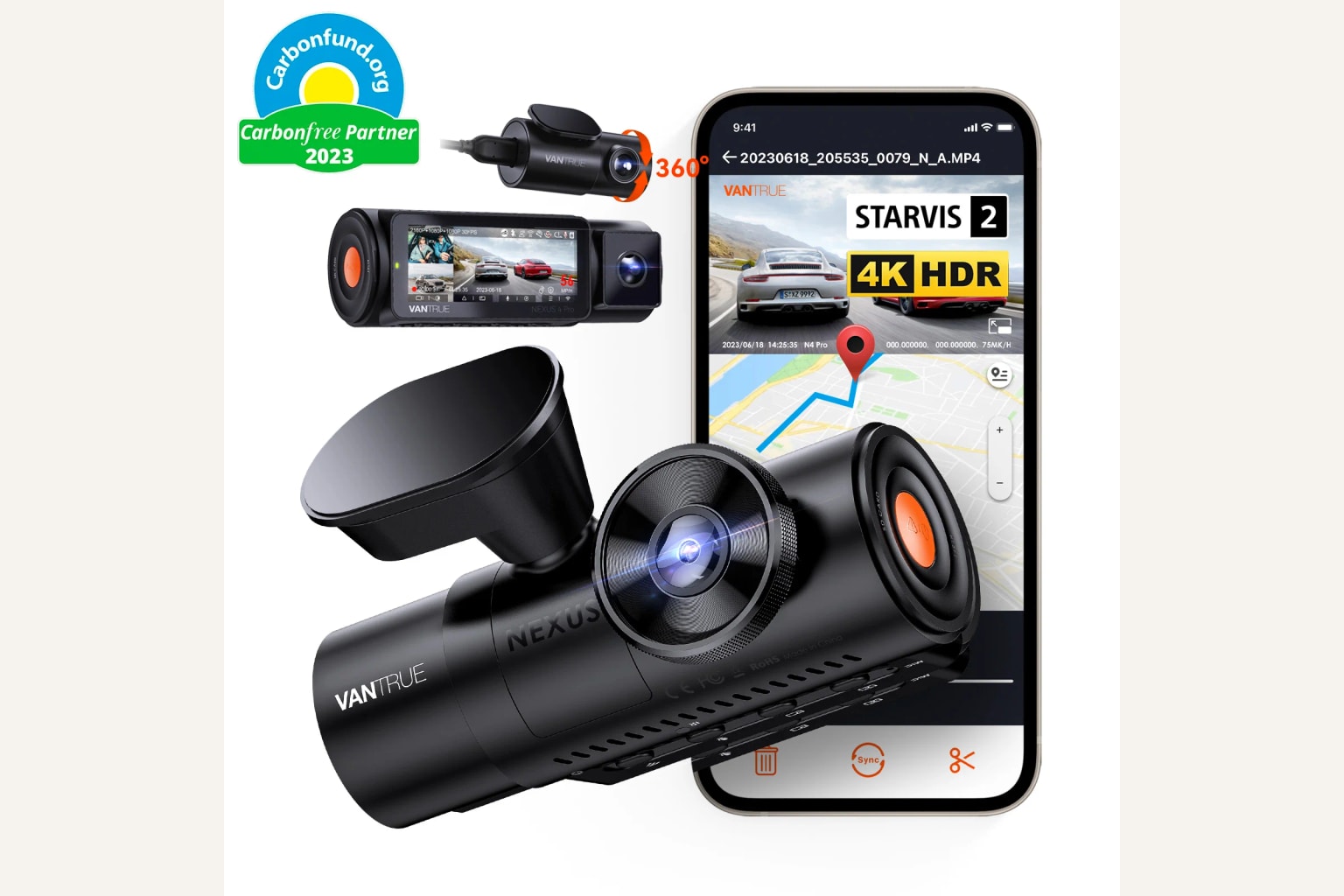
Vantrue N4 Pro is a better fit for a buyer who values the described app and file-access routine than for someone seeking the least hardware to handle. TechMishka describes a clean, helpful app, phone downloads and separate PC software for inspecting GPS logs. Those functions offer specific reasons to consider it if you expect to use more than one device with your recordings. The phone and computer routes serve different tasks, so decide which you would actually use.
The physical compromise is substantial. The reviewer describes a bulky, heavy main body and a thick rear-camera lead in the demonstrated configuration. Card access and quick-release handling help with particular actions, but the full arrangement remains more involved than a small front camera. If compactness is already your leading preference, take that concern seriously before the favorable app account moves this model to the top of your list.
Our overall everyday-use score is 7.3/10. Controls and recorded-clip access each earn 8/10; physical handling earns 5.5/10. The uneven result is useful: the interface makes a stronger case than the hardware's simplicity. This review concerns the original N4 Pro and the recorded configuration, with no assumption that another revision behaves identically. Choose it when you want its particular access routine and are comfortable with the equipment that accompanies it, including the rear connection if that is the kit you plan to use.
A clean app and a deliberate Wi-Fi action
The main review describes the app interface as clean and helpful. It also identifies a long press of a camera button as a way to enable or disable Wi-Fi. This is a useful detail because it links a physical action to the phone session, rather than leaving wireless access as a vague feature. If you like an intentional start to the connection routine, that kind of control may suit you.
A long press also differs from a control whose function is obvious from a quick glance. You need to learn the action, then remember it when you return to the camera. That is a modest burden rather than a reason to reject the model, but it belongs in the comparison with a large touchscreen or a camera whose app is only one of several routes. A control can be convenient after you know it without being immediately apparent to a new user.
Controls score 8/10 for the combination of the described app and usable physical access. The reviewer's account of encountering no glitches is a personal observation, not a guarantee for every phone or session. Buy because the actual routine looks comfortable to you, rather than assuming one review can establish universal software reliability. The relevant question is whether the app-led configuration and the long-press connection action are interactions you would be content to repeat.
Keep the app session focused on the job
In the review, the app is used for configuration as well as recording transfers. Those are related but distinct tasks. A settings session may be a brief check or adjustment; a file session may involve selecting and moving a recording. Thinking about them separately helps you decide whether the app's role is convenient in your use. You may like a phone interface for both, or prefer local controls for quick changes and a phone only when a file needs attention.
The N4 Pro's app description is positive, but it does not remove the need to understand which device is doing the work. The camera provides the recording and the wireless connection; the phone provides the larger interface and a destination for downloaded files. A good fit is someone who is comfortable with that partnership rather than looking for every action to happen on the camera body.
The reviewed main unit also has a display, while the recommendation here centers on the app's described settings and transfers. Prefer Nextbase 622GW if a large, visible local playback interface is your main requirement: its touchscreen and folder sequence are demonstrated more explicitly. Prefer VIOFO A119 Mini 2 if you want compact hardware with local menu controls. Those alternatives help separate the N4 Pro's app appeal from the different question of how much interaction you want on the camera itself.
Phone downloads and computer logs serve different purposes
The N4 Pro's two described destinations deserve separate consideration. The app downloads recordings to a phone. A PC program lets the reviewer inspect GPS logs. For a buyer who wants a phone copy of a clip, the app is the relevant route. For someone who specifically wants the log information on a computer, the separate program adds a reason to consider this model. Mentioning both devices should not make them sound like interchangeable file workflows.
Recorded-clip access scores 8/10. The review describes useful paths, while leaving the details of every possible search, export or destination outside that account. In particular, the PC log viewer is not evidence of a faster phone download, and the presence of recorded information says nothing about its accuracy. Judge the route by the job you want to finish: keeping a recording on a phone, or examining the associated log through another program.
That distinction makes the comparison with A229 Pro more useful. VIOFO's overview describes app transfer, USB use as a card reader and putting the removed card into a computer reader. Those are alternative ways to reach files. Vantrue's PC software has the more specific described purpose of log inspection. If computer access is what attracts you, decide whether you want alternatives for obtaining a file or that particular additional viewing task. You can then choose between the cameras without mistaking the word computer for the same advantage in both reviews.
Substantial files deserve a deliberate retrieval habit
The reviewer notes that recordings can be large, particularly in the demonstrated multi-camera setup. That is a relevant part of the file routine even without attaching a transfer-speed claim to it. A buyer who wants to collect several recordings at once should think about the destination and the selection task, rather than assuming that an app makes the quantity of material irrelevant. The convenience is access, not the disappearance of the files themselves.
It helps to distinguish identifying a recording from deciding what to retain. You may be browsing to find the right moment, or you may already know which recording you want. Those two situations put different demands on the interface. The available account describes app transfer and configuration, but it should not be treated as a complete demonstration of every possible search or export sequence. The score recognizes the useful described paths within that limit.
If you value alternative ways to move files to a computer, compare the VIOFO A229 Pro. Its overview describes USB use as a card reader and removable-card access as well as app transfer. Vantrue's separate PC log viewer has a more specific role. Choosing between them is partly about your intended task: a variety of file access routes, or the particular app and log-viewing combination described for the N4 Pro. Neither account justifies a promise that one will finish your transfers faster.
The main unit is a real handling commitment
The main body is described as bulky and heavier than the reviewer would prefer. That matters independently of the app's pleasant interface. When you reach for the body, adjust the setup or remove it, the object itself is what you handle. A buyer who strongly prefers a small camera should give that concern more weight than a narrow difference between overall scores. The N4 Pro's physical score is the clearest warning that its strengths come with a hardware compromise.
The reviewed arrangement combines substantial hardware in the main unit and adds a rear camera. That makes it useful to consider the complete configuration rather than judging only the front-facing product image. If you want a comparable setup, the body size and the additional connection are part of the ordinary experience you are choosing. If you do not need that arrangement, a simpler camera may match your needs more directly.
Physical handling scores 5.5/10. It is still possible for the camera to be the right choice if the controls and access options matter more to you. The balance is uneven: the app makes a persuasive case, while the physical design asks you to accept more. Garmin Mini 2 is the opposite kind of compromise, prioritizing a tiny body and shifting viewing to the phone. The A119 Mini 2 keeps compact hardware while retaining local controls.
Card access and quick release help in specific ways
The N4 Pro review describes card access beneath a side plate and quick-release handling. Those are useful conveniences when you need to interact with the body directly. Card access matters if you expect to reach the storage occasionally; release matters if you expect to take the body down. Think about each action separately, then consider whether the size of the object and its connected equipment suit the way you would handle it.
The account is not clear enough to identify the mounting base itself as magnetic. The useful buying description is card access and quick release, without attaching an uncertain mechanism to the mount. Nextbase 622GW offers a different comparison: its walkthrough explicitly demonstrates magnetic separation, which the reviewer finds convenient for windshield cleaning. If that specific action is why you are shopping, the Nextbase description gives you a clearer example to evaluate.
For Vantrue, the release convenience should sit alongside the bulk and rear lead in the decision. Taking hold of a substantial camera and accounting for its connections is a different physical task from handling a tiny front unit. A quick release can improve one stage while leaving the rest of the arrangement unchanged. That is why physical handling earns 5.5/10 despite these useful details. Choose it if the complete action seems comfortable, especially if you plan to use the same kind of multi-camera configuration shown in the review.
The rear lead is part of the physical decision
The reviewed rear camera connects through a lead the reviewer describes as too thick. That is a concrete handling concern in the demonstrated configuration. It is useful to know before selecting a multi-camera kit, because the main unit's app does not change the physical character of its connected equipment. Consider the rear component as part of the product arrangement rather than an invisible addition to the front camera.
The buying decision begins with whether you want the complete reviewed configuration and are content with its substantial connections. Compare the rear lead as part of that hardware choice, alongside the main body's size and release action. If a compact, simple arrangement is your priority, the extra hardware may matter more than a positive app description. If you already want the multi-camera arrangement, the thickness is a compromise to assess alongside the body and release mechanism.
Thinkware U3000 provides a useful comparison because its reviewed rear unit has a different physical concern: size and a coin-slot angle adjustment. The A229 Pro has its own main-body connections in the reviewed three-channel setup. These models should be compared as exact configurations, with no assumption that every listing contains the rear or interior units seen in a review. The Vantrue is most persuasive when you want its described access routine and accept the physical commitment that accompanies the reviewed equipment.
The final choice is software convenience versus hardware bulk
Choose the original Vantrue N4 Pro if the cleanly described app, long-press Wi-Fi toggle and separate computer log viewer fit tasks you want to perform. Its control and retrieval results are the reasons to consider it. Be equally deliberate about accepting the substantial main body and the thick rear lead in the reviewed setup. The overall 7.3/10 everyday-use score is less revealing than that contrast between useful access and more demanding handling.
For physical simplicity, start elsewhere. Garmin Mini 2 favors a tiny body and phone viewing. VIOFO A119 Mini 2 retains local menus in compact hardware. Nextbase 622GW offers a large touchscreen and demonstrated magnetic separation for removal. A229 Pro offers several described routes to files, with its own larger body and kit-specific connections. Each alternative changes a particular part of the routine; select the one that addresses the concern you actually have.
Before choosing Vantrue, name the configuration you want and the destination where your recordings will go. That keeps the rear hardware and PC program from becoming advantages merely because they exist in a demonstration. If you want that arrangement and can accommodate its physical demands, the app account makes a reasonable case. If you are already hoping the camera will feel smaller or its rear lead less substantial than described, let that hesitation decide the shortlist. The most comfortable purchase is one whose handling compromise you knowingly accept.
Vantrue N4 Pro
Vantrue
Buyers who accept substantial hardware for the described app and PC options.
A described app and computer log-viewing route alongside a bulky main unit and thick reviewed rear lead.
The takeaway
The software routine is more persuasive than the physical simplicity.
Reasons to choose it
- Clean app interface described
- Physical long-press Wi-Fi toggle
- Phone transfer and separate PC log viewing
Tradeoffs to know
- Bulky and heavy main body in the review
- Thick rear lead in the reviewed configuration
- Separate PC software adds another task
Think twice if: A small body and minimal handling are your main priorities.
Published specifications
- Computer route
- Separate software for GPS-log viewing
- Model
- Original N4 Pro
- Phone route
- Configuration and recording downloads described
Further reading
Ratings
Editorial score 7.3
Controls and menu navigation8
The described app and a long-press Wi-Fi action support ordinary control use.
Finding and saving a recorded clip8
Phone downloads and separate PC log viewing offer defined access routes with different purposes.
Physical handling and routine access5.5
Card access and quick release help, but the bulky body and thick reviewed rear lead remain significant compromises.
Sources & further reading
youtube.com review
youtube.com review
youtube.com review
youtube.com review
youtube.com review
youtube.com review
youtube.com review
youtube.com review
Keep reading
Something changed? Help us keep this useful.
Send a correction →