TP-Link Archer BE230 Review (2026): Budget Wi‑Fi 7, No 6 GHz
A deeper look at TP-Link’s budget BE3600 router: dual 2.5GbE ports, Tether setup, VPN tools, no 6 GHz band, range caveats, HomeShield boundaries, and the exact Amazon-new listing to check.
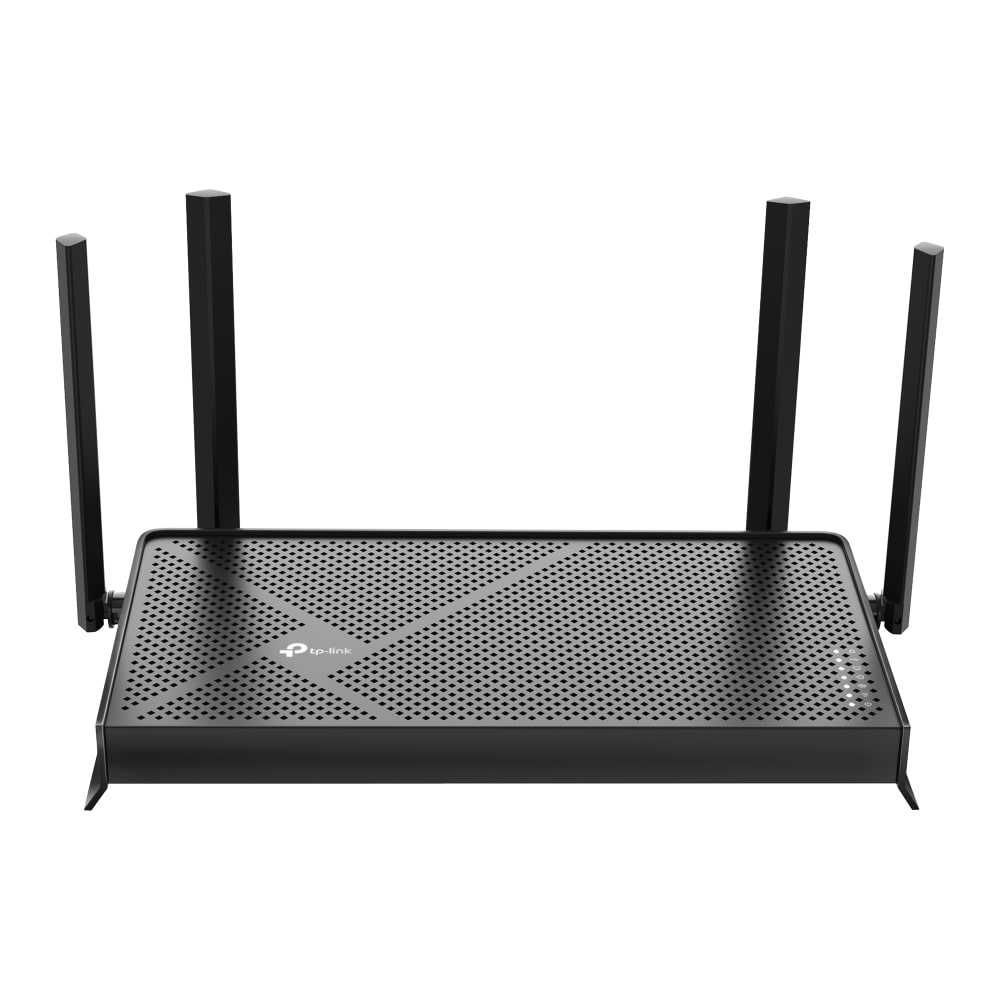
TP-Link Archer BE230 is the value Wi‑Fi 7 pick for small-to-medium homes that want modern router hardware without premium pricing. It earns its #2 spot with dual 2.5GbE ports, USB, Tether plus web setup, VPN features, EasyMesh compatibility, and visible firmware activity, but the missing 6 GHz band, wall-range limits, and HomeShield paid-feature boundaries are the details to catch before checkout.
MSRP
$119.99
Amazon
$86.97
at writing · 2026-05-17
Buyer fit
The best value lane: inexpensive current-new Wi-Fi 7 with dual 2.5GbE ports, USB, Tether/web setup, VPN features, and recent firmware activity, balanced by dual-band range and HomeShield subscription caveats.
MSRP
$119.99
Amazon
$86.97
at writing · 2026-05-17
Score breakdown
How this product scored
Same rubric, but focused on one product so the reasons behind the score stay readable.
Coverage & reliability
Strong close-range value, but walls and distance are the clear reason not to overbuy the Wi‑Fi 7 label.
Setup & recovery
Tether, printed guidance, web access, and firmware prompts make setup approachable for normal buyers.
Speed headroom
Dual 2.5GbE ports, USB, and BE3600 Wi‑Fi 7 are excellent for the price, with no 6 GHz or 10G headroom.
Controls & subscriptions
VPN, guest/IoT networks, app and web control help, while HomeShield Pro boundaries need clear expectations.
Firmware & support trust
Captured support pages showed recent firmware work for stability, security, VPN connectivity, and wireless schedule behavior.
Fit & value clarity
One of the cleanest value fits in the set if the buyer has a small-to-medium home and understands the missing 6 GHz lane.
Before You Buy
The TP-Link Archer BE230 is the router that makes a deal-hunter feel clever: Wi‑Fi 7 on the box, two 2.5GbE ports, USB, VPN tools, app setup, and a captured Amazon-new price of $86.97. That is a lot for a budget router. It is also why this deserves a careful read before checkout. The key question is not whether TP-Link is selling “real” Wi‑Fi 7. It is. The question is which parts of the Wi‑Fi 7 wish list got left out to make the price this low.
Think of this page as the no-regrets check. The Archer BE230 can be a terrific upgrade for an apartment, small house, or straightforward 1-to-2.5Gbps setup. It can also disappoint the buyer who expects a 6 GHz lane, flagship mesh-style range, or free advanced family/security controls. If you want the full category map, start with our best home Wi‑Fi routers ranking; this page is the deeper Archer BE230 read. Use the product links to recheck the exact B0DC99N2T8 listing, new condition, seller, price, and return terms, and they also help support KB4UB.
Quick Verdict
The Archer BE230 is our #2 router and the Best value Wi‑Fi 7 pick because it gives normal homes the parts that matter most without charging flagship money. In the captured Amazon snapshot, it was under $90 and still brought BE3600 dual-band Wi‑Fi 7, a 2.5Gbps WAN port, a 2.5Gbps LAN port, three gigabit LAN ports, USB 3.0, TP-Link Tether setup, a web interface, VPN server/client support, and EasyMesh compatibility. That is a genuinely useful pile of router hardware for the price.
The catch is what “Wi‑Fi 7” may make people assume. This is a dual-band router, so there is no 6 GHz lane. Simon’s Reviews put the expectation mismatch plainly: “most people think of Wi‑Fi 7” and “assume 6 GHz bandwidth,” but “this router doesn’t have 6 GHz bandwidth.” TechGearLab liked the value too, saying it “strikes just the right balance between affordability and cutting-edge utility,” while warning that its signal “struggles to retain its strength through walls and other obstructions.”
That combination is the whole review in miniature: excellent budget hardware, easy enough setup, and honest limits. Buy it for a small-to-medium home where close-range speed, wired ports, and price matter. Do not buy it as a large-home range cure just because the box says Wi‑Fi 7.
Score Breakdown
- Coverage & reliability: 7.0/10. Close-range evidence is strong for the price, but formal and transcript testing point to meaningful distance and wall drop-off.
- Setup & recovery: 8.0/10. Tether setup, printed guidance, web access, LED clues, and firmware prompts make first setup approachable, with the usual modem/ISP handoff caveat.
- Speed headroom: 7.8/10. Dual 2.5GbE ports and Wi‑Fi 7 features are excellent at this price. No 6 GHz and no 10G keep it out of flagship territory.
- Controls & subscriptions: 6.8/10. Guest/IoT networks, VPN tools, web management, and HomeShield basics help, but some security and parental-control features may require HomeShield Pro.
- Firmware & support trust: 7.8/10. TP-Link support pages showed 2026 firmware activity, including stability/security work and VPN fixes, which is a good sign for a budget router.
- Fit & value clarity: 9.3/10. The value story is unusually clean if the buyer understands the home-size, 6 GHz, and subscription caveats first.
Overall score: 7.7/10. It is not the most powerful router in the set; it is the one that gives the clearest answer for shoppers who want current hardware without paying ASUS, NETGEAR, or tri-band prices.
What Feels Great After Setup
The first pleasant surprise is that the Archer BE230 does not feel like a bare-minimum budget box. The port layout is the clearest example: one 2.5Gbps WAN, one 2.5Gbps LAN, three gigabit LAN ports, and USB 3.0. For a household with a faster modem, a wired desktop, a NAS-ish USB storage habit, or a small switch, that mix is far more useful than the all-gigabit hardware still common at the low end.
The app experience also looks reassuring for normal buyers. BroadbandNow’s hands-on transcript called setup “refreshingly simple” and said the entire setup took “less than 5 minutes from start to finish.” Another reviewer described scanning the router’s QR code, choosing an admin password, naming the network, and being ready after about two minutes, then called the mobile app “super simple to use.” Those are not lab-grade guarantees for every ISP modem, but they do suggest this is not a router only a networking hobbyist can bring online.
The second ownership win is that TP-Link did not remove every deeper control to hit the price. The source evidence points to web access at tplinkwifi.net or 192.168.0.1, guest and IoT network options, EasyMesh compatibility, and VPN server/client support including WireGuard. Simon’s Reviews singled out “the ability to set this router up as a VPN client” as one of the favorite software touches, and that is exactly the sort of feature that keeps a cheap router from feeling disposable after the first week.
Setup and Daily Use Details
Setup should feel familiar if you have used a recent TP-Link router. You connect the modem, power up the BE230, open the Tether app, and follow the prompts. BroadbandNow noted that the included guide explains the LED behavior, including what to do if the 2.4GHz or 5GHz lights do not appear right away. Another transcript said the router immediately produced an internet connection after being plugged in, though the reviewer correctly added that this can depend on the internet provider.
Daily management is split in a good way: the app handles the quick jobs, while the browser interface remains available when you want a bigger screen or deeper settings. In the app evidence, reviewers saw connected clients, network usage, CPU/RAM data, guest networks, firmware prompts, parental controls, security tips, and advanced options. That makes the BE230 friendlier than a web-only router without pushing every setting into a simplified phone screen.
There are small practical annoyances. BroadbandNow called the unboxing “not exactly premium” because the antennas were wrapped tightly enough to need patience and scissors. HighSpeedInternet also flagged that average users may be confused by MAC Address and IPTV setup steps. Those are not major flaws for the right buyer, but they are the kind of little setup details that matter if you are replacing a router during a workday and everyone in the house is waiting for Wi‑Fi to come back.
What Gets Annoying
The biggest annoyance is the Wi‑Fi 7 label doing too much work in shoppers’ heads. The BE230 has Wi‑Fi 7 features on 2.4GHz and 5GHz, including Multi-Link Operation language, but it does not have a 6 GHz radio. If you bought a Wi‑Fi 6E laptop or a newer phone because you wanted the cleaner 6 GHz band, this is not the router that gives you that lane. NETGEAR RS500 is the premium 6 GHz option in this set, while ASUS RT-BE86U also skips 6 GHz but gives you much stronger wired/control hardware.
Range is the second caveat. TechGearLab’s verdict praised close-range performance but said the “biggest downside” was signal strength through walls and obstructions. Roberto Jorge Tech saw the same pattern in a more home-like way: very high speed near the router, decent results through some barriers, then a point where he “reached the limit of this router” and moving farther would lose signal. That does not make the BE230 bad; it makes it a poor choice for a large, chopped-up house where the old router’s main problem was already the far room.
The subscription wording needs a careful eye too. TP-Link markets HomeShield security and parental-control features, and review material notes optional upgrades for deeper security and activity tracking. Treat the basics as useful, but do not assume every advanced family-control or security feature is included forever. If subscription-free controls are a top priority, the ASUS RT-BE86U is the cleaner choice in this ranking.
How It Compares
Compared with the ASUS RT-BE86U, the Archer BE230 is cheaper and easier to justify for normal small-to-medium homes. ASUS wins for advanced users because it brings deeper ASUSWRT controls, a stronger wired story with 10G/2.5G hardware, VPN/security tools, AiMesh, and security features that are not pushed behind a required monthly plan. If you know you want to tune the network, buy ASUS. If you mainly want an affordable modern router and a cleaner checkout price, the BE230 is the value play.
Compared with NETGEAR Nighthawk RS500, the BE230 is the opposite kind of Wi‑Fi 7 recommendation. NETGEAR gives you tri-band hardware and the 6 GHz lane, but it costs much more and comes with its own account/app and Armor/parental-control caveats. Compared with eero 7, TP-Link gives you more traditional router controls and a web interface; eero is calmer for app-first households that would rather add nodes than manage settings. Compared with TP-Link’s cheaper Archer AX21 V5, the BE230 is the upgrade path: Wi‑Fi 7, dual 2.5GbE ports, USB, and more headroom, while AX21 V5 is the “do not overbuy” Wi‑Fi 6 baseline.
That leaves the Archer BE230 in a specific and useful lane: buy it when value matters, but you still want current-generation features and better ports than the bargain shelf usually provides.
Who Should Buy It
Buy the TP-Link Archer BE230 if you have a small-to-medium home, apartment, or straightforward layout; a 1Gbps to 2.5Gbps internet plan; a few wired devices; and a desire to move into Wi‑Fi 7 without spending $200 to $400. It is especially appealing if Tether setup, web management, VPN support, USB sharing, and two 2.5GbE ports sound useful.
Skip it if your home is large, wall-heavy, or already full of Wi‑Fi complaints at the edges. Also skip it if your main reason for upgrading is 6 GHz, if your internet plan is faster than the router’s 2.5Gbps ceiling, if you want a true premium tri-band router, or if paid HomeShield boundaries would frustrate you.
Bottom line: Archer BE230 is a smart buy because its compromises are understandable, not because they disappear. Check the exact B0DC99N2T8 Amazon listing, confirm new condition and seller/shipper details, and compare it against the full home Wi‑Fi router ranking if the 6 GHz or range caveats sound close to your home.
Tell us what this page missed
These pages get better when real buyer complaints make it back into the scoring model. If something important is underweighted, say it.
Rate this review
Give it a score from 1-10 and tell us what to improve.
0/4000 characters