TP-Link Archer AX21 V5 Review (2026): The Cheap Wi‑Fi 6 Reality Check
A closer look at TP-Link’s budget AX1800 router: small-home fit, Tether setup, gigabit-only ports, firmware cautions, range limits, and the exact B08H8ZLKKK Amazon-new offer to recheck.
TP-Link Archer AX21 V5 is the cheap Wi‑Fi 6 baseline in our home-router ranking. It is a sensible low-cost upgrade for small homes and basic internet plans, but its gigabit-only ports, dual-band design, mixed setup anecdotes, and range limits make it the router to buy only when you truly do not need more.
MSRP
—
Amazon
$52.07
at writing · 2026-05-17
Buyer fit
Cheap dependable Wi-Fi 6 baseline for small homes/basic internet; included so buyers do not overbuy Wi-Fi 7, but gigabit-only hardware, dual-band limits, and mixed setup/firmware anecdotes keep it below the newer routers.
MSRP
—
Amazon
$52.07
at writing · 2026-05-17
Score breakdown
How this product scored
Same rubric, but focused on one product so the reasons behind the score stay readable.
Coverage & reliability
Good enough for small homes and simple layouts, but distance, walls, and mixed complaint signals keep range expectations conservative.
Setup & recovery
Tether, web setup, support videos, modem troubleshooting resources, and app-based firmware checks make setup approachable, though modem handoff anecdotes remain worth noting.
Speed headroom
Dual-band AX1800 Wi‑Fi 6 and all-gigabit ports are fine for basic plans, but there is no 6 GHz, Wi‑Fi 7, multi-gig WAN/LAN, link aggregation, or high-speed USB.
Controls & subscriptions
Guest, basic parental/QoS-style controls, VPN server support, WPA3 language, and web/Tether access are useful, but advanced controls and subscription boundaries are less clean than stronger picks.
Firmware & support trust
Official support pages show recent V5/V5.6 firmware activity and setup resources, while hardware-version warnings mean updates should be handled carefully.
Fit & value clarity
Very clear low-cost fit: small homes, basic internet, and buyers who should not pay for Wi‑Fi 7 or multi-gig hardware they will not use.
Before You Buy
The Archer AX21 V5 is the router you look at when the checkout voice in your head says, “Please do not make this expensive.” At the captured Amazon-new price of $52.07, it promises a clean jump to Wi‑Fi 6, four antennas, gigabit Ethernet, Tether app setup, and enough everyday features for a small home that mainly streams, works, browses, and keeps phones online.
The catch is that cheap routers are where regret often hides. This one is not a range monster, a multi-gig upgrade, a 6 GHz congestion fix, or a power-user control box. It ranked #5 in our best home Wi‑Fi routers ranking because it is useful for the right buyer and easy to overbuy past. Read this before checkout if you want to know whether the annoyances are normal budget-router tradeoffs or signs you should move up to the TP-Link Archer BE230, eero 7, or ASUS RT-BE86U instead. Use the product links to recheck the exact B08H8ZLKKK listing, new condition, seller, price, hardware-version/firmware notes, and return terms; those links also help support KB4UB.
Quick Verdict
The Archer AX21 V5 is our Best cheap Wi‑Fi 6 baseline pick, not because it beats the newer routers, but because it gives budget buyers a sane place to stop. TP-Link’s official page calls it an “AX1800 Dual-Band Wi-Fi 6 Router,” and the Amazon listing captured for this review matched the V5 title, ASIN B08H8ZLKKK, and a $52.07 new-item snapshot sold and shipped by Amazon.com.
That makes it a good fit for a small apartment, a modest cable/fiber plan, or a household replacing an old ISP router without needing Wi‑Fi 7. PCMag’s older AX21 review framed the appeal well: it “won’t wow you with features,” but gives you Wi‑Fi 6 for under $100 and was “a cinch to install.”
The honest answer is simple: buy it when low cost and basic reliability matter more than headroom. Skip it when your home is large, your walls are punishing, your internet is faster than gigabit, or you are already fighting unexplained dropouts.
Score Breakdown
The Archer AX21 V5 scores 6.5/10 in the parent ranking. That is not a failing grade; it is a fit warning. Its best score is Fit & value clarity: 8.8/10, because this is one of the easiest routers in the set to understand. If you need a cheap Wi‑Fi 6 box for a simple home, the value is obvious. If you need more, the limits are obvious too.
Setup is the next bright spot at 7.4/10. TP-Link says you can set it up through either the Tether app or web interface, and support pages include no-internet recovery videos for DSL and cable modem situations. That matters because budget-router buyers are often replacing an ISP box and may hit modem handoff weirdness.
The low score is Speed headroom: 4.8/10. PCMag notes four 1Gbps LAN ports, one 1Gbps WAN port, USB 2.0, no link aggregation, and “no multi-gig LAN/WAN.” Combine that with dual-band Wi‑Fi 6 and no 6 GHz, and the AX21 V5 should be treated as today’s cheap baseline, not tomorrow’s big upgrade.
What Feels Great After Setup
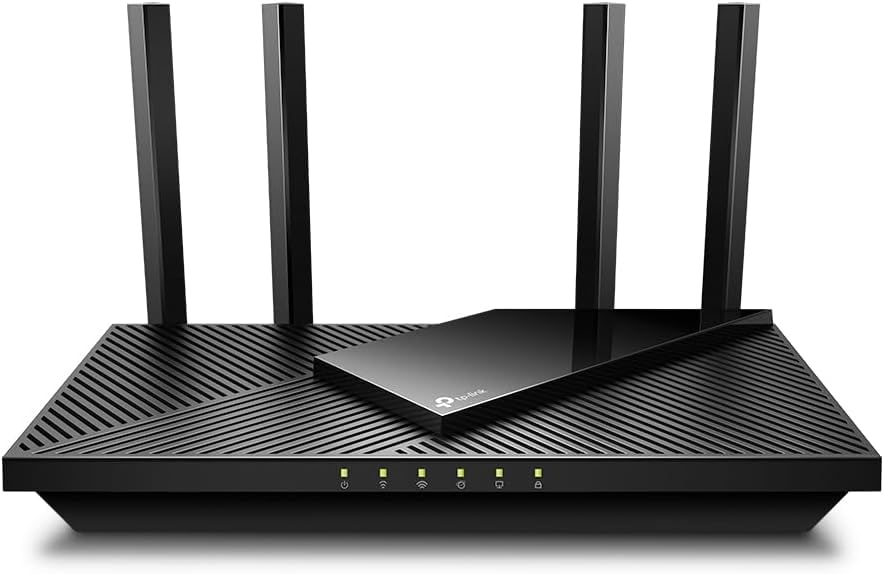
The best part of living with the AX21 V5 is that it does not ask a small-home buyer to care about premium-router problems. The hardware is easy to understand: one gigabit WAN port for the modem, four gigabit LAN ports for wired devices, four adjustable antennas, and a USB 2.0 port. There is no guessing whether you paid for 10G ports you cannot use.
The Wi‑Fi 6 pitch is also practical at this price. TP-Link says Wi‑Fi 6 brings “faster speeds, less lag, and higher capacity,” while Amazon’s product copy lists up to 1200 Mbps on 5 GHz and up to 574 Mbps on 2.4 GHz. Those are marketing numbers, not a promise for every room, but they are enough to explain why this can feel like a real upgrade from an aging Wi‑Fi 5 or ISP-supplied router.
There is a nice low-drama feature mix too: guest networking, Tether management, web setup, VPN server support, WPA3 language on TP-Link’s page, support videos, and an EasyMesh expansion story. None of that turns the AX21 V5 into a flagship. It does make the router feel less disposable than its price suggests.
Setup and Daily Use Details
TP-Link’s setup story is friendlier than the price might imply. The product page says, “Whether you prefer the intuitive Tether App or the powerful web interface, you can set up your Archer AX21 in minutes.” Support material backs that up with setup videos, Starlink and modem-related help, OpenVPN/PPTP tutorials, address reservation guides, and “what should I do if I cannot access the internet?” recovery videos for DSL and cable modem setups.
That does not mean every first run will be effortless. One setup transcript described an Xfinity/modem handoff that made the first run rough, even though Tether troubleshooting eventually mattered. That is the sort of snag that can happen with any replacement router, but it matters more on a cheap product because the buyer may expect “plug it in and forget it.”
Firmware is the other daily-use detail to respect. TP-Link’s support page warns that a “wrong firmware upgrade may damage your device and void the warranty,” and recommends not powering off during the upgrade. Recent V5/V5.6 firmware entries are a good sign — one says “Enhanced system stability and security” — but the hardware-version warning means buyers should update carefully, not casually download a random AX21 file.
What Gets Annoying
The first annoyance is range expectation. Amazon’s own copy says performance varies by “conditions, distance to devices, and obstacles such as walls.” That sentence should be printed on every cheap-router box. TP-Link talks about beamforming, a front-end module, and four antennas; those are helpful technologies, but they do not magically turn a $52 dual-band router into a whole-house fix for a difficult floor plan.
The second annoyance is headroom. There is no 6 GHz band, no Wi‑Fi 7, no multi-gig WAN, no multi-gig LAN, and no high-speed USB. If your internet plan is 1.2Gbps, 2Gbps, or faster, this router can become the bottleneck immediately. If your apartment is crowded with neighboring networks and you specifically wanted a cleaner 6 GHz lane, this is the wrong TP-Link model.
The third caveat is reliability. One YouTube complaint-synthesis transcript said “Almost 6% of users give it one star and 2% give it just two stars,” then pointed to random disconnect, weak-range, firmware, and app complaints. Treat that as a caution signal rather than proof that most AX21 V5 units fail. It is still enough to say: do not buy this router as a rescue mission for a home already plagued by dropouts.
How It Compares
Compared with the rest of the parent ranking, the AX21 V5 is the deliberate budget floor. The TP-Link Archer BE230 costs more in the captured snapshot, but it jumps to Wi‑Fi 7 and dual 2.5GbE ports, making it the better value pick for buyers who can spend a little more and want modern headroom. The eero 7 is easier for app-first households and gives you a cleaner mesh path, though it brings its own cloud/app and paid-feature boundaries.
NETGEAR’s RS500 is the premium tri-band option with 6 GHz performance headroom, but it costs several times more and has its own account and subscription caveats. ASUS RT-BE86U is the strongest standalone router in the set because it combines serious wired ports, ASUS controls, and no mandatory security subscription, but it is also a more technical router and far more expensive than the AX21 V5.
That context is why the AX21 V5 stayed in the ranking. It is not pretending to beat the leaders. It is here for the reader who sees the Wi‑Fi 7 upsell, looks at their small apartment and basic plan, and realizes a careful cheap buy may be smarter.
Who Should Buy It
Buy the Archer AX21 V5 if your home is small, your internet plan is at or below gigabit, and your wish list is mostly “make the old router less awful.” It is especially sensible for renters, students, small apartments, starter homes, guest spaces, or basic family setups where phones, laptops, streaming boxes, and a few smart-home devices are the main clients.
Skip it if your router problem is coverage through several walls, repeated unexplained disconnects, heavy gaming and NAS traffic, lots of wired devices, or a desire for deep router controls. Also skip it if you are buying new Wi‑Fi 7/6E clients specifically to use 6 GHz.
The AX21 V5 is at its best when you are honest about the job. It is a cheap, current-new Wi‑Fi 6 replacement router with useful support resources and enough everyday features. It is not a cure-all. If that sounds relieving instead of disappointing, it belongs on your shortlist.
Tell us what this page missed
These pages get better when real buyer complaints make it back into the scoring model. If something important is underweighted, say it.
Rate this review
Give it a score from 1-10 and tell us what to improve.
0/4000 characters