
The recommendation
The original Thinkware U3000 suits buyers comfortable using a phone for settings and recordings. Basic Bluetooth actions and separate notification volumes are useful, while Wi-Fi viewing and the reviewed camera adjustments add details to learn.
Grades at a glance
| Product | Overall | Controls and menu navigation | Finding and saving a recorded clip | Physical handling and routine access |
|---|---|---|---|---|
| Thinkware U3000 | 7.4 | 8.0 | 7.0 | 7.0 |
Does it fit your life?
Who should consider the U3000
The original Thinkware U3000 is most appealing if you like using a phone for camera settings and want to adjust different notification volumes separately. The retailer walkthrough describes basic Bluetooth app actions alongside Wi-Fi for heavier viewing tasks. That split is the central interaction to understand: an ordinary settings visit and a recording-viewing session do not necessarily use the same connection. Buy with those particular tasks in mind.
The hardware needs an equally specific check. The front lens moves with an adjustable plate that has a limited tilt range. In the reviewed dual-camera kit, the rear unit is relatively large and its angle adjustment uses a coin slot. These are the details you encounter when you handle the equipment, regardless of whether you enjoy the app. An appealing phone interface is only half the decision if the placement or adjustment mechanism does not suit your intended arrangement.
Our overall everyday-use score is 7.4/10. Controls earn 8/10, with recorded-clip access and physical handling each at 7/10. The described downloads provide a useful phone route, while offering less detail about the full clip-finding and export sequence. This review concerns the original U3000, with rear-camera observations limited to the demonstrated kit. Keep that model identity clear when comparing packages: the U3000 Pro does not supply the missing details for this camera, and a dual-camera review does not establish the contents of every offer.
Bluetooth covers a useful subset of tasks
In the retailer walkthrough, Bluetooth can handle basic app actions such as changing settings. The account distinguishes these from heavier work such as streaming recordings, for which Wi-Fi is still required. That is a useful separation for a buyer who expects to make occasional adjustments without entering a full viewing session every time. The benefit is specific to those basic actions; it does not make Bluetooth a substitute for every camera connection.
The practical question is what you expect to do most often. If your interactions are usually brief settings checks, that basic connection path could suit you. If you regularly browse recordings, the Wi-Fi side remains part of the normal routine. Thinking in tasks helps avoid the assumption that one convenient connection feature makes every other job equally simple.
Controls score 8/10. That recognizes the described basic app access and useful adjustment options while leaving room for the extra connection distinction. It is a good fit for someone who is comfortable with a phone interface and willing to learn the difference between configuration and viewing. If you prefer to see a menu on the camera itself, compare the VIOFO models or the large touchscreen on Nextbase 622GW. Their attraction is a different location for the interface, rather than a better version of the same Bluetooth routine.
Separate notification volumes are a practical strength
The walkthrough describes independently adjustable volumes for different types of audio notifications. That gives you more control than treating every prompt as one undifferentiated sound setting. For someone who wants ordinary system messages at a different level from other notifications, separate adjustments can make the camera feel more tailored to the way they use it. The useful claim is the control itself, rather than any broader benefit attributed to a notification feature.
This is the kind of small interaction that may matter more than an impressive feature name. A camera that produces prompts you dislike can become an annoyance even if you seldom open its settings. Being able to distinguish their levels gives you a way to make an intentional choice. It also gives a concrete reason to look at the U3000's app settings before deciding that all phone-led cameras are alike.
Consider whether this is a setting you would actually use. If you are happy with a simple default arrangement, it may not be a reason to prefer the Thinkware. If you often tune a device's sounds to suit your routine, it is a more relevant advantage. In either case, pair that preference with the separate Wi-Fi requirement for viewing. The U3000's controls make the most sense when the specific adjustments appeal to you, not when you simply want the longest list of connected functions.
App downloads are described, with less detail about finding a clip
A separate U3000 review describes using the Thinkware Dash Cam Link app to download clips and perform firmware updates without removing the card. That establishes a useful phone route for obtaining recordings. The account gives less detail about the exact sequence for locating a particular recording and completing an export, so it supports a moderate rather than top retrieval recommendation.
Recorded-clip access scores 7/10. For a buyer, that means the described route is credible enough to consider, but the complete search-and-save routine should matter more than the phrase app download. If you know you often need to browse several files before finding the one you want, the details of the file interface become especially important. A review describing a download does not tell you everything about how comfortable that browsing will feel.
The described app behavior belongs to the configuration used in that review. There is no promise of a specific current layout or transfer time. Use it to identify the routine you would be choosing: phone connection, file selection and a phone copy rather than compulsory card removal. If you want a more visibly demonstrated local file-browsing arrangement, compare Nextbase's important and normal folders or the A229 Pro's file-list menu. Those are concrete differences in access style, not merely a contest over wireless terminology.
Decide which phone session you will repeat most
Think of the U3000 as offering two kinds of phone session. The first is a short settings visit: you want to change an ordinary option and finish. The second is a viewing session: you want to inspect recordings and perhaps download a clip. BlackboxMyCar's walkthrough describes Bluetooth for basic in-app actions, with Wi-Fi still needed for heavier viewing. That makes the task, rather than the wireless label, the useful starting point.
For a buyer who frequently adjusts settings, the basic app path may have real appeal. For someone who chiefly opens the app to retrieve recordings, the Wi-Fi side deserves more attention. The useful question is whether the part of the interface you expect to use most looks comfortable. A convenient connection for settings does not by itself establish how easy it will be to identify the right file or save it to the device where you need it.
This distinction also helps when comparing cameras. Nextbase 622GW offers a visible local playback interface; A229 Pro combines local controls with several described access routes. Garmin Mini 2 keeps a tiny body and uses a phone for viewing. The U3000 makes a more particular case through its app adjustments and notification controls. Choose it if those are advantages you value, while accepting the connection change for viewing. If you rarely alter settings, give more weight to the clip routine and the front and rear adjustment mechanisms you would actually handle.
The front lens plate has a limited adjustment range
Check the front adjustment before making the U3000 your preferred camera. In the retailer walkthrough, the lens moves with its plate rather than rotating independently, and the reviewer calls out the limited up-and-down range. He specifically raises a concern about a vertical windshield. That gives you a concrete geometry question to resolve for your intended position, instead of relying on a broad statement that a mount is adjustable.
An adjustment limit may be unimportant once you have a position that suits it. It becomes decisive if the angle you need is outside what the mechanism comfortably allows. The app's useful controls cannot change that physical range. If you expect to move the camera between substantially different positions, treat each position as something to check rather than assuming one successful placement establishes all of them. This is a purchase consideration, not a reason to improvise around an unsuitable mounting angle.
Physical handling scores 7/10, reflecting that constraint together with the rear-camera arrangement in the reviewed kit. Compare mechanisms when handling is your main concern. A229 Pro has a described lens tilt separate from its sliding mount; Nextbase 622GW has an adjustable mount and convenient magnetic separation. Those alternatives offer different actions to inspect, without establishing a universal fit themselves. For the U3000, the right outcome is confidence in the actual movement you need, before its appealing notification and app settings settle the choice.
The reviewed rear unit adds its own handling routine
In the reviewed dual-camera kit, the rear unit is described as relatively large. Its angle adjustment uses a coin slot, rather than simply rotating the lens by hand. Those details belong to the reviewed rear-camera arrangement and should not be treated as a statement about every U3000 package. They are relevant if you intend to use a comparable dual-camera configuration.
The rear component belongs in the comparison alongside the front camera. Consider the object you would hold, the connection it adds and the adjustment action you would use. If you expect to set the angle once and seldom revisit it, the coin-slot mechanism may be a minor concern. If you expect frequent changes, it deserves more weight. Base that judgment on the reviewed original-U3000 kit and the exact equipment you intend to obtain.
If you mainly want a small front camera, be careful not to let a dual-camera demonstration define your needs for you. If you do want both units, assess how often you expect to adjust or remove them. A mechanism that is acceptable for an occasional deliberate adjustment may be less appealing if you expect frequent changes. Thinkware's handling compromise is specific and understandable: useful app functions coexist with hardware that benefits from checking the adjustment range and the exact kit before you commit.
Which alternatives change the choice
Nextbase 622GW is the clearest alternative if you want a visible interface on the camera. Its large touchscreen and separate important and normal recording folders suit local browsing, while its magnetic separation is useful for body removal. The reviewed Nextbase routine requires recording to be stopped before settings and playback, so it has its own interaction rule to learn. The decision is largely about where you want that interface to live.
VIOFO A229 Pro is worth comparing if alternative file routes matter to you. Its overview describes app transfer, USB use as a card reader and card removal for a computer reader, alongside a local file-list menu. The larger body and the reviewed multi-camera connections remain physical considerations. It offers flexibility in how to reach recordings, rather than the same Bluetooth-for-basic-settings approach as the U3000.
Garmin Mini 2 is a very different phone-oriented option: tiny body, no local playback screen and a simpler physical proposition centered on compactness. It may suit someone who wants the smallest object and is content to view recordings on a phone. The Thinkware becomes more attractive when its specific app adjustments and notification controls are the reasons you are shopping. Let those preferences guide the comparison instead of assuming two phone-based routines must feel alike.
The decision to make before buying
Choose the original U3000 if the described basic Bluetooth app controls and separately adjustable notification volumes answer needs you already have. Be comfortable using Wi-Fi for heavier viewing tasks and using a phone as a regular interface. Then check the physical arrangement: the front plate's range, and the rear unit's size and coin-slot adjustment if you want the reviewed dual-camera configuration. Those details should agree with the setup you intend to handle.
Its 7.4/10 overall everyday-use score reflects stronger controls alongside more moderate retrieval and handling. A described app download is useful, but the account gives less detail about searching for a particular recording and completing the export. If file browsing is the main reason you interact with a camera, that limit deserves weight. If brief settings visits are more important to you, the U3000's particular control options may be the stronger deciding factor.
Choose Nextbase 622GW when a large local touchscreen would address your concern more directly. Compare A229 Pro when you want several ways to reach files on a computer or phone. Consider Garmin Mini 2 when compactness leads and phone viewing is acceptable. The Thinkware's case rests on its own combination of app controls and physical mechanisms. A precise match to those features is a better reason to buy than assuming that a familiar model family or a connected-feature list guarantees the ordinary routine you want.
Thinkware U3000
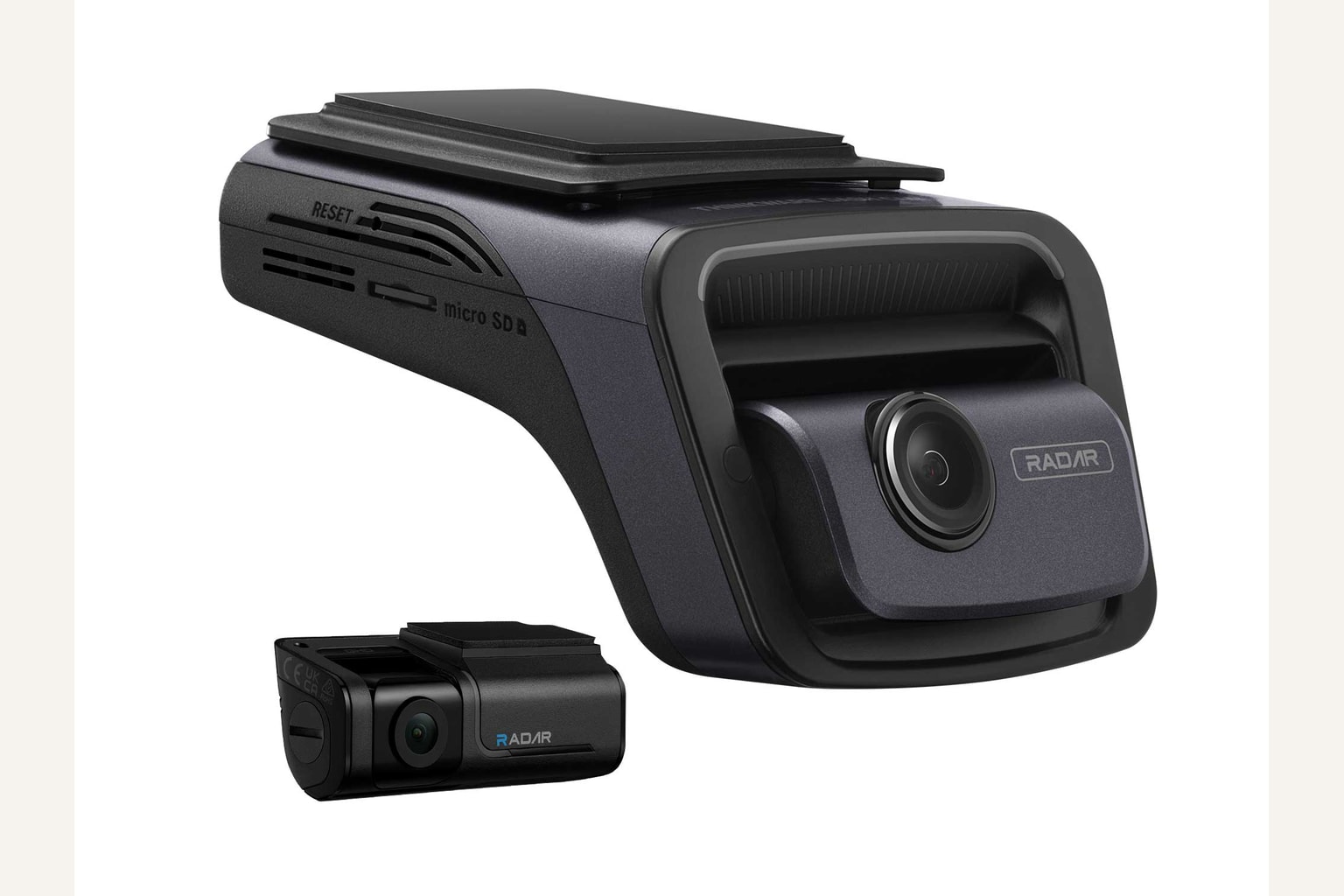
Thinkware
Buyers who like a phone interface and distinct notification-volume controls.
Basic Bluetooth app settings and separate notification volumes, with Wi-Fi viewing and kit-specific adjustments.
The takeaway
A considered phone-led choice when its particular app controls fit your habits.
Reasons to choose it
- Basic app actions over Bluetooth described
- Separate notification-volume controls
- Phone clip downloads described
Tradeoffs to know
- Wi-Fi needed for heavier viewing tasks
- Limited front lens-plate tilt
- Coin-slot rear adjustment in the reviewed kit
Think twice if: You prefer local playback or have not checked the lens adjustment range.
Published specifications
- Connection split
- Bluetooth for basic app actions; Wi-Fi for heavier viewing
- Model
- Original U3000
- Reviewed rear unit
- Relatively large, with coin-slot angle adjustment
Further reading
Ratings
Editorial score 7.4
Controls and menu navigation8
Basic Bluetooth app actions and separate notification volumes provide useful ordinary controls.
Finding and saving a recorded clip7
App clip downloads are described, but the complete locating and exporting path is less clear.
Physical handling and routine access7
Limited front tilt and the reviewed rear unit adjustment add physical details to consider.
Sources & further reading
youtube.com review
youtube.com review
youtube.com review
youtube.com review
youtube.com review
youtube.com review
youtube.com review
youtube.com review
Keep reading
Something changed? Help us keep this useful.
Send a correction →