
The recommendation
A reason to inspect the physical tilt design, with current requirements checked separately.
Grades at a glance
| Product | Overall | Positioning, aiming and handling | Input, menu and control selection | Everyday power, cables and packing |
|---|---|---|---|---|
| Samsung The Freestyle 2nd Gen | 7.7 | 9.0 | 7.0 | 7.0 |
Does it fit your life?
The physical design is the reason to look
The Freestyle 2nd Gen is worth investigating if you want to aim a small projector by tilting its body in an attached cradle. The Samsung-sponsored demonstration of a supplied pre-production second-generation unit shows broad physical tilt and remote rockers. Those are concrete interaction choices: move the body toward the intended surface, then use a handheld control for ordinary adjustments. The appeal is easy to picture for someone who dislikes arranging separate props whenever the viewing position changes.
The source needs an unusually clear qualification. It explicitly features a pre-production second-generation unit supplied by Samsung, and Samsung sponsored the video. We use only the directly described physical tilt, remote rocker, and cable handling. Those observations do not establish current shipping contents, apps, software behavior, automatic correction, image quality, or power-bank compatibility. The buying recommendation is therefore a reason to inspect the design, with exact current product checks still required before purchase.
This review was updated on October 16, 2026 after checking that cached report. It is not a new hands-on test or a new live acquisition. If your main reason for choosing the Freestyle is a current smart feature or a particular service, that question needs evidence outside this review. Here we examine whether the described physical arrangement offers the sort of carrying, positioning, and control routine you want to live with.
A cradle changes the aiming chore
The sponsored pre-production demonstration describes the body tilting widely in its cradle. Rather than carrying over the video's ambiguous claim about exact degrees in each direction, we use the broad physical motion it shows. That is enough to explain the everyday attraction. The cradle gives you an attached aiming mechanism, so changing direction starts with the projector's own support instead of finding a separate object to put underneath it.
Think about where that would be useful in your home. If you regularly choose different surfaces to project toward, having an attached tilt mechanism may remove one recurring piece of improvisation. If you always use the same wall and the same table, the advantage may be less dramatic. The design is most persuasive when it addresses an actual chore you repeat, rather than a hypothetical position you might try once because it appeared in a demonstration.
The tilt observation is a physical convenience, not a promise about the resulting image. A body can point in a direction without establishing accurate alignment, focus, or an acceptable picture for your use. Those questions are outside this review's claims. Start by deciding whether the mechanism and support arrangement fit the places you would use it, then investigate the viewing requirements separately. That keeps an attractive movement from carrying more of the purchase decision than the evidence supports.
The cradle still needs somewhere to sit
An integrated aiming mechanism does not remove the need for a suitable surface. The projector and its cradle occupy a place in the room, and the cable needs an appropriate route. Before buying, identify the surface at the intended location. A convenient tilt can make adjustment easier after placement, but it cannot clear a crowded bedside table or put a socket where you need it. Those ordinary room details can determine whether the design feels useful day after day.
For visits to unfamiliar places, ask about the location rather than assuming the compact shape settles it. Will there be room for the body and cradle? Can you reach the cable connection after placing it? Is there a place for the remote beside the viewer? These are practical preparation questions prompted by the physical setup. The historical report does not certify every possible placement or mounting arrangement, and this review does not recommend improvising one.
Compare the approach with a conventional box such as the Halo+ or a folding design such as the Aurzen ZIP. The Freestyle's appeal is the attached cradle; the Halo account describes a small kickstand and tripod option; the ZIP accounts describe several folding pivots. Consider which arrangement answers your actual room problem. Choosing a mechanism around the available surface is more useful than deciding from a photograph that all small projectors are equally easy to place.
Keep the remote discussion equally specific
The pre-production report describes rocker controls for volume and channels on the remote. That supports a modest but useful conclusion: the demonstrated handheld controller offers familiar physical actions for those ordinary commands. If you like a rocker that moves up and down, this may be more intuitive than navigating to an on-screen control each time. It is a tangible interaction to look for when inspecting the current product.
We do not extend that observation to every function of a shipping remote. The same sponsored video discusses apps and other features, but those are outside this review's transfer limits. A report about a physical rocker does not establish responsiveness, current software integration, or the availability of a particular action today. Confirm the actual remote and controls on the exact second-generation unit you intend to buy, especially if a specific shortcut is important to you.
For daily use, give the remote a consistent place. A small projector that changes rooms can easily leave its controller behind. Decide whether it stays beside the body in storage or in a dedicated pouch with the cable. This is a minor organizational choice, but it supports the very convenience that a compact design promises. The physical control is useful only when it is available where you are sitting rather than in the room where you last used the projector.
Learning a few controls beats assuming familiarity
The rocker is familiar in shape, but a shared household still benefits from a brief introduction to the actual controller. Show the ordinary actions needed for your setup, then establish where the remote belongs afterward. There is no need to teach every setting at once. A simple handover can make a projector more approachable for someone who did not choose it, without depending on unverified claims that the interface is effortless.
If you expect guests to operate it, think about what they will need to do from their seat. Will they change volume, choose a source, or return from an unwanted screen? The retained physical rocker observation answers only part of that routine. Check the other necessary actions on the current unit rather than assuming that a compact controller or a familiar brand makes every task obvious. This is a purchase-preparation point, not a criticism inferred from missing evidence.
Cable handling belongs in the placement plan
The sponsored pre-production report describes a USB-C cable connection used to power the projector. We use that as a physical cable-handling observation. It tells you that the reviewer's setup included a lead entering the body, so cable reach and access belong in the arrangement. It does not establish a universal supply standard, compatibility with a particular power bank, or the contents of the current retail package.
Before choosing the support location, picture where that lead would run and where the power arrangement would sit. A body that tilts conveniently can still be awkward if the connection is difficult to reach or the cable is left behind during a move. Give the relevant lead and supply a defined place in storage. The practical aim is a complete kit that you can inventory, rather than treating a familiar connector shape as proof that any cable nearby will serve the job.
If you plan to take it away from mains power, settle the exact power requirement separately. The historical video offers broader suggestions that we do not adopt here. Do not infer compatibility from the connector alone. Your purchase should include a verified plan for the specific arrangement you intend to use, while this review can only help you identify that power and cable handling are part of the physical routine.
Compare the current package with your intended kit
Treat the supplied, sponsored pre-production demonstration as a view of physical handling. Its tilt cradle, rocker controls, and cable connection are useful things to inspect on the exact product you are considering. A current listing needs to answer a different question: which body, remote, lead, and supply are actually part of that purchase? Check the second-generation identity and the named contents together. Similar-looking photographs or familiar product names do not settle the contents of a particular offer.
Build your proposed kit from the activity, then compare it with the listing. For a regular room, identify the surface and where the remote would stay. For visits, include how you would carry the body and cradle together with the required cable and power arrangement. If you want a separate stand or another accessory, establish that item's suitability independently before counting on it. The attached cradle supplies the physical aiming idea discussed here; it does not establish every optional mounting arrangement.
A useful way to compare two offers is to note which pieces your plan requires and which pieces each offer expressly names. Leave an unanswered item as a question to resolve rather than filling it from the historical tour. This matters most when an accessory appears essential to the compact setup you imagined. If the source or supply you intend to use is not established, the physical appeal of the cradle can remain on your shortlist while that specific requirement is checked.
Keep the same distinction when comparing with another projector. Compare the bodies with their planned supports, remotes, and power pieces, rather than a bare Freestyle against a fully accessorized alternative. The result may favor the cradle for your room or may reveal that another arrangement is easier for you to store. Either is a useful outcome of the planning exercise. Neither is a claim that the pre-production video certifies a shipping bundle, a current app, remote endurance, or operation from a portable supply.
How to compare it without overreading the tour
The MoGo 4 Laser offers a useful comparison because its historical reports also emphasize an integrated physical stand. Its Laser-specific review adds a more detailed account of remote preference and menu discovery. If you want a richer description of those control chores, read that review alongside this one. The Freestyle's retained evidence is narrower, so its physical appeal should prompt an exact product check rather than a leap to current smart-feature conclusions.
The LG CineBeam Q is another relevant comparison for a handle that also props the body. Its accounts describe a different set of placement and power constraints, including a short cord and limited support options. The Freestyle cradle may be more attractive if broad physical tilt is your priority, while the LG may appeal through its carrying handle. Neither comparison here ranks their image quality. It helps distinguish how the body is aimed and what else must be arranged around it.
If unplugged relocation is the main requirement, read the Mars 3 Air and Halo+ reviews, whose reviewer accounts describe internal-battery use in that context. Those observations still do not promise viewing duration or arbitrary external-supply compatibility. They simply describe another physical routine to consider. Comparing these routines openly is more useful than letting the word portable stand in for several different requirements: small size, easy aiming, convenient carrying, and a manageable power kit.
For an occasional trip, make the current kit easy to inventory before leaving. Keep the body and cradle, actual remote, required lead, and verified power arrangement on one list. If an accessory remains a possibility rather than a necessity, decide that before packing. A clear collection is easier to compare with the other designs in this guide than a collection of imagined future uses.
Reading the everyday-use score
Positioning, aiming, and handling earns 9/10 for the broad physical cradle tilt described in the sponsored pre-production report. The category is about the convenient mechanism, without claiming shipped-unit alignment performance. Input, menu, and control selection earns 7/10 for the directly described ordinary rocker actions. The limited report supports those basic interactions but does not justify treating all current control or software behavior as established.
Power, cables, and packing earns 7/10 for the described cable and remote handling, with exact supply and package questions still needing their own checks. The overall everyday-use score is 7.7/10. It is a narrow editorial assessment of the described chores. It does not score brightness, picture quality, sound, apps, automatic correction, remote endurance, or operation from a particular power source. Those omissions matter if any of those features is the reason you are considering this model.
Keep the Freestyle 2nd Gen on your shortlist if the attached tilt cradle addresses a real placement chore and the physical remote layout appeals. Before buying, verify the current second-generation identity, controls, included pieces, and intended power arrangement. The historical demonstration gives you useful questions to take into that check. It supports interest in the physical design, while leaving the rest of your intended setup to be established with exact current information.
Samsung The Freestyle 2nd Gen
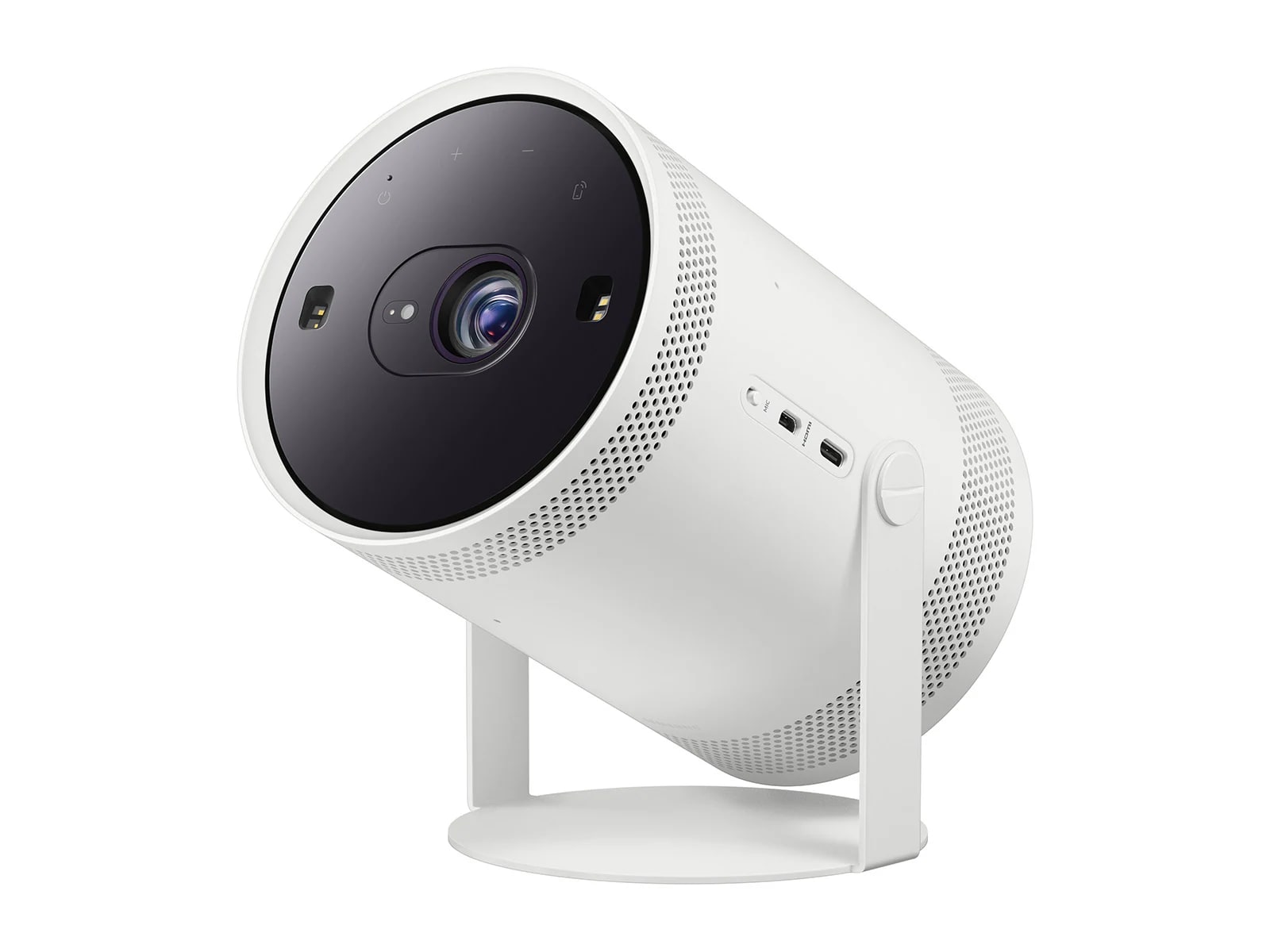
Samsung
Buyers interested in an attached tilt cradle who will check the exact current product.
A sponsored pre-production demonstration shows broad cradle tilt, remote rockers and cable handling.
Reasons to choose it
- Broad physical tilt demonstrated
- Familiar remote rocker actions described
- Attached cradle provides the aiming mechanism
Tradeoffs to know
- Retained account is sponsored pre-production
- Current contents need separate checking
- Exact power plan is not established by a connector
Think twice if: Your decision depends on current apps, shipped accessories or a particular portable supply.
Published specifications
- Admitted actions
- Tilt, remote rockers and cable handling
- Current bundle
- Not established by retained source
- Evidence context
- Sponsored pre-production second-generation demonstration
Further reading
Ratings
Editorial score 7.7
Positioning, aiming and handling9
The sponsored pre-production report describes convenient broad cradle tilt; current correction outcomes are outside this score.
Input, menu and control selection7
The physical volume and channel rockers support ordinary selection, without establishing current app or interface behavior.
Everyday power, cables and packing7
The pre-production cable and remote handling are workable, while exact present contents and supply arrangements need separate checks.
Sources & further reading
youtube.com review
youtube.com review
youtube.com review
youtube.com review
youtube.com review
youtube.com review
youtube.com review
youtube.com review
youtube.com review
youtube.com review
youtube.com review
youtube.com review
youtube.com review
youtube.com review
Keep reading
Something changed? Help us keep this useful.
Send a correction →