
The recommendation
Appealing for pinch playback and swipe volume, with a personal fit check and attention to the case contact area.
Grades at a glance
| Product | Overall | Fit and handling | Case and storage | Everyday controls |
|---|---|---|---|---|
| Samsung Galaxy Buds3 Pro | 8.0 | 8.5 | 6.5 | 9.0 |
Does it fit your life?
The direct gestures are the main attraction
Galaxy Buds3 Pro are most appealing here for their physical control arrangement. PCMag describes pinching the outer stem for playback and track selection, with swipes on the back of the stem for volume. Separating the gestures that way gives your fingers two distinct actions to learn.
A personal report also describes the earbuds staying in place while eating. That is a useful ordinary-use detail because jaw movement is part of daily life. It remains one person's experience from a same-day account, rather than a prediction of how the shape will sit in your ears.
The case caveat needs equally careful wording. SamMobile reports that cleaning the earbud bottoms and the case's charging pins helped some people reporting docking-related charging problems, while others were not helped. This supports attention to the contact area as a possible ownership chore. It does not establish how common a problem is, identify a cause for your pair or make cleaning a guaranteed remedy.
Choose these when the stem gestures feel natural and the buds settle comfortably. Keep the case-care concern in proportion: it is a specific reported inconvenience to consider, rather than a basis for a broad judgment about product dependability.
A useful eating report, with personal limits
The positive fit account is concrete: the writer says the buds stayed in place while eating, when other earbuds had fallen out for them. That is more informative than a bare star rating. It identifies a movement you can pay attention to during a fitting opportunity.
The writer describes receiving the buds that day, so this is an immediate fit impression. That timing is useful context: the account tells you how the shape behaved during eating on that occasion, without answering how comfortable the person found it after longer use. Start your own check with jaw movement, then pay attention to whether the same position remains comfortable.
Try talking and ordinary jaw movement with the buds seated. Notice whether you keep adjusting the angle or pushing them inward. A stable feeling in a still pose is only part of the decision if you wear earbuds while moving through a normal day.
Keep the control area in mind while making those adjustments. The stem gives you a visible place to pinch and swipe, but your preferred grip must still let you reposition the bud without inadvertently making the same gesture. The favorable fit report makes this a plausible shape to try; it does not remove that practical check.
If the shape suits you, direct stem gestures can become the main reason to choose it. If it does not, the control layout cannot compensate for constant repositioning. That is the appropriate limit on the positive fit judgment.
Pinch for selection, swipe for volume
PCMag's reviewed layout uses one pinch for playback, two for the next track and three for the previous track. Swipes on the back of the stem adjust volume. Treat these as the gestures described in that review, rather than a guarantee about every current configuration.
This is a relatively direct arrangement for someone who prefers movement along a stem to a repeated tap count. You still need to learn the difference between gripping the stem to move the bud and pinching it to make a command. Try both actions rather than deciding from the gesture names alone.
The same review says the left and right controls cannot be set differently apart from the pinch-and-hold gesture. That historical limitation matters if you like giving each ear a substantially different role. A symmetrical layout can be easy to remember, but it is less attractive when your habits depend on extensive side-specific assignments.
Start with the functions you actually reach for. If playback and volume cover most of your needs, the pinch/swipe split is the useful detail. If you expect to create a highly individual layout, check the available settings on the actual purchase before relying on that expectation.
The attraction is the separation between a pinch and a slide. A buyer who finds both easy can reasonably prioritize that physical layout. If you struggle to find the back of the stem by touch, however, the listed gesture is less useful than it sounds. Try reaching for the control without watching your hand, as you would during ordinary use.
Understand the contact-care report
SamMobile describes reports of one earbud not charging properly and says attention to the earbud bottoms and the pins inside the case helped some people, while others continued to have difficulties. Its account supports checking access to those areas. It does not provide a dependable diagnosis for a particular pair.
The buying relevance is narrow: the docking and contact area may need attention in ordinary ownership. A case is not only something you carry; it is also where you repeatedly place the earbuds. This report gives a reason to notice whether that area is easy for you to see and access.
Look at both halves of that arrangement during a hands-on inspection: the bottom of each earbud and its corresponding area inside the case. Can you see where the bud sits, and is that area accessible to you? Those are useful purchase questions even though the report cannot tell you how often an owner will encounter the problem.
If your pair is not behaving as expected, follow the product's applicable care or support guidance rather than treating a reported experience as a repair instruction. For selection purposes, simply recognize that contact care can be part of the routine.
This is why the case-care judgment is more reserved than the control judgment. Direct pinch and swipe gestures are a positive design feature; the secondary contact-care report is a separate practical caveat. Neither cancels the other.
Which stem arrangement suits you?
AirPods Pro 2 USB-C also offer volume swipes, with favorable reporting on lid opening and docking. Nothing Ear (2024) offers pinch controls and a side-mounted case button beside its cable port. Those are relevant alternatives if you like the stem concept but want to compare the whole storage routine.
Beats Fit Pro swaps the stem gesture for a physical button and adds fixed fins. Sony uses a different shell shape with a reviewed four-tap volume sequence. Bose provides swipes but has a specific report of touch input while adjusting the fit.
The Galaxy Buds3 Pro make the most sense when the shape sits comfortably and you value the pinch/swipe distinction. Keep the reported contact-care issue as a limited caveat, and judge the actual fit rather than borrowing the certainty of someone else's positive first day.
Samsung Galaxy Buds3 Pro
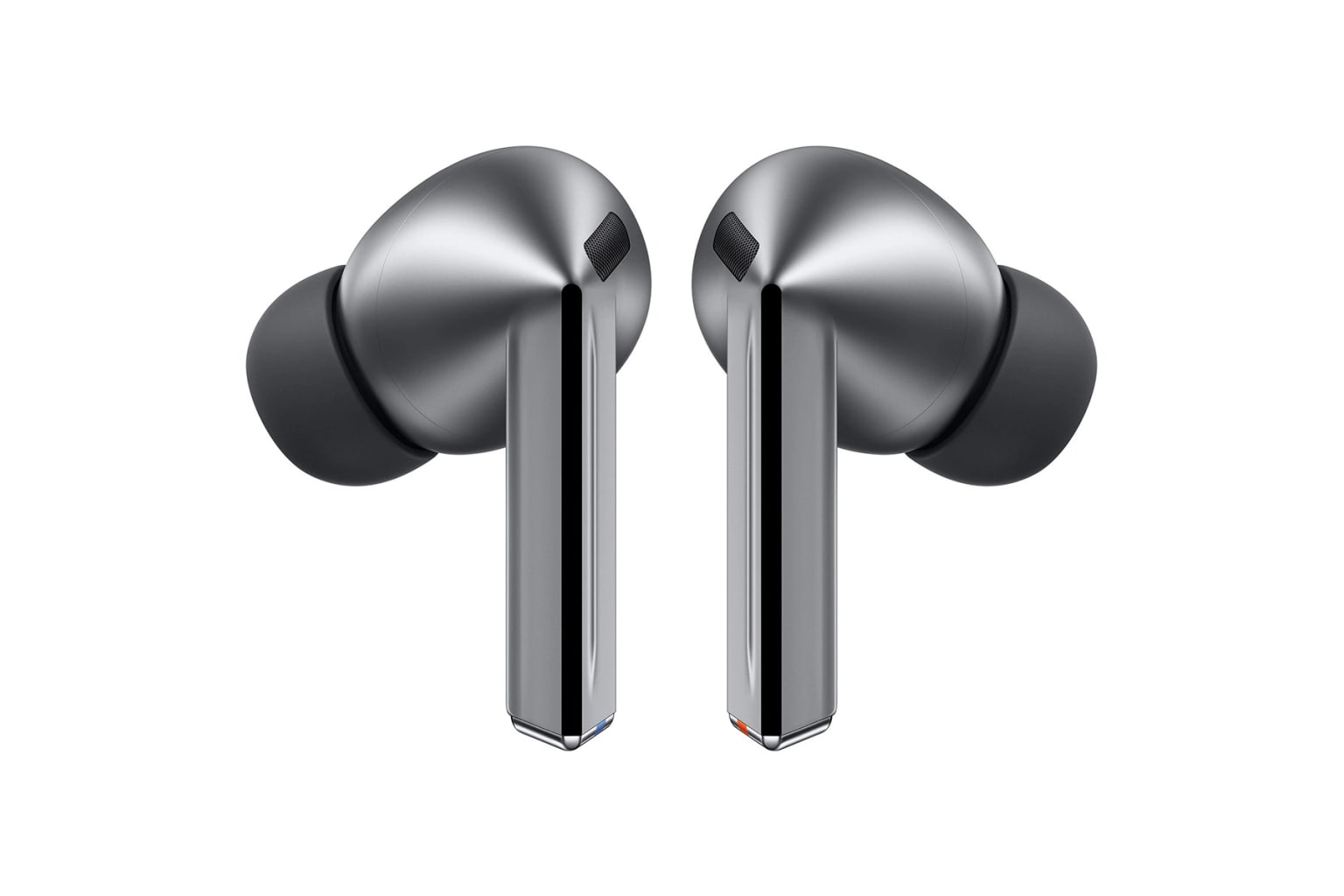
Samsung
People who like separate pinch and swipe actions on a stem.
Galaxy Buds3 Pro are most appealing here for their physical control arrangement. PCMag describes pinching the outer stem for playback and track selection, with swipes on the back of the stem for volume. Separating the gestures that way gives your fingers two distinct actions to learn.
Reasons to choose it
- Pinch and swipe give distinct control actions
- A personal report describes a settled fit during eating
- Stem layout offers an identifiable place to interact
Tradeoffs to know
- Reviewed left/right customization has limits
- Fit praise comes from an individual experience
- Reported contact-care friction warrants attention
Think twice if: You need broad left/right control differences or want to overlook the physical docking area.
Published specifications
- Model
- Samsung Galaxy Buds3 Pro
Further reading
Ratings
Editorial score 8
Fit and handling8.5
The specific early eating-fit report is a useful positive observation with an explicit personal limit.
Case and storage6.5
The secondary contact-cleaning account supports a limited care chore, without a prevalence or remedy inference.
Everyday controls9
Pinch playback and swipe volume are distinct actions; the reviewed side-assignment limitations remain.
Sources & further reading
pcmag.com review
sammobile.com review
User reports at Reddit
Keep reading
Something changed? Help us keep this useful.
Send a correction →