
The recommendation
Choose the Argus 4 Pro if person-filtered playback is a task you expect to use often and landscape viewing suits your phone habits. Compare eufy Security SoloCam S340 if panel placement and app charge information matter more. Both have a useful reported phone-save routine, with different details to weigh before mounting.
Grades at a glance
| Product | Overall | App navigation and ordinary controls | Finding and saving an event | Physical handling and power routine |
|---|---|---|---|---|
| Reolink Argus 4 Pro | 8.4 | 8.0 | 9.0 | 8.0 |
Does it fit your life?
Who should choose it
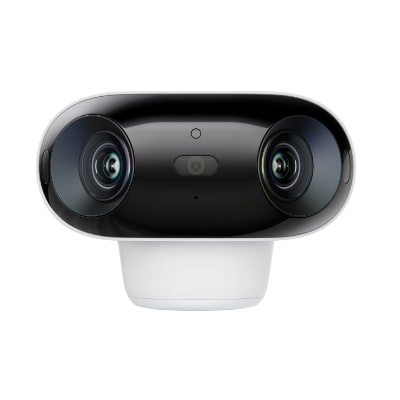
The Argus 4 Pro is a strong shortlist choice when you often want to narrow recorded events and save one to a phone. LifeHackster shows playback, a person-only filter and downloading in the same walkthrough. Its wide live view may be easier to use with the phone turned sideways, while separate charging and card covers need room around the mount.
Updated October 16, 2026. Compare the eight-camera guide or jump to grades, controls, recordings, handling and the decision.
Everyday-use grades
| Everyday task | Grade / 10 |
|---|---|
| App navigation and ordinary controls | 8 |
| Finding and saving an event | 9 |
| Physical handling and power routine | 8 |
| Overall | 8.4 |
Grades compare app controls, finding and saving recordings, and physical handling. They are based on the linked historical reviews and reports, not firsthand testing by us. Security, privacy, detection accuracy, image/audio quality and battery duration are outside this assessment.
Using the everyday controls
Tap the camera snapshot to open live view in LifeHackster’s Argus 4 Pro walkthrough. Pause, listening, snapshots, recording and view-quality choices are available there, with battery, display and detection settings behind the gear. The 8/10 controls grade reflects accessible ordinary actions alongside more settings to learn.
The wide image is also part of the app experience. The reviewer suggests enlarging it or turning the phone to landscape. If you usually check a camera one-handed, try the portrait view before buying; if you are happy turning the phone, the same layout may fit your routine well.
Sources: Reolink Argus 4 PRO Review - 4K 180 Degree Low Light Wireless Security Camera — LifeHackster
Finding and saving a recording
From playback, LifeHackster narrows recorded events to people and identifies the download control for saving footage to a phone. The 9/10 retrieval grade reflects this concrete sequence. For someone looking through a busy event list, a filter gives the search a useful starting point; its presence does not measure how accurately events are classified.
The walkthrough inserts a microSD card into the camera. Home Hub is mentioned separately as an optional configuration, so the shown routine should not be read as a reason you must buy a hub. In the recording setup you choose, try finding one existing event, opening it and saving it to the phone.
Sources: Reolink Argus 4 PRO Review - 4K 180 Degree Low Light Wireless Security Camera — LifeHackster
Mounting, access and power chores
The rear rubber flap covers USB-C charging; a second flap underneath covers the card slot and power button. Leave clearance for both when choosing the bracket position. The mount screws to its base and the camera screws to the mount, so adjustment and future access deserve attention before you finish the installation.
LifeHackster also uses a separate solar panel and additional gutter-mount accessories. Those are choices in his installation, not promised contents of every Argus 4 Pro package. The 8/10 physical grade balances approachable access with the cable and accessory arrangement. These observations apply to the Pro model.
Sources: Reolink Argus 4 PRO Review - 4K 180 Degree Low Light Wireless Security Camera — LifeHackster
Which routine fits you
Choose the Argus 4 Pro if person-filtered playback is a task you expect to use often and landscape viewing suits your phone habits. Compare eufy Security SoloCam S340 if panel placement and app charge information matter more. Both have a useful reported phone-save routine, with different details to weigh before mounting.
Read the eufy Security SoloCam S340 review or return to the comparison table.
Comparison sources: Reolink Argus 4 PRO Review - 4K 180 Degree Low Light Wireless Security Camera — LifeHackster; Eufy SoloCam S340 - 3 Things You Need to Know! — ModernDayTech; 3 MAJOR FLAWS of the Eufy S340 You NEED to Know! — Ultratec [Jesse Sanchez]; Eufy SoloCam S340 review: a solar-powered and fully wireless outdoor security camera
Check the selected Amazon listing for the exact package, current terms and availability.
Sources and review context
Reolink Argus 4 PRO Review - 4K 180 Degree Low Light Wireless Security Camera — LifeHackster
LifeHackster says Reolink supplied the review camera and that the video was not sponsored.
Reolink Argus 4 Pro
Reolink
Narrowing playback to people events and saving a selected clip
The Argus 4 Pro is a strong shortlist choice when you often want to narrow recorded events and save one to a phone. LifeHackster shows playback, a person-only filter and downloading in the same walkthrough. Its wide live view may be easier to use with the phone turned sideways, while separate charging and card covers need room around the mount.
Reasons to choose it
- Playback includes a person-only filter and phone-download control.
Tradeoffs to know
- The wide live view may be more comfortable in landscape.
- Rear charging and bottom card covers both need access.
Think twice if: Turning the phone sideways for a wide live view would be inconvenient
Published specifications
- Everyday-use focus
- Narrowing playback to people events and saving a selected clip
Further reading
Ratings
Editorial score 8.4
App navigation and ordinary controls8
Gear settings expose battery, display and detection controls; wide live view may call for landscape phone orientation.
Finding and saving an event9
Playback offers person-only filtering and download to phone in demonstrated app.
Physical handling and power routine8
USB-C charging flap and separate card-slot flap are shown with adjustable mount and optional separate solar panel.
Sources & further reading
youtube.com review
youtube.com review
youtube.com review
the-independent.com review
Keep reading
Something changed? Help us keep this useful.
Send a correction →