
The recommendation
A useful choice for pinch controls and a clearly arranged case, provided the three-size tip set suits your ears.
Grades at a glance
| Product | Overall | Fit and handling | Case and storage | Everyday controls |
|---|---|---|---|---|
| Nothing Ear (2024) | 8.4 | 8.0 | 8.0 | 9.0 |
Does it fit your life?
A clear physical idea, with a fit qualification
Nothing Ear (2024) is worth considering if you like a stem you can pinch and a case whose button and cable connection are together on one side. PCMag describes the default pinch layout as sensible and reports a comfortable, secure fit with the supplied silicone tips. Those are useful reasons to put it on a shortlist.
The fit is not a settled question for every ear. One personal account wanted longer or deeper-fitting tips, while another describes the existing shape as snug and comfortable. That disagreement points to the real decision: whether the available tip shape and insertion feel suit you.
This is the 2024 Nothing Ear, rather than Ear (a) or a previous numbered model. Similar naming and a familiar appearance can make comparisons confusing. Check the full model identity when comparing a listing or a review.
The recommendation is strongest for someone who wants a distinct pinch action and finds the supplied shape comfortable. If you are already searching for a deeper fit to make a bud feel settled, try this model before assuming its three tip sizes will address that preference.
Three sizes and two different reactions
PCMag describes three pairs of silicone tips and finds the fit secure and comfortable. That is a positive experience with the supplied arrangement. It is more useful as a starting point for fitting than as an assurance that every ear will find the same result.
A personal report describes wanting longer or deeper tips, while a separate account praises a snug fit in small ear canals. These observations can both be true. Tip size is one dimension of fit; the shape, depth and angle you prefer matter too.
During a fitting opportunity, try the supplied options and notice whether the earbud sits naturally. If you repeatedly press it farther inward to feel satisfied, that is a reason to pause the purchase decision. Do not assume that the largest or smallest supplied tip will necessarily change the aspect of fit that bothers you.
Talk and move your jaw in an ordinary way, then remove and replace the bud. You want a position you can reproduce without prolonged fiddling. A shape that feels good once but is difficult to reseat can still be inconvenient.
Use the fit disagreement to decide what to compare next. If the tip opening feels wrong, trying another supplied size is a straightforward check. If it is the depth or angle you dislike across the available sizes, a different earbud shape may be more promising. The positive small-ear account is encouraging for that person; it does not establish a universal fit for small ears.
Pinch gestures are the strongest reason to consider it
PCMag describes one pinch for playback, two for the next track and three for the previous track. Its review describes the default layout as the same on both sides. These are the gestures documented at review time; current settings should be checked on the actual product rather than assumed from a historical description.
A pinch can be a useful choice if you prefer a deliberate action around a stem to tapping a broad exterior panel. The distinction is physical. Your fingers close around a target, rather than finding a surface and counting touches on it.
PCMag also describes changing most gestures independently for each earbud while leaving the single pinch fixed. That offers a useful distinction between the reviewed default, which matches on both sides, and a customized layout. Check the actual product's settings before relying on those options, particularly if you want the two sides to perform different jobs.
Think through your two most common commands. If playback and track navigation dominate, the described default may be enough. If you frequently want volume on the earbuds, check the actual available assignment rather than assuming it is part of the default sequence.
Try pinching while the bud is seated, then try repositioning it without making a command. The action should feel deliberate without requiring an awkward grip. A gesture that looks simple on a diagram is most valuable when your fingers find it naturally.
The useful details are on the side
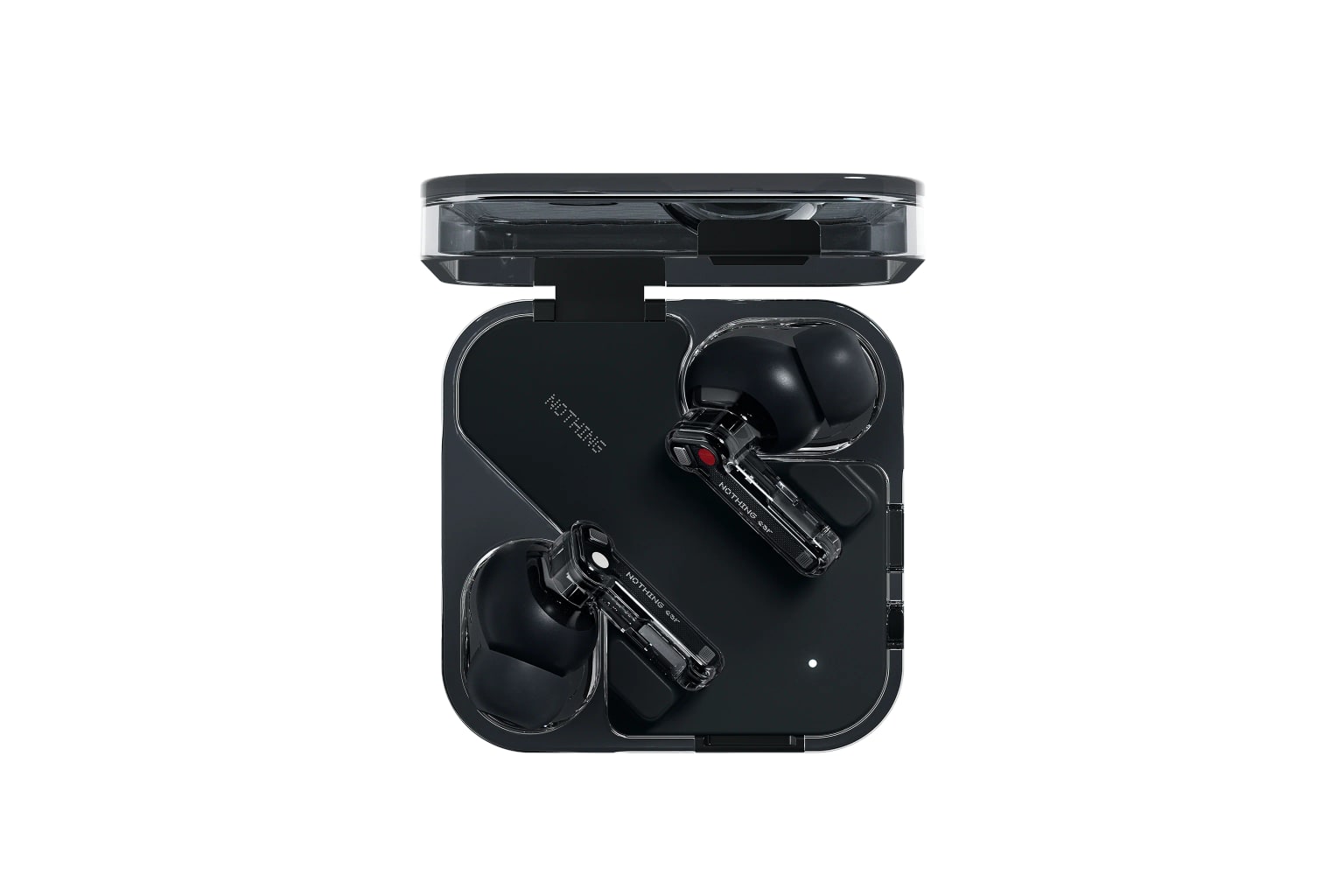
PCMag describes a transparent lid over two charging cradles, a small indicator in one corner and the Nothing logo in another. A button on the right side puts docked earbuds into pairing mode in the reviewed arrangement, and a nearby USB-C port provides the cable connection.
Having the button and port on the same side gives you a recognizable area to find. Consider whether side access suits the place where you normally leave the case. A cable approaching from the side occupies space differently from a rear connection. That is a storage consideration, not a statement about charging speed.
The transparent lid makes the interior arrangement visible. What matters for daily use is whether you can lift the buds, orient them correctly and return them comfortably. Try that sequence if you can, rather than judging the case only as a closed object.
Compare that side access with Sony's rear button and port or the recessed rear port on Beats Fit Pro. A case left along the back of a desk may offer different clearance at its side than behind it. Identify where your cable would approach and whether you can reach the button without moving other items. This small layout choice can matter more to your storage routine than the transparent finish.
The case should make putting the buds away uncomplicated. If you like the look but find the lift-and-return sequence awkward, that practical reaction deserves more weight than the styling.
Compare the grip before the feature list
AirPods Pro 2 USB-C are a useful comparison for four tip sizes, stem swipes and a favorably described docking sequence. Samsung Galaxy Buds3 Pro pairs pinch playback with a volume swipe, with a separate reported case contact-care caveat.
Beats Fit Pro offers a physical button and fixed fins if you want a different kind of support. Bose's reviewed touch area can be activated during adjustments, while Sony's grip reports disagree and its reviewed volume command uses four taps. Each alternative changes the action your hand performs.
Choose Nothing Ear (2024) when the pinch feels natural and the tip fit is settled. The side-by-side case access is an additional convenience if it suits your storage space. If depth or insertion remains distracting, choose another shape rather than treating a positive reviewer's fit as a reason to ignore your own.
Nothing Ear (2024)
Nothing
People who prefer a stem pinch and identifiable side access on the case.
Nothing Ear (2024) is worth considering if you like a stem you can pinch and a case whose button and cable connection are together on one side. PCMag describes the default pinch layout as sensible and reports a comfortable, secure fit with the supplied silicone tips. Those are useful reasons to put it on a shortlist.
Reasons to choose it
- Pinch controls have a clear physical action
- Three supplied silicone tip sizes
- Side button and nearby cable port are easy to identify
Tradeoffs to know
- Fit reports differ about tip depth
- Reviewed default controls are symmetrical
- A comfortable reviewer fit does not predict yours
Think twice if: You already need a deeper tip fit that this particular shape does not provide.
Published specifications
- Model
- Nothing Ear (2024)
Further reading
Ratings
Editorial score 8.4
Fit and handling8
Three supplied tips and positive reviewer fit are tempered by conflicting personal depth preferences.
Case and storage8
The side pairing button and nearby USB-C port keep the case’s main access points together.
Everyday controls9
Pinch controls give playback a deliberate gesture, while track changes require counting two or three pinches.
Sources & further reading
pcmag.com review
Keep reading
Something changed? Help us keep this useful.
Send a correction →