MSI PRO MP165 E6 Review (2026): The Cheap Portable Monitor That Needs the Right Expectations
A close look at MSI’s under-$100 portable monitor: the 1080p panel tradeoff, external-power reality, tripod mount, USB-C and HDMI checks, weak color evidence, and exact Amazon-new caveats.
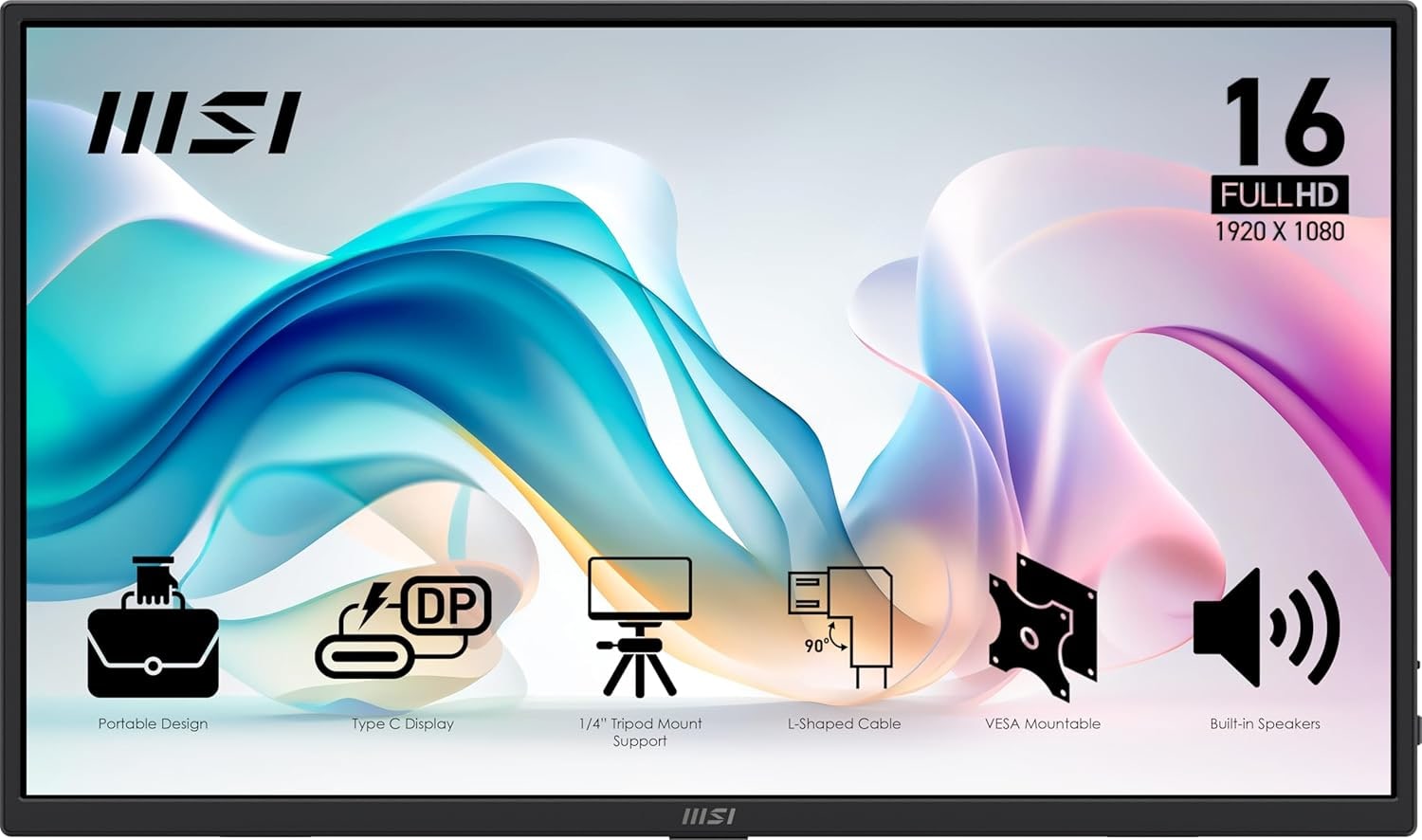
MSI PRO MP165 E6 is the budget portable monitor to consider when price matters most: useful USB-C/HDMI flexibility, kickstand, sleeve, and mounting options, but a basic 1080p 60 Hz panel and power checks you should understand before buying.
MSRP
$94.99
Amazon
$69.99
at writing · 2026-05-17
Buyer fit
Best if the goal is a very cheap brand-name portable monitor with USB-C, HDMI, a sleeve, kickstand, tripod/VESA-style mounting, and acceptable office/media quality.
MSRP
$94.99
Amazon
$69.99
at writing · 2026-05-17
Score breakdown
How this product scored
Same rubric, but focused on one product so the reasons behind the score stay readable.
Display readability
MSI PRO MP165 E6 scores 5/10 for display readability because the panel is usable indoors, but resolution, brightness, or color evidence keeps it behind the sharper and premium picks.
Setup and power reliability
MSI PRO MP165 E6 scores 6/10 for setup and power reliability because USB-C and HDMI paths are useful, but host Alt Mode, external power, and pass-through details still matter.
Stand and portability
MSI PRO MP165 E6 scores 7/10 for stand and portability because the built-in stand and travel sizing are useful, with some limits around portrait, rigidity, or mount verification.
Device and use-case fit
MSI PRO MP165 E6 scores 7/10 for device and use-case fit because it has a clear buyer lane, but that lane is narrower than the overall winner.
Color and motion fit
MSI PRO MP165 E6 scores 5/10 for color and motion fit because media/color use is acceptable for the lane, not the reason to buy it.
Reliability and support
MSI PRO MP165 E6 scores 7/10 for reliability and support because current new-listing evidence exists, but long-term exact-model owner/QC evidence remains thin.
Evidence confidence
MSI PRO MP165 E6 scores 7/10 for evidence confidence because the dossier, product-set, source reservoir, and current Amazon snapshot are enough for ranking with stated caveats.
Quick Verdict
The MSI PRO MP165 E6 is the portable monitor to consider when the fear is not buying the wrong premium screen — it is spending twice as much as you needed for a spare 15.6-inch display. In our full portable monitors ranking, it lands as the under-$100 basic pick because it gives students, travelers, handheld gamers, and backup-desk users a recognizable-brand 1080p screen with USB-C, HDMI, a kickstand, speakers, a sleeve, tripod support, and mounting points.
That value is real, but it only works if you walk in with the right expectations. CNET’s review says the MP165 E6 “doesn't offer much in the way of features,” then immediately adds that it is “not as frill-free as you'd think” for well under $100. That is the whole story: useful hardware bundle, basic panel.
At the Amazon snapshot, the exact MSI PRO MP165 E6 ASIN B0FV4S4YV9 was new, in stock, sold and shipped by Amazon.com at $69.99. Recheck the current price, seller, condition, return window, and port details before buying. If the price stays close to that, the compromises are easier to accept. If it creeps toward sharper or faster competitors, the case gets weaker quickly.
Score Breakdown
- Display readability: 5/10. The 15.6-inch 1080p IPS-class panel is fine for email, notes, chat windows, spreadsheets, video, and a temporary second screen, but it is not the crisp 2.5K/4K lane.
- Setup and power reliability: 6/10. USB-C video and HDMI make it flexible, but external power and host compatibility still matter. Do not assume every USB-C port will carry video.
- Stand and portability: 7/10. The built-in kickstand, sleeve, right-angle cables, tripod support, and VESA-style mounting story are stronger than the price suggests.
- Device and use-case fit: 7/10. It fits a narrow job well: cheap extra screen space for laptops, handhelds, phones with desktop mode, and consoles when you bring the right cables and power.
- Color and motion fit: 5/10. This is a 60 Hz budget screen with weak color evidence. Buy it for utility, not creator color, OLED contrast, HDR, or high-refresh gaming.
- Reliability and support: 7/10. The Amazon-new snapshot, Amazon seller/shipper status, return window, product support signal, and manufacturer-warranty detail help; exact-model long-term owner evidence is still thin.
- Evidence confidence: 7/10. Confidence is good enough for a ranked budget pick because the packet combines CNET, Amazon listing/review rows, YouTube hands-on notes, and the parent dossier, with the unresolved caveats stated plainly.
What Feels Great Right Away
The nicest surprise is that the MSI does not feel like a bare panel with a mystery cable in the box. The Amazon listing describes a 15.6-inch Full HD IPS portable monitor for laptops, MacBooks, PCs, phones, Switch, PS5, and Xbox, and the hands-on transcript backs up the broad-device idea with USB-C video, HDMI, Samsung DeX, handhelds, and battery-bank use.
The accessory story is also better than a lot of cheap-screen listings. ETA Prime’s unboxing notes a full-size HDMI cable with a 90-degree end, a USB-C video cable, and a USB-A-to-C power cable. That right-angle detail sounds tiny until the monitor is sitting beside a laptop and a straight plug is sticking out into your mouse space or travel-desk clutter.
Owners in the packet liked the same low-drama setup. One verified Amazon reviewer called it a “Perfect Extra Screen for Traveling and at Home” and said setup was “just plug in the USB-C and you’re ready.” That will not be true for every device — USB-C Alt Mode still matters — but it explains why this kind of cheap second screen is tempting when the setup works.
Setup, Power, and Cable Checks
This is the section to read before checkout. The MSI can be simple, but only when the device and cable path are right. It has two USB-C ports, HDMI, a 3.5 mm jack, OSD controls, and a power button. In the hands-on transcript, one USB-C port is used for video, one for power, and HDMI is available for devices that do not send video over USB-C.
The important catch: it has no internal battery. ETA Prime says, “this one here needs to be externally powered,” though it can sometimes pull power from the connected device. That means a handheld, phone, or laptop may run the monitor from its own battery in a pinch, but the safer travel plan is a wall charger or battery bank. If you are using a Switch-style or console HDMI setup, treat separate power as required.
Pass-through charging is promising but unresolved. The transcript measured the monitor “passing through up to 56 watts” to an ROG Ally X from a 65 W charger, while also saying MSI’s site stated 15 W. That conflict is exactly why the review does not promise high-watt charging. Test your own charger, cable, and device while returns are easy.
Stand, Mounting, and Travel Reality
The MSI earns more trust physically than most $70-ish portable monitors because it gives you several ways to place it. CNET liked that it has “a built-in kickstand rather than a flimsy foldable cover,” and the YouTube transcript shows the same idea in daily use: you can set it up on the desk with the kickstand, then use the rear mounting points when you want something steadier or taller.
The tripod mount is the standout detail. The Amazon listing describes a built-in 1/4-inch tripod mount, and the hands-on reviewer says the rear mounting points were “one of the big reasons I wanted to get my hands on this.” That matters if you want a small screen next to a camera, mini PC, handheld, treadmill desk, temporary workstation, or cramped desk where a folio stand eats too much room.
For travel, keep it reasonable. The slim body, sleeve, and light weight make it backpack-friendly, but this is still a budget plastic portable monitor. The kickstand is useful; it is not a premium articulated stand. Pack the sleeve, protect the panel, and bring the right power path.
Screen, Color, and Audio Caveats
The MP165 E6 screen is the reason to keep expectations low. A 15.6-inch 1080p panel is workable for basic laptop expansion, but text will not look as crisp as it does on the Arzopa Z1RC’s 2.5K panel or the ViewSonic OLED’s premium screen. If you are buying a portable monitor to make long writing, coding, or spreadsheet days feel polished, the MSI is the cheap lane, not the comfort upgrade.
Color is the bigger caveat. CNET says the “biggest corner it cuts is the cheap panel,” with about 64% sRGB coverage, and calls that “really low.” That does not ruin the MSI for Slack, Gmail, notes, a reference browser, a YouTube window, or a handheld menu screen. It does mean photos, design work, brand colors, and games with rich color will look less convincing than they should.
Brightness and audio land in the same practical zone. CNET lists strong anti-glare and decently bright as pros, but there is no trusted lab brightness value in this packet. The rear-facing speakers and headphone jack are convenient; they are not a reason to choose this over better headphones or a laptop with decent speakers.
How It Compares
The MSI PRO MP165 E6 is not trying to beat the top picks on screen quality. It is trying to make the price low enough that the compromises feel acceptable.
- Arzopa Z1RC: Buy the Z1RC if your main work is reading, writing, coding, spreadsheets, or long laptop sessions. It is sharper, taller, and our best overall pick. Choose the MSI only if the lower price matters more than text comfort.
- ViewSonic VX1655-4K-OLED: Buy ViewSonic when the display is the whole point: OLED, 4K, contrast, and color impact. The MSI is the opposite lane — basic, cheap, and useful.
- Lenovo ThinkVision M14t Gen 2: Buy Lenovo if touch, pen input, and business-travel polish are worth paying for. The MSI has no touch or premium travel feel.
- ASUS ZenScreen MB229CF: Buy ASUS if you need a moveable temporary office display. It is much larger and stand-focused, not a backpack spare.
- Arzopa Z1FC: Buy the Z1FC if you want cheap high-refresh gaming. The MSI’s 60 Hz panel is for basic utility.
Who Should Buy the MSI PRO MP165 E6
Buy the MSI if you need an inexpensive second screen for a student desk, travel bag, spare work setup, handheld gaming bench, Samsung DeX-style phone setup, console HDMI use, or a laptop that only needs extra room for secondary windows. It makes the most sense when you already know 1080p and 60 Hz are enough.
It is also a good fit if mounting flexibility matters more than panel quality. The kickstand, sleeve, tripod support, mounting points, speakers, USB-C, and HDMI give you more ways to use it than the price suggests. One Amazon owner who used it with an iPhone for videos while working said it was “obviously not replacing” a 32-inch 4K OLED main monitor — that is the right mindset. It is an auxiliary screen.
Skip it if you are sensitive to soft text, washed-out color, low refresh rates, plastic build, or setup checks. Also skip it for touch, pen, HDR, high-refresh gaming, creator work, or a single-cable guarantee across random USB-C devices. Before buying, confirm the exact MSI PRO MP165 E6 ASIN B0FV4S4YV9, current new price, seller, return window, and whether your device can send video over USB-C or needs HDMI plus power.
Bottom Line
Buy the MSI PRO MP165 E6 if: you want the cheapest credible brand-name portable monitor in this set, and you are happy with a basic 15.6-inch 1080p, 60 Hz screen as long as it has USB-C, HDMI, a kickstand, sleeve, tripod support, and useful accessory coverage.
Skip it if: you want crisp 2.5K/4K text, OLED contrast, reliable creator color, touch or pen input, high-refresh gaming, premium materials, verified high-watt pass-through charging, or a setup that never asks you to think about USB-C Alt Mode and external power.
Bottom line: the MSI PRO MP165 E6 is a smart cheap pick only when the current new price stays close to the captured $69.99. It is not special as a screen. It is useful because the price, ports, kickstand, sleeve, and mounting options make its basic panel easier to forgive. If the price changes, compare it against the rest of our portable monitors ranking before buying.
Feature breakdown
Full feature list
Grouped feature details are expandable so buyers can go deep when they want, without turning the whole review into a spec landfill.
Full feature list
4 features
+
Full feature list
4 features
Buyer Lane
basic under-$100 second screen
Commerce Snapshot
[object Object]
Source Signal Count
42
Source Family Posture
[object Object]
Tell us what this page missed
These pages get better when real buyer complaints make it back into the scoring model. If something important is underweighted, say it.
Rate this review
Give it a score from 1-10 and tell us what to improve.
0/4000 characters