
The recommendation
Choose the Garmin Dash Cam Mini 2 for a tiny body and simple basic controls when you are happy to use your phone for settings and viewing. Choose a camera with a screen if local playback is part of your routine.
Grades at a glance
| Product | Overall | Controls and menu navigation | Finding and saving a recorded clip | Physical handling and routine access |
|---|---|---|---|---|
| Garmin Dash Cam Mini 2 | 7.3 | 7.0 | 7.0 | 8.0 |
Does it fit your life?
Who the Mini 2 suits
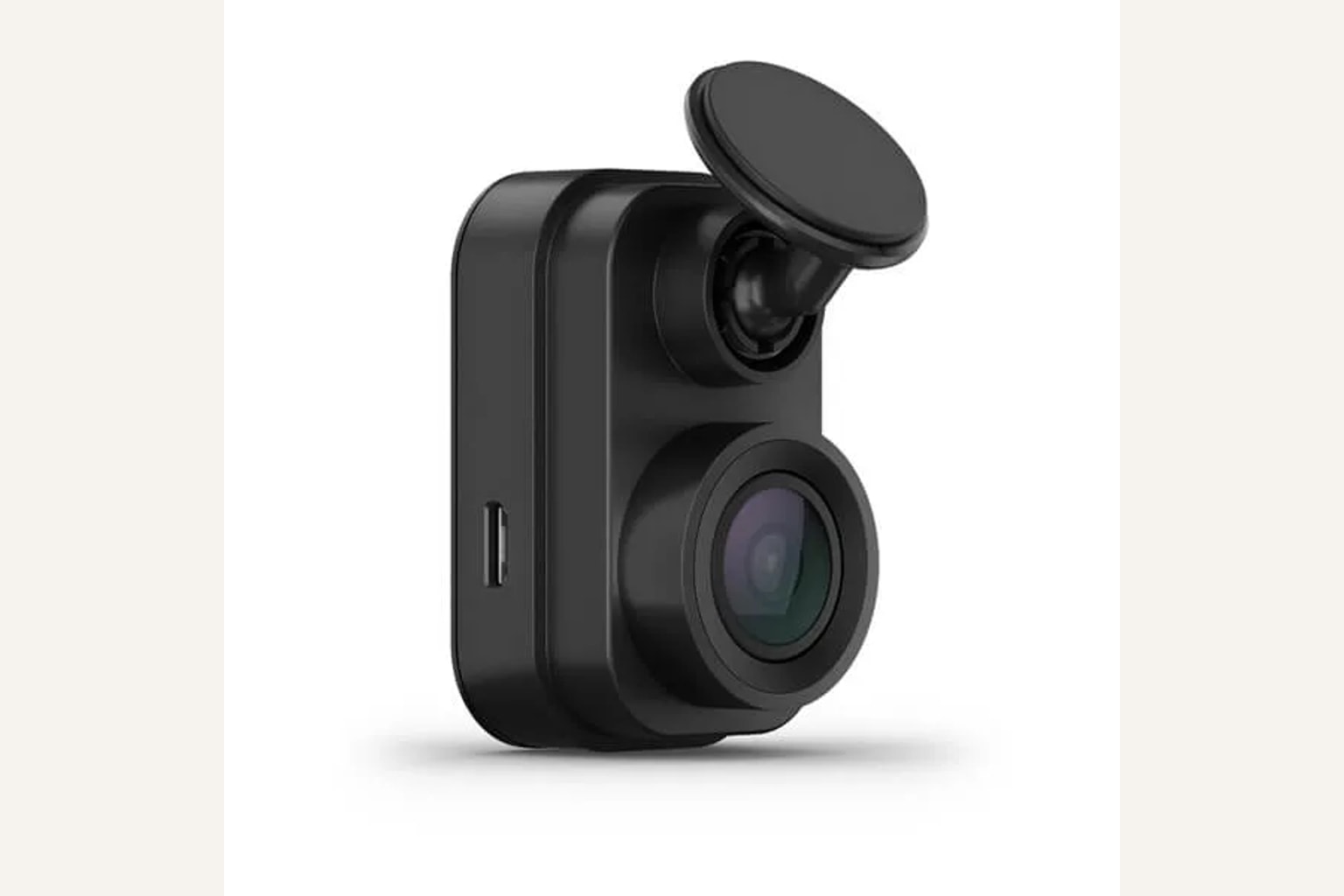
The Garmin Dash Cam Mini 2 is worth choosing when you want a very small camera and are happy to use your phone to view recordings. That is the purchase in one sentence. Its tiny body and small adhesive mount are appealing precisely because a larger display has been left out. Before putting it on your shortlist, be sure the phone is a device you want involved whenever a recording needs a closer look.
That arrangement can suit someone who makes settings changes occasionally, then largely leaves the camera alone. It is a less comfortable fit for someone who wants to stand beside the parked car and browse files directly on the camera. Think through that occasional task as carefully as the camera's everyday presence. The day you want a recording is also the day the missing display will matter. A small body saves physical space, while the phone supplies the viewing interface.
Our overall everyday-use score is 7.3/10. Physical handling earns 8/10; controls and recorded-clip access each earn 7/10. The result reflects a useful compact design with a more limited camera-side interface. The review concerns the Mini 2 and the configurations described in the linked walkthroughs. If compactness is your main concern, it has a clear case. If you want compactness plus local menus, compare VIOFO A119 Mini 2 before deciding that a screenless camera is the right answer.
Basic actions remain on the camera
The primary walkthrough describes basic mute and save controls on the Mini 2. Those direct actions give the small body a useful role even though settings and file viewing live in the app. A buyer who mainly wants a few ordinary controls on the camera may find that division quite agreeable. There is no local screen to navigate when you want the richer interface; for that, you reach for the phone.
Learn the mute and save actions from the controls and instructions for the unit you have. The review's spoken explanation is not precise enough to supply a button-location guide or establish that the same button performs both actions. That distinction matters because an appealingly simple body can still require you to learn what each control does. We recommend the availability of those basic functions, without turning a casual walkthrough into an exact operating sequence.
Controls score 7/10. The direct actions are useful, while the app adds another device for settings and viewing. Consider how often you expect to make changes while parked. If that is rare and a phone interface is familiar, the split may feel natural. If you prefer to inspect a menu on the device itself, VIOFO A119 Mini 2 offers a compact alternative with a small display and physical controls. The Garmin is strongest when you positively prefer minimal hardware, rather than merely hoping the lack of a screen will never inconvenience you.
The app experience deserves as much attention as the size
Using the Mini 2's app is part of using the camera. In the primary review, it provides settings and file viewing, supplying the screen the body lacks. That is an efficient division of hardware for someone who already wants to do those tasks on a phone. It is also a commitment: a quick look at a recording still involves another device, even if you have no intention of downloading or sharing the file.
There is a reason to temper expectations about that session. John Reviews Everything too describes the app as less than speedy in his Mini 2 review. His report does not establish how every phone or later app version behaves, but it adds a useful practical caution to the attractive small-camera idea. Choose the design because the phone is where you want to work, with some tolerance for the connection and browsing process. Avoid treating compact hardware as a promise of instant interaction.
The available accounts describe earlier configurations. They are most useful for understanding the division of tasks: direct basic actions on the body, settings and viewing in the app. Before deciding, picture a short settings visit and a longer clip-review session. If both belong naturally on your phone, the Garmin's design is coherent. If you want the camera to provide a second screen for either job, a model with local menus or playback will suit that preference more closely.
Viewing a recording means reaching for the app
Recorded-clip access scores 7/10. The reviewer explicitly describes viewing files in the phone app and explains that the camera cannot play them on its own because it has no screen. That establishes the basic viewing route. It gives less detail about finding a particular clip and completing an export, so the score remains moderate. A description of file viewing is useful, but it is not the same as a fully demonstrated sequence for every sharing destination.
For a buyer, the practical implication is to decide whether you want the phone to be the place where the recording becomes useful. If you do, there is a straightforward logic to a small camera paired with a larger phone screen. If you sometimes need to inspect a recording without that phone, the Mini 2 cannot supply camera-side playback as an alternative. That limit matters independently of how often you expect to need a clip.
Compare the A229 Pro when you want more access choices. Its reviewed overview demonstrates a local file list and describes app, USB and removable-card routes. Those alternatives give it a different retrieval proposition from the Mini 2. They do not establish faster transfers, but they may suit someone who likes to choose between a phone and a computer. Garmin is more focused: select it because you accept the phone-centered viewing routine, rather than assuming all Wi-Fi-equipped cameras have interchangeable file access.
Where the tiny body earns its advantage
Physical handling scores 8/10. The review places the Mini 2's tiny body and small adhesive mount at the center of its appeal. That is a concrete advantage for a buyer who dislikes a large camera housing. It also helps explain why someone might willingly give up the display found on other models. The Mini 2's design gives priority to the object you leave in place, with viewing shifted to the phone when needed.
Size should still be considered together with access. A small camera may be agreeable to have in the vehicle yet require you to be more deliberate about reaching its controls or connection. Before settling on it, think about the parked occasions when you will handle the body, inspect the connector or reach the card. The useful comparison is with the complete experience you want, not simply which camera looks smallest in a photograph.
The reviewer's account of using the camera in work vehicles belongs to that reviewer. It should not become a claim that every buyer can move the same mount arrangement easily between vehicles. The adhesive mounting approach and any separately obtained accessory are distinct decisions. If your aim is a compact camera that generally stays in one place, the Mini 2 has a clear rationale. If frequent removal is the priority, compare the specific release mechanisms on alternatives rather than choosing on body size alone.
Micro-USB is a small but recurring detail
The reviewed Mini 2 uses micro-USB, and the reviewer expresses disappointment with that choice. A connector is an ordinary detail that can matter more over time than its place on a specification sheet suggests. If your other small devices use a different connector, this camera asks you to keep track of another cable type. If you already have an appropriate cable routine, the same point may be a minor inconvenience.
The account also distinguishes the included cable arrangements from accessories the reviewer acquired separately. Treat that distinction carefully when you compare packages. A cable or mount appearing in a review does not establish that every offer includes it. Check the actual package you are considering, with particular attention to the connection you will use for ordinary handling. Compare the supplied pieces with the accessories you actually expect to handle.
The VIOFO A119 Mini 2 offers a useful contrast because its review describes USB-C connections on the body and mount, with a distinction between their roles. That may suit a buyer who prefers that connector, but it introduces its own detail to learn. Neither design should be selected from the connector name alone. For Garmin, the more decisive issue remains the small body and phone interface; micro-USB is an additional practical compromise to accept alongside them.
Do not assume the reviewer's accessory is in the box
The primary account discusses a separately obtained suction-mount arrangement as well as the small adhesive mounts. It also reports uncertainty around that accessory's compatibility. This makes the suction option a poor basis for a general promise about fit or included equipment. The small adhesive mounting approach is the clearer starting point for understanding the reviewed camera's physical routine.
If an alternative mount is important to your decision, establish what the particular package and accessory actually are. An appealing demonstration can make an accessory look like an ordinary part of the product, especially when the camera body is the same. Yet a separate purchase can change the handling experience without changing the model name on the camera. Keeping those decisions distinct avoids choosing a device for a routine that its standard package does not establish.
Nextbase 622GW is worth comparing if taking the body down is a central priority. Its walkthrough specifically demonstrates magnetic separation that the reviewer finds convenient for cleaning the windshield. That is a different proposition from selecting a tiny Garmin and then assuming a separate mount will make frequent moves simple. For the Mini 2, choose the compact body on its own merits and treat any alternate mount as a specific accessory decision. A small camera and an easy-release camera can be appealing for different reasons.
The alternatives that change the decision
The closest conceptual alternative is VIOFO A119 Mini 2. It keeps a compact main unit while retaining a small display and physical menu controls. Its app is an alternative route for settings and recordings, rather than the only place to obtain a viewing screen. If the Garmin's phone dependence makes you hesitate, the VIOFO deserves consideration before you move to a much larger camera. Its display is still small, so the choice is about local access rather than a spacious interface.
Nextbase 622GW goes further toward visible interaction. Its large touchscreen, important and normal recording folders, and magnetic release make it a stronger fit for someone who wants to browse and handle the camera itself. The reviewed settings and playback routine requires recording to be stopped, and the app's previews depended on a dual-file option. These are tradeoffs to consider, but they are different from having no camera-side playback at all.
VIOFO A229 Pro belongs on the list if your concern is flexibility once a recording needs to leave the camera. Its described computer and phone routes offer more alternatives, with a larger body and the reviewed kit's extra connections as the physical cost. Garmin's case stays simple: choose it when the tiny object matters most and you are content to use the phone. Choose one of the others when the interface or retrieval options matter more.
The buying decision
Buy the Garmin Dash Cam Mini 2 if a tiny body is your leading priority and you willingly accept a phone for settings and recording review. The small adhesive-mount arrangement and basic mute/save functions support that choice. Keep micro-USB in mind as an additional handling detail, especially if you prefer all the small devices you carry to use the same cable type. It is a manageable preference question, but one worth settling before you buy.
Choose something else if camera-side playback is a requirement. That is a firm interface difference, and no amount of appreciation for the Garmin's size supplies the missing screen. The app-slowness report also deserves weight if you have little patience for phone sessions. For frequent removal, examine the particular release mechanism you want rather than assuming a separately purchased suction mount will give the Mini 2 a universal fit or a simple moving routine.
The closest alternatives address distinct concerns. VIOFO A119 Mini 2 keeps local menus in compact hardware; Nextbase 622GW offers a larger touchscreen and convenient magnetic separation; A229 Pro describes several routes for reaching recordings on a phone or computer. Against those choices, Garmin's 7.3/10 everyday-use result is easy to understand. Its compact handling is the advantage, and phone-dependent viewing is the cost. Choose it when you are comfortable with both, including the occasional file task that will draw your attention back to the app.
Garmin Dash Cam Mini 2
Garmin
Buyers who value a tiny body and accept phone-dependent viewing.
A tiny screenless camera with basic mute/save controls and a phone app for settings and viewing.
The takeaway
A focused compact choice if using the phone is a comfortable part of the routine.
Reasons to choose it
- Tiny main body
- Small adhesive mount
- Basic mute and save controls described
Tradeoffs to know
- No camera-side playback screen
- Phone needed for viewing and settings
- Micro-USB connector
Think twice if: You want local playback or prefer to avoid a micro-USB device.
Published specifications
- Connector
- Micro-USB in the reviewed unit
- Local display
- None
- Viewing route
- Phone app
Further reading
Ratings
Editorial score 7.3
Controls and menu navigation7
Basic mute/save controls are available, while settings depend on the phone app.
Finding and saving a recorded clip7
The app provides file viewing; camera-side playback is absent and complete export detail is limited.
Physical handling and routine access8
The tiny body and small adhesive mounting arrangement help, with micro-USB and separate accessory choices to consider.
Sources & further reading
youtube.com review
youtube.com review
youtube.com review
youtube.com review
youtube.com review
youtube.com review
youtube.com review
youtube.com review
Keep reading
Something changed? Help us keep this useful.
Send a correction →