
The recommendation
Canopy offers accessible removable parts and local fan, light and sound selection. An incentivized Jade 2.0 report praises filling, while another reports crowded buttons. There is no app or numeric target selection.
Grades at a glance
| Product | Overall | Filling and handling | Controls | Routine care access |
|---|---|---|---|---|
| Canopy Bedside Humidifier 2.0 | 8.3 | 9.0 | 7.0 | 9.0 |
Does it fit your life?
Start with the tasks you repeat
Who it suits · Filling · Controls · Care access · Alternatives · Product details
Canopy offers accessible removable parts and local fan, light and sound selection. An incentivized Jade 2.0 report praises filling, while another reports crowded buttons. There is no app or numeric target selection. Canopy incentivized reports.
Choose it if: You want approachable filling and removable-parts care, and prefer local controls to a phone.
Look elsewhere if: You need a numeric target, app access, or generous spacing between adjacent controls. Canopy 2.0 demonstration.
Who should choose the Canopy 2.0
Choose the Canopy Bedside Humidifier 2.0 if the recurring chore that puts you off humidifiers is dealing with their parts. Filling, accessing removable pieces and changing a filter are the most persuasive reasons to consider it. The attraction is a routine you can understand, rather than a long list of settings you may never touch. Its local light and sound features are additional conveniences if you actually want them in the same appliance. Canopy incentivized reports.
There is a clear limit to that recommendation. The second-generation demonstration has no app and no numeric humidity target to select. A person who wants to change a setting from a phone will have a different daily experience from someone happy to reach over and select a fan level. The Canopy makes more sense for the second person. Buying it for remote control and hoping that the extra bedside features compensate would miss the central tradeoff. Canopy 2.0 demonstration.
Pay particular attention to the button layout if closely spaced controls frustrate you. An incentivized Jade 2.0 report describes neighboring selections activating when the writer tries to press one button. That specific complaint makes the spacing worth checking before buying, especially if you expect to make quick adjustments without looking closely.
Filling and returning the tank
An incentivized report for the Jade Bedside Humidifier 2.0 describes filling as easy. That makes Canopy worth a look if refilling is the chore you want to improve. For your own space, the useful next step is to picture the trip between the tank and the sink, including where you will put the pieces down. Canopy incentivized reports.
Consider where Canopy would sit relative to your sink. A clear place to put removable pieces and a comfortable carrying route can matter as much as the opening itself. If your previous humidifier was awkward because you had nowhere to set its parts, compare that part of the routine before buying another appliance for the same spot. Canopy 2.0 demonstration.
The same incentivized Jade 2.0 account praises easy filter changes. This is a useful advantage if you are comfortable obtaining replacements and want the physical change to be straightforward. Keep the purchase and handling tasks separate: an accessible filter can still be an extra item on your shopping list.
Fan choices, light and sound
The 2.0 demonstration shows automatic and manual fan selection alongside light and white-noise choices. These extras are useful if you want to combine bedside functions in one appliance. If you already have a light and sound device you like, give more weight to the fan controls and care layout than to functions you may leave unused. Canopy 2.0 demonstration.
Canopy uses local touch selections, and the 2.0 demonstration describes no app or numeric humidity target selection. It suits someone happy to reach the appliance for a change. If you want to make adjustments from across the room, the light and sound extras will not fill that gap. Canopy incentivized reports.
One incentivized Jade 2.0 report likes the light, while another describes the buttons as small and close together. Those reactions capture the tradeoff: more bedside functions can be welcome, but you still need to reach the intended control comfortably. Buyers who prefer generous spacing should inspect the cluster closely.
Removable parts and the filter chore
The second-generation demonstration and an incentivized Jade 2.0 report both describe convenient access for care, including dishwasher use for removable parts. Check the supplied instructions for which parts and conditions apply. The practical attraction is being able to separate the pieces and reach them comfortably, with filter replacement still part of the routine. Canopy incentivized reports.
Filter changes remain part of the routine. The incentivized Jade 2.0 account describes the change as easy and likes automatic delivery. If you tend to forget recurring supplies, consider how you would obtain replacements; if you prefer buying them as needed, judge the physical access separately from any delivery service.
Canopy is most appealing when you are comfortable with a replaceable filter but dislike working around multiple small internal pieces. Picture the whole job, including putting the main pieces back and keeping replacements available. A routine with distinct, manageable steps may suit you better than a design that looks simpler from the outside.
Three alternatives to weigh
Compared with Carepod One
Canopy and Carepod One both deserve attention when access for care is the deciding factor. Canopy's accounts pair removable-parts care with recurring filter changes; Carepod's contrasting reports agree on an accessible steel bowl and few main pieces. The choice is therefore not simply which one attracts more praise. It is whether you prefer a filter-based routine with additional local bedside functions or a bowl-centered routine with basic mist and timer selection. Carepod's reported bright indicators and Canopy's adjacent-button complaint qualify the control experience in different ways. Canopy incentivized reports · Carepod One purchase account.
Compared with LEVOIT LV600S
Choose between Canopy and the LV600S by deciding how you want to reach the controls. Canopy's demonstrated local fan, light and sound selections come without an app or numeric target selection. The LV600S demonstration shows local controls and VeSync access, with display darkening. The LV600S also provides a top opening and folding handle, but its care assembly includes several removable pieces. Canopy's appeal is the reported accessible parts routine; LEVOIT's is the combination of filling choices and remote selection. Neither advantage eliminates the other's particular chores. LV600S hands-on demonstration.
Compared with Honeywell HCM350B
Canopy and the HCM350B both involve a filter or wick routine, but their control and filling tradeoffs differ. An incentivized Jade Canopy 2.0 account describes easy filling, while the HCM350-family demonstration shows a screw-cap tank and inversion. Honeywell's three local fan choices make a short menu; Canopy adds light and sound functions, with a reported crowded button layout. Prefer Honeywell if those extra functions add little for you and the cap-fill sequence suits your sink. Prefer Canopy if its reported filling and removable-parts routine are the stronger attraction. HCM350 walkthrough.
Also consider DREO HM713S
Canopy and DREO prioritize different interfaces. The Canopy 2.0 demonstration shows local fan, light and sound choices without an app or numeric target selection. DREO shows local, phone and voice access as well as display darkening. Canopy has favorable care reports, including an incentivized Jade 2.0 account about easy filter changes, while DREO has a tube and several smaller removable pieces. If remote adjustments are a recurring need, start with DREO. If accessible care and local bedside functions matter more, Canopy deserves the closer look, with its reported adjacent-button issue kept in mind. HM713S controls demonstration.
Also consider Vicks V745
Canopy and Vicks show why easy care and filter-free are different considerations. Canopy's accounts describe accessible removable parts, with an incentivized Jade 2.0 report praising easy filter changes. Vicks avoids a wick-change routine but still has a cup, chamber and tray, with its reviewer calling care tedious. Canopy also provides more local bedside functions, though one account finds its neighboring buttons crowded. Vicks has the shorter high/low menu and a reported persistent light. Focus on the chore you find difficult: obtaining a filter and managing several separate pieces are not the same task. Vicks hands-on review.
The three tasks at a glance
| Everyday task | What to expect |
|---|---|
| Filling and handling | An incentivized Jade 2.0 report describes easy filling. |
| Controls | Local fan, light and sound choices; no app or numeric target selection. |
| Routine care access | Accessible removable parts, with recurring filter changes. |
Details to check before buying
The short reports about easy filling, filter changes and crowded buttons concern the Jade Bedside Humidifier 2.0 and are incentivized. Check the offered version's control cluster and removable parts if either is decisive for you. The detailed 2.0 video includes commercial links and codes and discloses a Baby Arc channel sponsorship; it does not establish whether Canopy supplied the humidifier. Canopy incentivized reports.
The useful comparison is the 2.0 layout: local bedside functions, accessible care and a recurring filter. If you need remote selection, or want widely separated controls, make those requirements part of your shortlist before choosing a color or finish.
Make the choice around your routine
Before choosing Canopy, decide whether the local extras are useful additions or functions you already prefer elsewhere. If you already have a light and sound device you like, the care layout must justify the purchase on its own. If combining those selections matters, the 2.0's broader local menu has a more concrete role. In either case, the adjacent-button report is worth weighing because it concerns the very interface you will touch. Canopy incentivized reports.
Your second decision is whether filter replacement fits your habits. The favorable account describes the change as easy, which is different from saying you will never need to remember it. A supply routine you find predictable may be preferable to managing small internal pieces. Another person may prefer a removable bowl specifically to avoid that recurring item. Neither preference needs a sweeping claim about the rest of the category.
The clearest reason to buy is that accessible care and straightforward filling are your recurring priorities, and you can live with the local control limitations. The clearest reason to pass is that you want remote settings or precise separation between small controls. That is a more useful dividing line than treating every bedside feature as equally valuable.
Questions that can settle the choice
Is the Canopy still a good fit if I already have a light and sound machine?
It can be, but the reason to choose it becomes narrower. The accessible care arrangement and favorable filling account would have to matter enough on their own. The demonstrated light and sound choices are useful only when you want to make those selections on this appliance. Keeping a separate device you already like may be more comfortable than changing routines for the sake of combining functions. Decide which buttons you would actually press before treating the extra menu as a benefit. Canopy incentivized reports.
Does easy filter replacement make it the simplest design here?
It makes one recurring job approachable in the individual account. It does not decide whether a filter-based routine suits you better than Carepod's bowl or Honeywell's wick arrangement. If obtaining replacements is easy for you, straightforward filter access may be a strong advantage. If you are specifically trying to avoid another recurring supply, the same design may be less attractive. The useful comparison is the task you accept, rather than a general claim that all care has become simple. Carepod One video review · HCM350 walkthrough.
How should the button complaint affect my decision?
Give it more attention if close controls already frustrate you or you want to make selections without looking closely. The report describes neighboring choices activating, which is a concrete layout concern. It does not establish that every person will have that experience every time. Balance that concern against the functions you intend to use: an interface with more bedside selections is worthwhile only if reaching the intended one is comfortable for you.
Canopy Bedside Humidifier 2.0
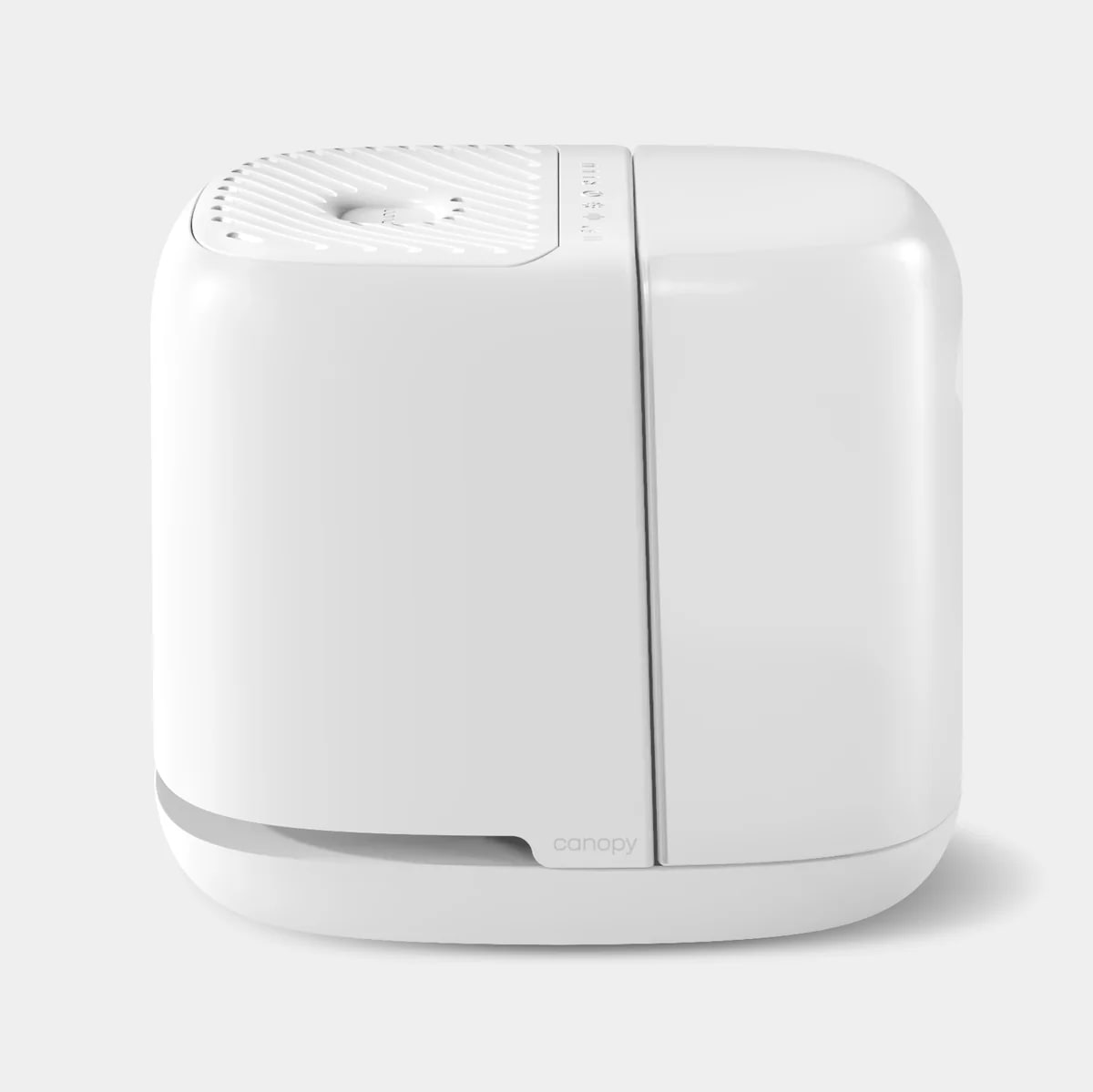
Canopy
You want approachable filling and removable-parts care, and prefer local controls to a phone.
Canopy offers accessible removable parts and local fan, light and sound selection. An incentivized Jade 2.0 report praises filling, while another reports crowded buttons. There is no app or numeric target selection.
Reasons to choose it
- An individual account describes easy filling and easy filter changes.
- Removable-parts care is a recurring positive in the accounts.
- Local fan, light and sound selections offer useful bedside choices.
Tradeoffs to know
- One account describes small, closely spaced buttons that trigger adjacent choices.
- No app or numeric target selection in the demonstrated 2.0 controls.
- Filter handling remains part of the routine.
Think twice if: You need a numeric target, app access, or generous spacing between adjacent controls.
Further reading
Ratings
Editorial score 8.3
Filling and handling9
An incentivized report for the Jade Bedside Humidifier 2.0 describes filling as easy. That makes Canopy worth a look if refilling is the chore you want to improve. For your own space, the useful next step is to picture the trip between the tank and the sink, including where you will put the pieces down.
Controls7
The 2.0 demonstration shows automatic and manual fan selection alongside light and white-noise choices. These extras are useful if you want to combine bedside functions in one appliance. If you already have a light and sound device you like, give more weight to the fan controls and care layout than to functions you may leave unused.
Routine care access9
The second-generation demonstration and an incentivized Jade 2.0 report both describe convenient access for care, including dishwasher use for removable parts. Check the supplied instructions for which parts and conditions apply. The practical attraction is being able to separate the pieces and reach them comfortably, with filter replacement still part of the routine.
Sources & further reading
youtube.com review
youtube.com review
manuals.plus product information
youtube.com review
youtube.com review
youtube.com product information
youtube.com review
youtube.com review
youtube.com review
User reports at api.okendo.io
youtube.com review
User reports at goalstogetglowing.com
Keep reading
Something changed? Help us keep this useful.
Send a correction →