
The recommendation
Worth considering for physical buttons and built-in support fins, with a careful fit check before you commit.
Grades at a glance
| Product | Overall | Fit and handling | Case and storage | Everyday controls |
|---|---|---|---|---|
| Beats Fit Pro (1st Gen) | 7.9 | 7.5 | 7.0 | 9.0 |
Does it fit your life?
Choose the fins as carefully as the tips
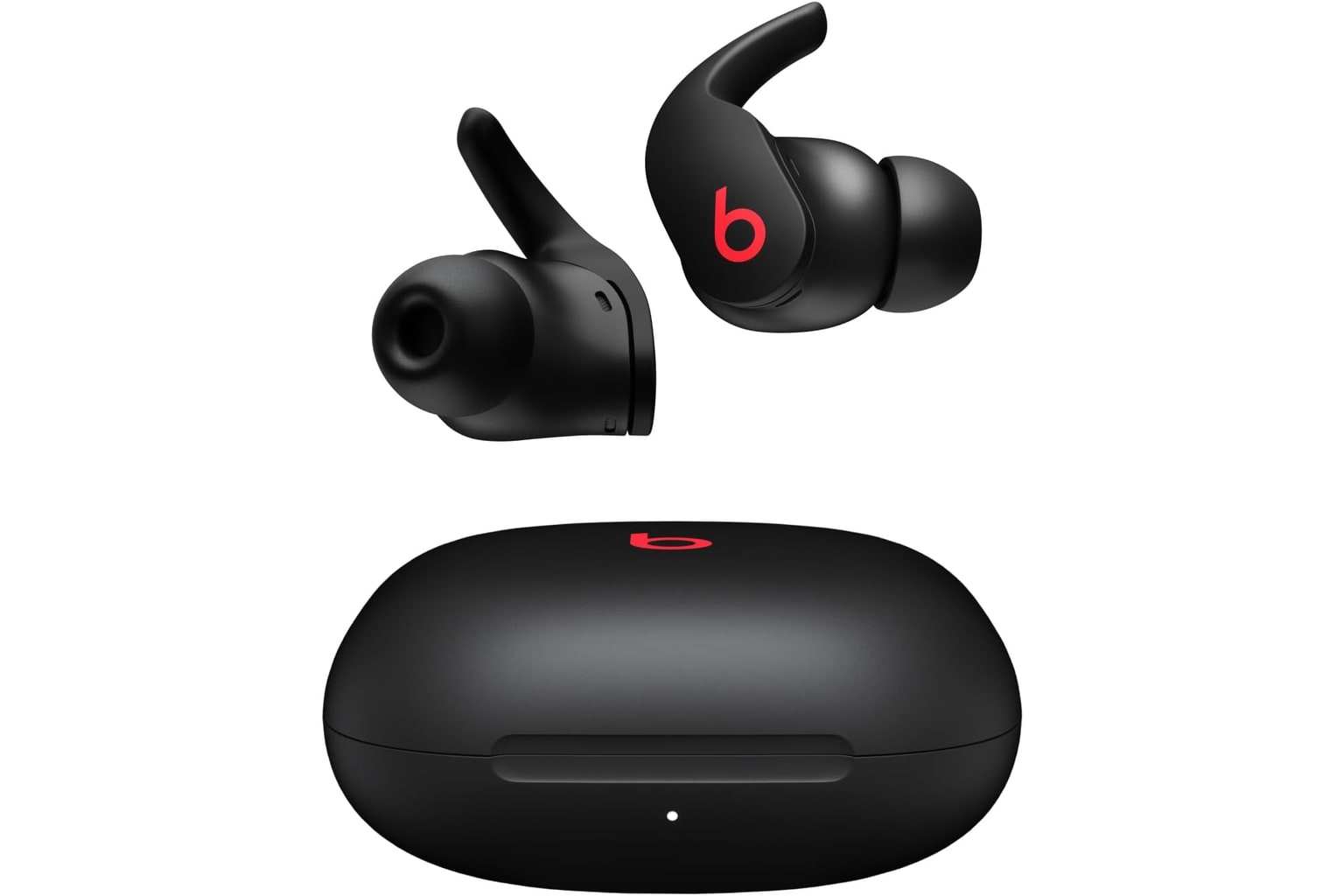
Beats Fit Pro are worth a close look if ordinary earbuds feel insufficiently supported in your ears. Their defining physical feature is an earfin built into each earpiece. PCMag credits those fins with a secure fit, but the same fixed construction limits adjustment. You can change the silicone tip size; you cannot select a different fin size from a set.
That makes the fitting decision more consequential than the name suggests. Personal reports include people who value the support and people who find the wing uncomfortable. One account describes growing accustomed to the wing, while another describes discomfort across the supplied tip sizes. Neither experience predicts yours. Do not buy on the assumption that you should simply get used to a shape that bothers you.
The other clear attraction is the button. PCMag describes the controls as easy to operate without disturbing the fit. For someone who dislikes brushing a touch panel while adjusting an earbud, a distinct physical press is a meaningful design difference. The recommendation is strongest when both the fin and the button feel natural in your own hands and ears.
Support that is not independently adjustable
The supplied tip set described by PCMag contains small, medium and large pairs. The fins, by contrast, are part of the actual earpieces. Separate the two sensations during fitting: how the tip sits in the ear canal and where the fin touches the outer ear. Changing a tip may alter the overall position, but it does not provide a softer, smaller or differently shaped fin.
A secure feeling is only one part of a useful fit. Notice whether the fin stays unobtrusive when you talk or move your jaw, whether the housing feels natural and whether you keep wanting to reposition it. A shape that stays put but demands attention can still be tiring to live with.
The most useful disagreement concerns that extra point of contact. One person describes the wing becoming comfortable with familiarity; another says all the supplied tip sizes became uncomfortable after a while. That makes a brief, secure first impression insufficient on its own. Use any available trial or return period to decide whether you still like the fin after the novelty wears off, without assuming that irritation must resolve.
If you already know that support wings suit your ears, these are a more plausible starting point than if every previous winged design has bothered you. Even then, inspect this particular shape. A successful fit with another model does not establish the same result here.
A physical press with a layout choice
PCMag describes buttons on the outer Beats-logo panels. Its reviewed layout uses one press for playback, two for the next track and three for the previous track. The attraction is the distinct press action and the reviewer's observation that operating it did not compromise the in-ear fit.
The same review describes an optional long-press volume assignment, with the left side lowering volume and the right side raising it. That assignment replaces another long-press function. Treat this as a historical description of the reviewed control arrangement, not a guarantee about the settings available on your current device.
That choice matters most if you adjust volume frequently. Assigning the long press to volume gives each side a simple role, but you give up its other assignment. If you mostly play, pause and skip, the ordinary press sequence may be the more important part of the layout. Decide which action you want immediately available before treating customization itself as a benefit.
Try the button while the earbud is properly seated. An action can be easy on a loose earpiece in your hand and less pleasant when it is against your ear. PCMag's positive experience is encouraging, but your preferred pressing force and finger placement still matter. Count the presses you actually use rather than rehearsing a long list of functions you rarely need.
A rounded case and a rear recess
PCMag describes a flip-top lid opening over the two docking positions and a pairing button. A small indicator is on the front, while the USB-C port is recessed into the rear panel. The included cable described in that review is short. These are straightforward physical details, but they affect where the case sits and how you reach around it.
With the port recessed at the back, examine both the connector opening and the room behind your usual storage spot. The short cable described by PCMag could leave less flexibility about where you place the case relative to a cable connection. That is a practical layout check: can you set it down where you want while still reaching the port comfortably?
Case bulk is a separate reservation. A personal report finds it much too large for practical use, while another criticizes the case more generally. Those are personal reactions, not measurements, but they make a pocket check worthwhile. A case you happily leave in a bag can be less appealing in a shallow pocket.
Go through the whole storage sequence if you can: lift the lid, remove a bud, return it and close the case. Make sure the fixed fins do not make the orientation confusing for you. The goal is a routine you can repeat without stopping to study the shape.
Who should keep looking
AirPods Pro 2 USB-C offer four tip sizes and a separate stem instead of an integrated fin. They are the relevant alternative if you want another tip choice and easier-to-identify stem handling, although their fit is also personal. Nothing Ear (2024) is another stem-and-pinch option if your priority is keeping the control action away from a broad outer panel.
Bose and Sony illustrate why button preference matters. Their reviewed touch controls can be triggered during fit adjustments. That does not make touch universally worse; it does make the Beats' distinct press worth considering if that specific annoyance bothers you.
The Fit Pro earns its place through the combination of a fixed fin and a physical button. Either feature alone is an incomplete reason to choose it: a reassuring button does little for a wing that keeps bothering you, and a secure fin does not shrink the case. Buy when all three parts—the fit, press action and carrying arrangement—work together in your routine.
Beats Fit Pro (1st Gen)
Beats
People who want a definite button press and like the feel of an integrated earfin.
Beats Fit Pro are worth a close look if ordinary earbuds feel insufficiently supported in your ears. Their defining physical feature is an earfin built into each earpiece. PCMag credits those fins with a secure fit, but the same fixed construction limits adjustment. You can change the silicone tip size; you cannot select a different fin size from a set.
Reasons to choose it
- Physical buttons offer a distinct action
- Built-in fins add a stabilizing contact point
- Case has an identifiable rear cable port
Tradeoffs to know
- The fins cannot be swapped for another size
- Reports disagree about wing comfort
- Rounded case may feel bulky in a pocket
Think twice if: You need interchangeable fin sizes or dislike pressure from a fixed support wing.
Published specifications
- Model
- Beats Fit Pro (1st Gen)
Further reading
Ratings
Editorial score 7.9
Fit and handling7.5
The integrated fin supports positioning but cannot be independently resized, and comfort reports conflict.
Case and storage7
The rear recessed port is identifiable, while the short cable and reported bulk temper case convenience.
Everyday controls9
A distinct physical button is positively described; the historical long-press assignment involves a choice.
Sources & further reading
pcmag.com review
Keep reading
Something changed? Help us keep this useful.
Send a correction →