ASUS ZenScreen MB229CF Review (2026): Big Portable Office Screen, Real Setup Checks
What to know before buying ASUS’s 21.5-inch moveable office screen: clamp setup, partition hook fit, USB-C power behavior, 1080p softness, brightness limits, weight, and the Amazon return warning.
The ASUS ZenScreen MB229CF is the big-screen office oddball in our portable-monitor ranking: awkward for true travel, but genuinely useful when you need a 21.5-inch display you can move, clamp, hang, or prop up.
MSRP
$329
Amazon
$309.99
at writing · 2026-05-17
Buyer fit
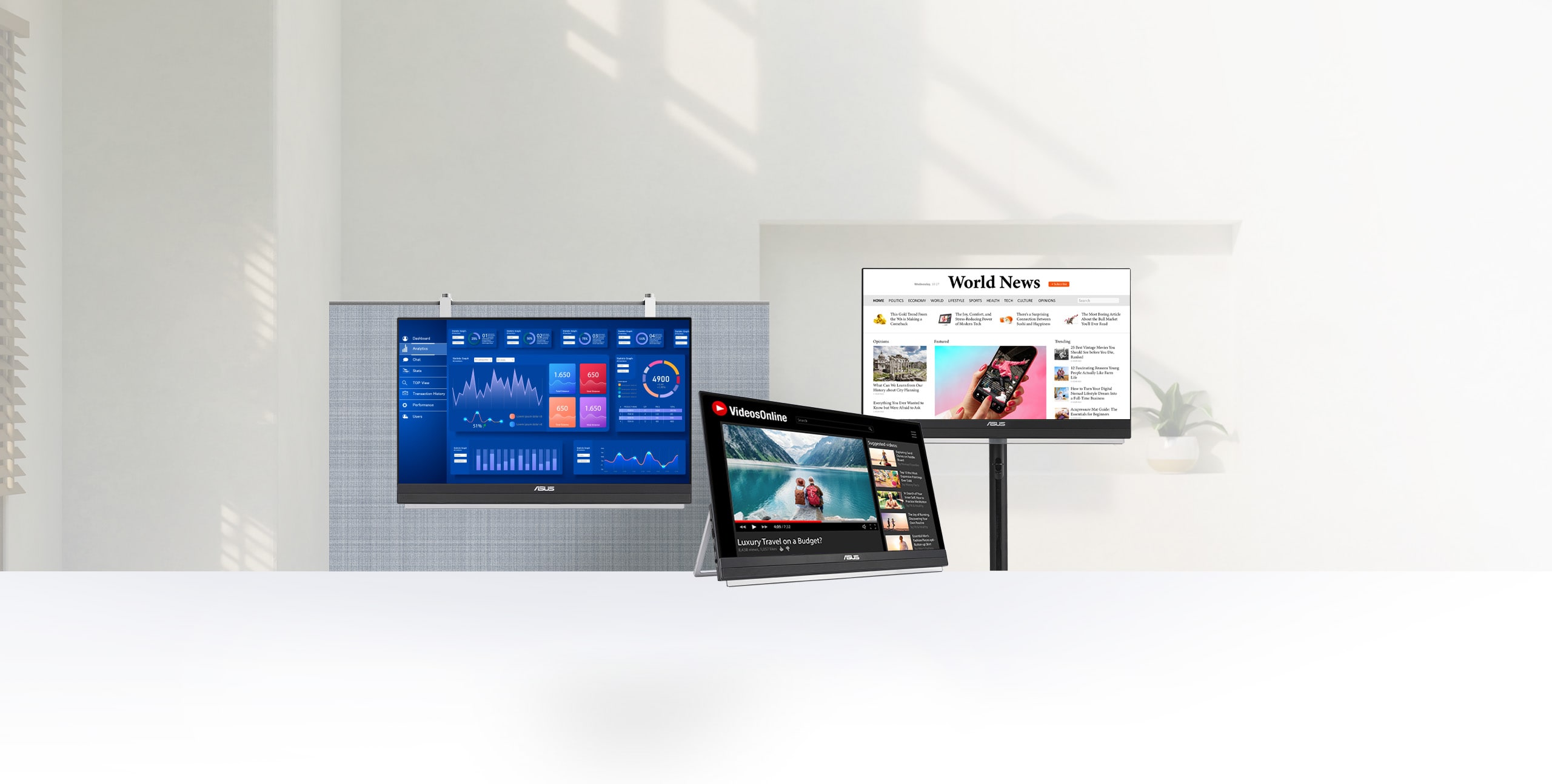
Best if “portable” means building a temporary workstation with a 21.5-inch screen, clamp, partition hook, kickstand, HDMI, and USB-C PD rather than carrying a thin panel in a backpack.
MSRP
$329
Amazon
$309.99
at writing · 2026-05-17
Score breakdown
How this product scored
Same rubric, but focused on one product so the reasons behind the score stay readable.
Display readability
ASUS ZenScreen MB229CF scores 6/10 for display readability because the huge 21.5-inch workspace helps office use, but 1080p density and ordinary brightness limit readability quality.
Setup and power reliability
ASUS ZenScreen MB229CF scores 8/10 for setup and power reliability because USB-C PD, HDMI, and included mount hardware are strong, but ASUS warns single-cable brightness can be limited.
Stand and portability
ASUS ZenScreen MB229CF scores 7/10 for stand and portability because its stand system is excellent for temporary desks but the size and weight make it only conditionally portable.
Device and use-case fit
ASUS ZenScreen MB229CF scores 8/10 for device and use-case fit because it has a clear buyer lane, but that lane is narrower than the overall winner.
Color and motion fit
ASUS ZenScreen MB229CF scores 6/10 for color and motion fit because media/color use is acceptable for the lane, not the reason to buy it.
Reliability and support
ASUS ZenScreen MB229CF scores 7/10 for reliability and support because ASUS/Amazon.com availability is reassuring, but return-warning and variant-mixed review evidence deserve caution.
Evidence confidence
ASUS ZenScreen MB229CF scores 8/10 for evidence confidence because the dossier, product-set, source reservoir, and current Amazon snapshot are enough for ranking with stated caveats.
Quick Verdict
The ASUS ZenScreen MB229CF is the portable monitor to consider when the usual 15.6-inch travel screen still leaves you cramped. It ranked #4 in our full portable monitors ranking because it is not trying to be a thin panel for a laptop sleeve. It is the big, moveable office option: 21.5 inches, a handle/kickstand, a C-clamp arm, a partition hook, VESA support, a tripod socket, USB-C power delivery, and HDMI.
That size changes the whole buying question. CNET says the MB229CF “pushes the boundaries of portability at 21.5 inches,” and that is exactly why it belongs here. If you move between a spare room, hot desk, cubicle, training space, or conference room, this can solve a problem a small travel monitor never really solves. If you want a flight, café, or one-bag travel screen, it is the wrong idea from the start.
The catch is also easy to miss on a product page. The display is useful rather than luxurious: 1080p at 21.5 inches, 250 cd/m² typical brightness, office-leaning color, and enough weight that returning it would be more annoying than boxing up a small panel. Buy it only if the stand system matters as much as the screen.
Score Breakdown
- Display readability: 6/10. The 21.5-inch workspace is the point, but 1920×1080 spread across that size is ordinary desktop sharpness, not laptop-like density, and ASUS lists only 250 cd/m² typical brightness.
- Setup and power reliability: 8/10. USB-C with DisplayPort Alt Mode, 60 W power delivery, HDMI 1.4, included cables, and the 90 W adapter story are strong for a temporary workstation, with one-cable brightness caveats to check.
- Stand and portability: 7/10. The stand system is excellent for offices: kickstand, C-clamp, partition hook, VESA 100×100, and tripod support. The weight keeps it from scoring like a true travel monitor.
- Device and use-case fit: 8/10. It has a very clear buyer lane: hotdesking, spare rooms, cubicles, presentations, and office moves.
- Color and motion fit: 6/10. The 100 Hz refresh rate is a nice office bonus, but this is not the creator-color, OLED, or gaming pick.
- Reliability and support: 7/10. ASUS identity, a three-year warranty claim in the Amazon title, and Amazon.com seller/shipper status help; the return warning and variant-mixed reviews still deserve caution.
- Evidence confidence: 8/10. Official specs, CNET coverage, the product dossier, current Amazon snapshot, and category comparisons are enough for a confident narrow recommendation.
What Feels Great Right Away
The best first impression is not panel magic; it is desk relief. The MB229CF gives you a real 21.5-inch workspace you can move, clamp, hang, or prop. That matters if your portable-monitor problem is not “the colors are bad,” but “I still cannot keep a spreadsheet, notes, a call window, and a browser visible without shuffling everything.”
The hardware is the reason this ASUS stands out. CNET describes the built-in metal kickstand as sturdy and says it allows “a wide range of angles.” That ownership detail matters because it keeps the monitor from feeling improvised. You can use the handle/kickstand on a table, move to the C-clamp arm when a desk edge is available, or hang it over a partition wall when a cubicle is stealing every inch of desk space.
ASUS backs that up with a surprisingly complete accessory list: USB-C cable, HDMI cable, power adapter, partition hook, L-shaped screwdriver, and C-clamp arm, plus VESA 100×100 and a 1/4-inch tripod socket in the official specs. For the right office, the nice part is not that it disappears into a bag. It is that it gives you several ways to make a borrowed or temporary surface workable.
Setup, Power, and Cable Checks
The setup story is stronger than most thin budget travel monitors because ASUS gives you more than one path. The official specs list “USB-C x 1 (DP Alt Mode),” HDMI 1.4, an earphone jack, and “USB-C Power Delivery : 60W.” A compatible USB-C laptop can send video to the monitor, and the monitor can pass power back when it is running from the included adapter.
The important phrase is “included adapter.” CNET notes that the USB-C port can handle power and video, or provide 60 W pass-through charging “when the monitor is powered by the included 90-watt adapter.” If you are trying to run the monitor from a laptop over a single USB-C cable, brightness can be limited, and the laptop still has to support DisplayPort Alt Mode. If you use HDMI, assume the monitor also needs its own power.
That is not a dealbreaker; it is a reason to test early. Before trusting it for a work trip or training day, plug in the exact laptop, dock, mini PC, console, or adapter you plan to use. Check brightness, charging, wake/sleep behavior, and cable placement while you are still inside the return window.
Stand and Portability Reality
The MB229CF is portable the way a folding table is portable: you can move it, store it, and rebuild a workspace around it, but you are not casually slipping it into a laptop sleeve. ASUS lists the monitor at 2.2 kg / 4.85 lb without the stand, and the dossier notes 4.0 kg / 8.82 lb with stand hardware. That is dramatically different from the 14- to 16-inch picks in this guide.
That tradeoff makes sense only if you want the stand system as much as the screen. CNET says the quick-release mount works with the included C-clamp desk stand so “you can quickly set it up like a regular desktop monitor.” That is the good version of this product: a screen you bring to a shared office, training room, spare bedroom, or pop-up workstation because a tiny travel monitor would still feel compromised.
The bad version is buying it for airports, cafés, hotel nightstands, or one-bag travel. The MB229CF takes space, weighs more, and needs more setup attention. If your desk surface is small, the ASUS can be the thing that finally gives you room — or the thing that takes up the room you had left.
Display, Brightness, and Sharpness Caveats
The display is useful, not luxurious. A 21.5-inch 16:9 panel gives much more room than a 15.6-inch portable monitor, but 1080p at this size is familiar desktop-monitor density. It is fine for email, dashboards, slides, reference windows, and shared office work. It is not the crisp-text upgrade that the Arzopa Z1RC or ViewSonic 4K OLED lanes are trying to be.
Brightness needs the same honest framing. ASUS lists 250 cd/m² typical brightness, and CNET’s summary includes “Merely average display performance” as a con. That points toward indoor offices, conference rooms, spare rooms, and controlled-light spaces. Do not buy it for a sunlit café window or an outdoor demo.
Color and media are secondary here. The IPS panel, 178-degree viewing angles, 100 Hz refresh rate, speakers, and subwoofer are nice conveniences for presentations and casual use, but they are not the reason to spend around $300. Buy the MB229CF because you want a bigger temporary work surface with serious placement options.
Reliability, Commerce, and Return Risk
The reassuring part is that this was not a sketchy exact-product find in the parent research. The captured Amazon listing matched the MB229CF ASIN B0CVSLLGH4, showed current-new availability, and was sold and shipped by Amazon.com at $309.99. ASUS also has a clear official product/spec page for the same model, which is better than trying to decode a no-name monitor listing with shifting specs.
The caution is that Amazon also showed a frequently returned warning, and the review evidence can be mixed across ZenScreen variants. Treat that warning as a prompt to inspect, not a reason to panic. Check the exact model number, seller, condition, return window, warranty language, and recent owner reviews before checkout.
After delivery, test the boring things first: dead pixels, cable behavior, wake/sleep quirks, brightness limits, stand stability, and whether your host device charges the way you expected. That matters more here because this product is bigger and more awkward to repack than a small travel panel.
How It Compares
The MB229CF is the category boundary pick. It is not competing to be the best monitor for a backpack; it is competing to be the easiest large screen to move between temporary workspaces.
- Arzopa Z1RC: Choose the Z1RC if you want the safest all-around laptop second screen: sharper 16-inch productivity, easier travel, and less desk drama. Choose ASUS if screen size and mounting matter more than bag comfort.
- ViewSonic VX1655-4K-OLED: Choose ViewSonic if image quality is the point. Its 4K OLED panel is the premium screen upgrade. ASUS wins only when a large, movable office setup matters more.
- Lenovo ThinkVision M14t Gen 2: Choose Lenovo for compact travel, touch, and pen-oriented review work. ASUS is better for presentations, cubicles, and temporary desks where touch is irrelevant.
- Arzopa Z1FC: Choose the Z1FC if high-refresh gaming is the hook. ASUS has 100 Hz, but its size and mounting story are office-first, not play-first.
- MSI PRO MP165 E6: Choose MSI if you just need a cheap spare screen. Choose ASUS if a bigger screen and real mounting hardware are worth the cost and bulk.
Who Should Buy the ASUS ZenScreen MB229CF
Buy the MB229CF if “portable” means moveable within your work life: home office to spare room, cubicle to conference room, shared desk to training table, or one temporary setup to another. It is especially appealing if a laptop plus 15.6-inch monitor still leaves you wanting more room for spreadsheets, slides, reference docs, dashboards, or a second person looking at the screen.
It is also a good fit if mounting flexibility is not optional. The handle/kickstand, C-clamp arm, partition hook, VESA mount, and tripod socket give you more ways to place the screen than most portable monitors. For some offices, that can feel genuinely clever: a screen that gets off the desk, hangs where a normal monitor cannot, or turns a borrowed surface into a workable station.
Skip it if you fly often, work mostly in cafés, need the smallest possible travel kit, want touch or pen input, dislike 1080p text on 21.5-inch screens, need strong bright-room performance, or do color-critical work. Also slow down if the Amazon return warning, exact seller, or desk fit makes you uneasy.
Bottom Line
Buy the ASUS ZenScreen MB229CF if: you want a large moveable office screen with a handle/kickstand, C-clamp arm, partition hook, VESA/tripod options, HDMI, and USB-C power delivery for hot desks, cubicles, presentations, training rooms, or temporary home-office setups.
Skip it if: you want a backpack-light travel monitor, high pixel density, outdoor brightness, touch/pen input, creator-grade color confidence, or a cheap fixed desktop monitor.
Bottom line: the MB229CF is a strong pick only when you understand what kind of portable it is. It is too big to treat like a normal travel panel, but that size and stand system are exactly why it can be useful. Recheck the exact ASIN B0CVSLLGH4, current seller/condition, price, return warning, and your own desk fit before buying; if you are still choosing, compare it against the rest of our portable monitors ranking.
Feature breakdown
Full feature list
Grouped feature details are expandable so buyers can go deep when they want, without turning the whole review into a spec landfill.
Full feature list
7 features
+
Full feature list
7 features
Display
[object Object]
Mounting
carrying handle/kickstand, C-clamp arm, partition hook, VESA 100×100, 1/4-inch tripod socket
Buyer Lane
large temporary-office pick
Connectivity
[object Object]
Commerce Snapshot
[object Object]
Source Signal Count
47
Source Family Posture
[object Object]
Tell us what this page missed
These pages get better when real buyer complaints make it back into the scoring model. If something important is underweighted, say it.
Rate this review
Give it a score from 1-10 and tell us what to improve.
0/4000 characters