
The recommendation
Choose Sonos Arc Ultra for fewer pieces to place and direct touch playback and volume controls. Choose JBL Bar 1000MK2 when you want its detachable rear speakers and remote TV/Bluetooth selectors, and have room for the subwoofer plus a plan for charging the rear speakers.
The shortlist, at a glance
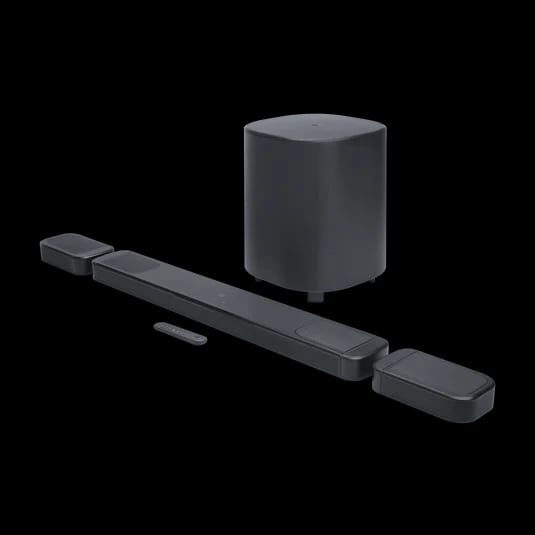
A room with space for a subwoofer and separate rear speakers, where remote source buttons suit your routine.
JBL Bar 1000MK2 →
Grades at a glance
| Product | Overall | Physical placement handling | Ordinary control selection | Connection accessory chores |
|---|---|---|---|---|
| Sonos Arc Ultra | 8.4 | 9.0 | 9.0 | 7.0 |
| JBL Bar 1000MK2 | 7.4 | 7.0 | 8.0 | 7.0 |
Compare your shortlist
Does it fit your life?
Choose around your room and habits
Choose Sonos Arc Ultra for fewer pieces to place and direct touch playback and volume controls. Choose JBL Bar 1000MK2 when you want its detachable rear speakers and remote TV/Bluetooth selectors, and have room for the subwoofer plus a plan for charging the rear speakers. Sonos guide and JBL manual.
The first decision is the configuration: a standalone Arc Ultra, or JBL’s system with a bar, subwoofer and detachable speakers. If separate rear speakers are part of what you want, JBL’s extra pieces may be useful enough to justify the handling. If you want fewer pieces around the room, Arc Ultra has the simpler starting point. Sonos guide and JBL manual.
Our grades cover placement, ordinary controls, and cable or accessory chores. They are based on manufacturer instructions, without hands-on testing, and do not establish which sounds better or offers better value.
Ordinary-workflow grades
All grades are out of 10 and describe the convenience of these documented tasks. The overall combines placement, control selection, and connection or accessory chores; it is not a sound-quality score. A gap between grades does not measure minutes saved or fewer mistakes.
On a narrow screen, scroll the comparison table sideways to read each buying choice.
| Ordinary task | Sonos Arc Ultra | JBL Bar 1000MK2 | What changes your choice |
|---|---|---|---|
| Placement and handling | 9.0/10 — one bar; horizontal, controls up, with TV clearance | 7.0/10 — bar, subwoofer and detachable speakers; side caps when undocked | Choose Sonos for fewer supplied pieces to locate; JBL if you want the separate-speaker layout |
| Control selection | 9.0/10 — tap playback, slide or tap volume; separate music skip controls | 8.0/10 — dedicated TV/Bluetooth selectors; cycle HDMI inputs and count presses for music skips | Choose by the actions you prefer: touch controls or remote source selection |
| Connections and accessory chores | 7.0/10 — TV cable route and app setup; separate adapter for the optical branch | 7.0/10 — separate bar/subwoofer power; rear speakers dock to charge or take separate USB-C connections | Sonos needs a TV-port check; JBL needs a plan for rear-speaker charging |
| Overall ordinary-workflow grade | 8.4/10 | 7.4/10 | A narrower convenience judgment, not an overall soundbar ranking |
The task descriptions follow the relevant sections of the Sonos guide and pages 7–13 of the JBL manual. The grades are editorial judgments about the steps described there. JBL’s lower placement grade reflects managing its full supplied system. Its detachable speakers may still make that layout worth choosing. The equal connection grades cover different chores, explained below.
Placement: one bar or several locations?
Start with the furniture. Arc Ultra needs a stable horizontal surface with its controls facing up. Sonos says to keep it out of an enclosed cabinet or corner and, when it sits below the TV, leave at least 4 in (10 cm) between the bar’s top and the TV’s bottom. A single bar reduces the number of locations to find, but that clearance still needs checking on a low TV stand. Sonos guide — Placement.
For JBL, plan places for the bar and subwoofer, then decide whether the detachable speakers will stay docked or sit separately. In an undocked layout, the manual calls for the supplied side caps to cover the exposed ends of the bar. It also says to remove the detachable speakers before moving the bar. These are additional handling steps, without implying that you must rearrange the system every day. JBL manual — pages 8–9.
The practical choice is whether you want to make room for that separate-speaker layout. Arc Ultra earns the higher placement grade for managing one supplied bar; JBL asks you to manage more components, but those components are also the reason to consider it. Adding optional Sonos speakers would change the placement task and falls outside this standalone comparison. Sonos guide and JBL manual.
Controls: which actions do you repeat most?
Think about the action you repeat most: adjusting volume, changing tracks or choosing a source. Arc Ultra provides tap play/pause, slide or tap volume, and separate next/previous controls for music. Radio cannot skip forward or back. Those direct actions underpin its higher control grade. Sonos guide — Controls and lights.
There is a little more to remember if you use other Sonos speakers. With another Sonos speaker already streaming, holding play/pause for about one second groups playback; holding for about two seconds swaps the stream to Arc Ultra. That distinction matters if moving music between speakers is part of your routine. Sonos guide — Controls and lights.
JBL’s remote has dedicated TV and Bluetooth selectors. HDMI selection cycles through inputs 1, 2 and 3. For Wi-Fi music streaming or Bluetooth playback, press once to pause or resume, twice for the next track and three times for the previous track. You get named source choices on the remote, with press counts to remember for music. The global manual shows regional remote variants, so follow the illustration matching your supplied remote. JBL manual — pages 7–8.
Favor Arc Ultra if the direct touch actions appeal to you; favor JBL if its remote source selectors fit your habits better. This comparison of particular controls is not an exhaustive list of ways to operate either product, and it does not measure app reliability. Sonos guide and JBL manual.
Cables and charging: choose the chore that fits
For Arc Ultra, check the TV’s ports before buying an adapter. Sonos supplies power and HDMI cables and directs external devices, such as a streaming box, to the TV. Connect the bar to the TV’s HDMI ARC/eARC port when available, then complete setup in the Sonos app on a compatible device. Sonos guide — Connect the cables and setup.
If the TV lacks HDMI ARC/eARC, the guide’s optical route adds a separately sold Sonos Optical Audio Adapter. Remove its protective cap, attach it to the HDMI cable and connect it to the TV’s optical output. This extra purchase and attachment task applies to that connection route; it is not an accessory every Arc Ultra buyer needs. Sonos guide — Connect the cables.
With JBL, allow for separate power connections for the bar and subwoofer. The rear speakers give you two charging choices: dock them on the bar, or connect each to power with a USB-C cable that is not supplied. If you intend to leave them in separate locations, decide whether returning them to the bar is convenient or whether you prefer arranging power and cables at those locations. JBL manual — pages 12–13.
Both receive 7.0/10 for connections and accessory chores, for different reasons. Arc Ultra combines TV cable routing and app setup with a conditional adapter step. JBL adds separate component power and a rear-speaker charging routine. That tie does not imply equal setup time or tell you how often the JBL speakers will need charging. Sonos guide and JBL manual.
Before buying: three practical checks
- Map the space. For standalone Arc Ultra, check the horizontal surface and the 4 in (10 cm) gap below the TV. For JBL, identify the subwoofer’s location and decide whether the detachable speakers will be docked or placed separately. Sonos guide and JBL manual.
- Check the TV connection. For Arc Ultra, distinguish HDMI ARC/eARC from the optical route before ordering the separate adapter. For JBL, follow the manual’s connection branch for your equipment; HDMI-CEC support is not guaranteed for every device. Sonos cable instructions and JBL manual — pages 10–11, 16–17.
- Choose the routine you will keep. Compare Arc Ultra’s direct touch actions with JBL’s remote source buttons and music press counts. If you choose JBL, decide where each rear speaker will charge. Optional Sonos speakers would add placement and app-setup tasks beyond the standalone configuration graded here. Sonos guide and JBL manual.
Arc Ultra is the stronger fit when fewer supplied pieces and direct touch controls are your priorities. JBL can be the better fit for your room when separate rear speakers and its remote selectors are features you actively want. Use the workflow grades to make that choice; assess dialogue, bass, surround effects and price separately.
Product views
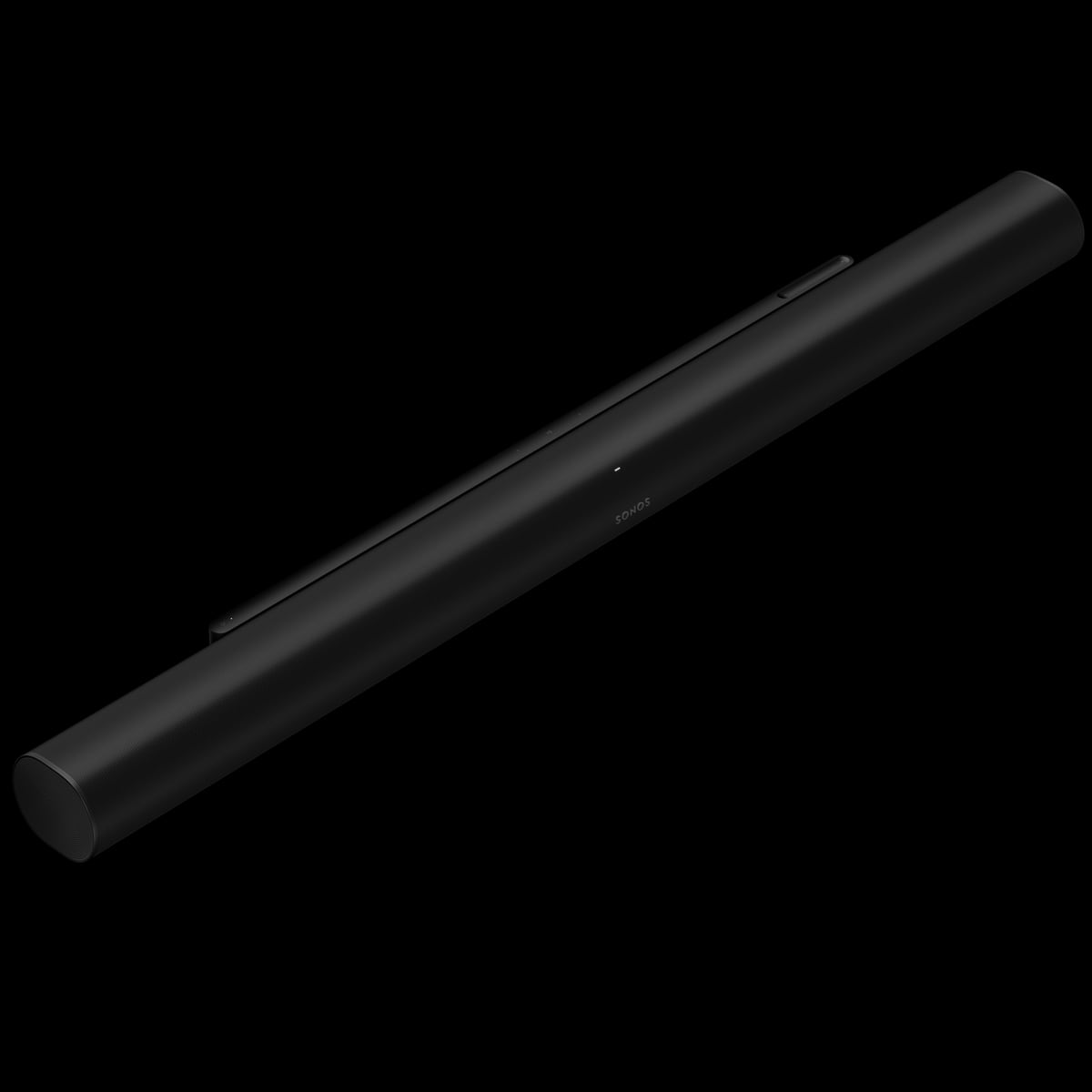
Arc Ultra illustration from the existing product-image collection. It shows the single-bar format, not a room setup or the required TV clearance.
JBL illustration from the existing product-image collection. The separated pieces help explain the layout choice; their positions in this image are not room-placement instructions.
Scope and sources
The sources are the Sonos Arc Ultra User Guide and JBL BAR 1000MK2 Owner’s Manual Global English V2. This comparison uses their instructions for the standalone Sonos bar and the JBL system described in that global manual. Regional JBL remote variants remain relevant when following the controls.
We reviewed locally stored guide material on 16 October 2026. That review date does not establish current firmware or live web changes. These are documented tasks, not reported owner experiences or measured usability results. Wall installation, listening performance, battery endurance, durability, current prices and guaranteed TV compatibility are outside the grades.
Sonos Arc Ultra
Sonos
A room where fewer supplied pieces and direct touch controls are priorities.
A standalone bar with direct touch playback and volume controls; check its horizontal placement and TV clearance.
The takeaway
Choose it for fewer supplied pieces and direct touch actions; check the TV port and clearance first.
Reasons to choose it
- One supplied bar to position
- Tap playback and slide or tap volume
Tradeoffs to know
- TV clearance and open placement requirements
- Optical TV branch needs a separate adapter
Think twice if: You want detachable rear speakers in the supplied configuration.
Further reading
Ratings
Editorial score 8.4
Physical placement handling9
One supplied bar limits positioning tasks, with horizontal orientation and TV-clearance requirements.
Ordinary control selection9
Direct playback and volume controls simplify ordinary actions; radio skipping and different grouping/swap holds limit convenience.
Connection accessory chores7
TV cable routing and app setup are distinct tasks; the optical branch adds a separately purchased adapter and attachment steps.
JBL Bar 1000MK2
JBL
A room with space for a subwoofer and separate rear speakers, where remote source buttons suit your routine.
System with a bar, subwoofer and detachable speakers; rear speakers dock to charge or connect separately to USB-C power.
The takeaway
Choose it when separate speaker placement and remote source selectors suit your routine, with a charging plan in place.
Reasons to choose it
- Detachable speakers can be positioned separately
- Dedicated TV and Bluetooth selectors on the remote
Tradeoffs to know
- More supplied pieces to position in an undocked layout
- Rear speakers need docking or separate USB-C charging connections
Think twice if: You do not want to plan multiple component locations and rear-speaker charging.
Further reading
Ratings
Editorial score 7.4
Physical placement handling7
Undocked use requires locations for the supplied pieces and side-cap handling; docked use remains possible.
Ordinary control selection8
Dedicated TV/Bluetooth selectors help source choice; HDMI cycling and press-count playback add control steps.
Connection accessory chores7
Separate bar/subwoofer power and rear-speaker docking or individual USB-C charging create accessory chores.
Sources & further reading
sonos.com product information
support.jbl.com product information
Something changed? Help us keep this useful.
Send a correction →