
The recommendation
Choose the wired Apex Pro TKL Gen 3 for onboard profile selection and puller storage when it will mostly stay connected to one computer.
Grades at a glance
| Product | Overall | Layout and handling | Controls and setup | Connection and care |
|---|---|---|---|---|
| SteelSeries Apex Pro TKL Gen 3 | 9.0 | 9.0 | 9.0 | 9.0 |
Does it fit your life?
Who it suits
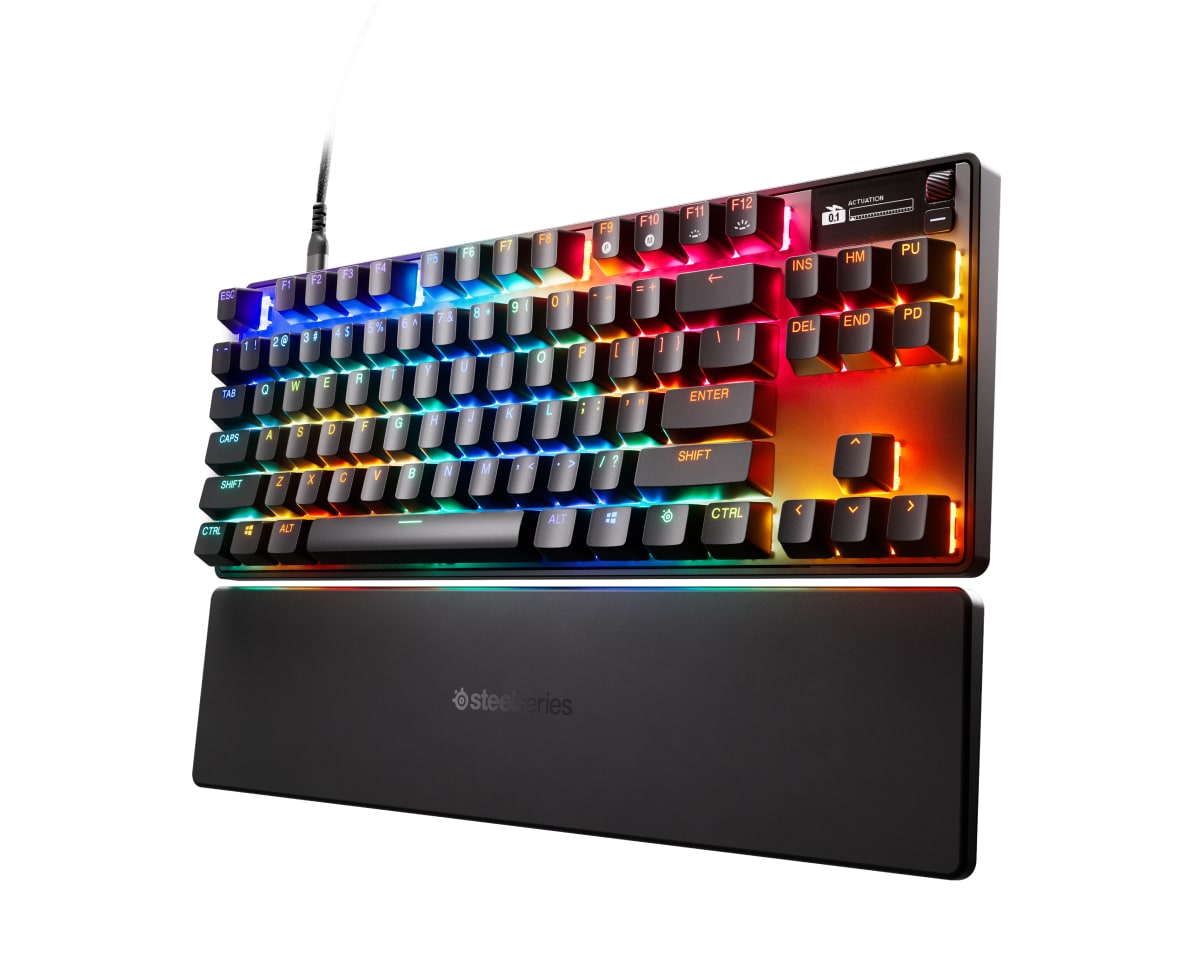
The wired Apex Pro TKL Gen 3 puts profile and settings navigation on a screen with a wheel and button. Its underside compartment gives the keycap puller a place to return; the wired connection is less convenient for frequent device changes.
Choose it for: Selecting profiles on the keyboard and keeping the keycap puller stored underneath.
Reconsider if: You frequently switch the keyboard between computers.
Scores for everyday use
| Keyboard | Layout and handling | Controls and setup | Connection and care | Overall |
|---|---|---|---|---|
| SteelSeries Apex Pro TKL Gen 3 | 9/10 | 9/10 | 9/10 | 9/10 |
Layout and handling: TechRadar found the compact layout and sloped bottom row easy to reach.
Controls and setup: A wheel and button navigate the screen; the November 2024 software review found no live adjustment feedback.
Connection and care: The reviewer found the puller compartment and rubber flap useful; frequent device changes still involve a wired connection.
Layout and handling
TechRadar found the wired TKL Gen 3's bottom-row keys easy to reach with the thumb and little finger, thanks to their slope and the compact layout. That makes the arrangement worth considering if bottom-row access is a priority.
Controls and setup
The Smart Screen uses a wheel and small button for navigation. TechRadar's November 2024 review describes selecting profiles and changing settings there. The reviewer also found GG easy to navigate, but missed visual feedback while adjusting settings. Consider the onboard route if you prefer selecting profiles at the keyboard.
Connection and care
A compartment underneath the keyboard stores the keycap puller behind a rubber flap, which TechRadar found worked well. Put the tool back there after use so it stays with the board. This is the wired TKL Gen 3, so it is a better fit for a mostly fixed computer connection than frequent device changes.
Which should you choose?
Choose the Apex Pro TKL Gen 3 for onboard navigation and a place to store the puller. Compare the Logitech G Pro X TKL Lightspeed when carrying the keyboard and receiver setup matter more. Consider the NuPhy Halo75 V2 for mouse space and rear mode switches.
SteelSeries Apex Pro TKL Gen 3
SteelSeries
Selecting profiles on the keyboard and keeping the keycap puller stored underneath.
The wired Apex Pro TKL Gen 3 puts profile and settings navigation on a screen with a wheel and button. Its underside compartment gives the keycap puller a place to return; the wired connection is less convenient for frequent device changes.
Reasons to choose it
- A wheel and button control the onboard settings screen.
- TechRadar found the sloped bottom-row keys easy to reach.
- An underside compartment stores the keycap puller.
Tradeoffs to know
- The wired connection makes frequent device changes less convenient.
- TechRadar's November 2024 review found no live visual feedback when adjusting software settings.
Think twice if: You frequently switch the keyboard between computers.
Published specifications
- Connection
- Wired
- Settings navigation
- Screen, wheel and button
- Tool storage
- Keycap-puller compartment underneath
Further reading
Ratings
Editorial score 9
Layout and handling9
TechRadar found the compact layout and sloped bottom row easy to reach.
Controls and setup9
A wheel and button navigate the screen; the November 2024 software review found no live adjustment feedback.
Connection and care9
The reviewer found the puller compartment and rubber flap useful; frequent device changes still involve a wired connection.
Sources & further reading
techradar.com review
User reports at bestbuy.com
tomshardware.com review
Keep reading
Something changed? Help us keep this useful.
Send a correction →