
The recommendation
Choose the Halo75 V2 for mouse space and rear connection controls. Allow time to check function-key settings and keep pullers clear of painted edges.
Grades at a glance
| Product | Overall | Layout and handling | Controls and setup | Connection and care |
|---|---|---|---|---|
| NuPhy Halo75 V2 | 8.3 | 9.0 | 7.0 | 9.0 |
Does it fit your life?
Who it suits
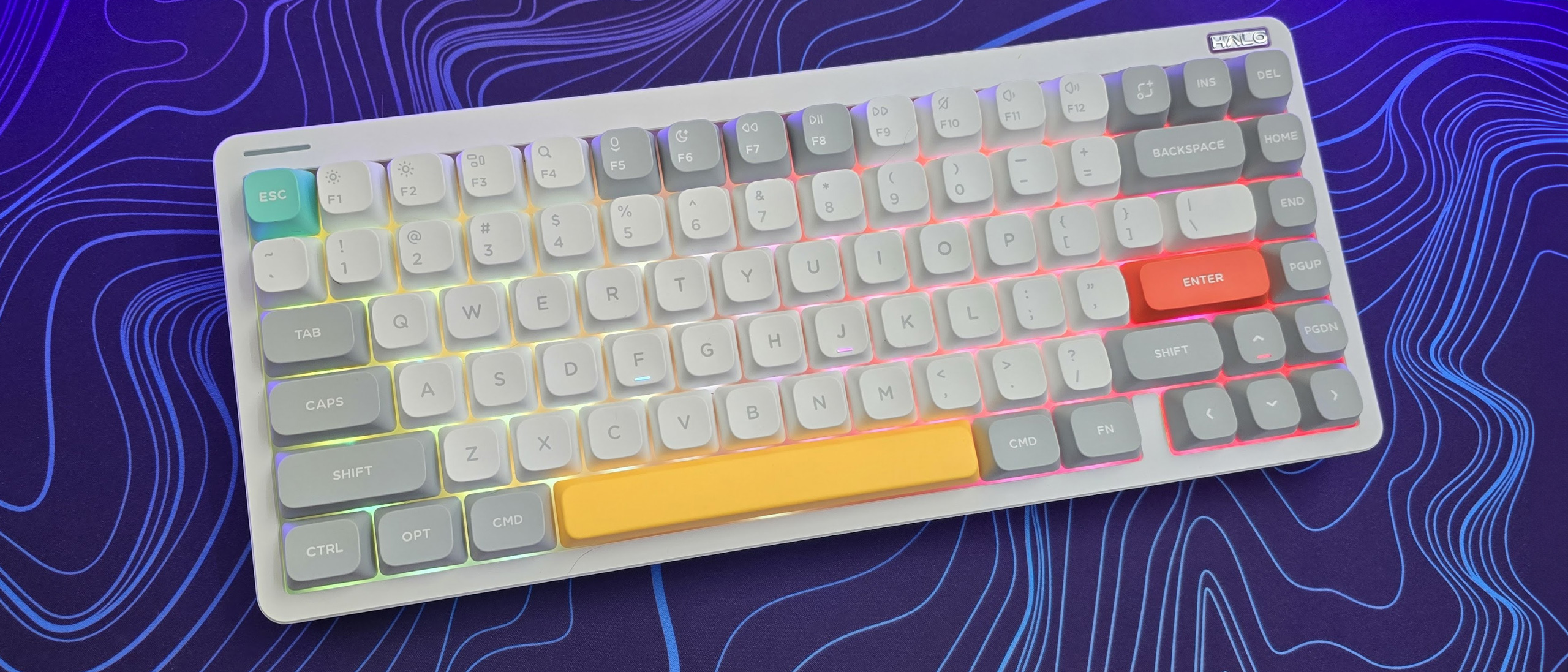
Tom's Hardware — pictured on the reviewer's desk mat.
The Halo75 V2 is a useful choice when space beside the keyboard matters. Its rear mode switches and receiver slot keep connection selection together; function-key setup and careful puller use are the chores to plan for.
Choose it for: Leaving room for the mouse and keeping mode switches and the receiver together at the rear.
Reconsider if: You want to avoid function-key troubleshooting or frequently use tools close to painted case edges.
Scores for everyday use
| Keyboard | Layout and handling | Controls and setup | Connection and care | Overall |
|---|---|---|---|---|
| NuPhy Halo75 V2 | 9/10 | 7/10 | 9/10 | 8.3/10 |
Layout and handling: Tom's Hardware found ample mouse space beside the smaller-than-TKL board.
Controls and setup: One user's function keys worked after a setting change, following unsuccessful layer adjustments.
Connection and care: Rear switches and a receiver slot group connection controls together; hard tools need care around the paint.
Layout and handling
Tom's Hardware's June 2024 review describes a 75% layout with a function row, arrow keys and a navigation column. The reviewer found ample room for the mouse beside it. That combination makes the Halo75 V2 worth considering when you want to keep those keys while leaving space alongside the board.
Controls and setup
One Halo75 V2 user successfully remapped ordinary keys but could not get the function keys working. Trying different layers did not help; after changing a setting, the user reported that the function keys worked as expected. If you depend on F-key shortcuts, check the keyboard's layer map and function-key settings during setup.
Connection and care
The June 2024 review places the connection-mode and operating-system switches at the rear, beside a slot for the receiver. It also describes switching Bluetooth sources with a simple keystroke. When removing keys or switches, keep hard puller edges clear of the painted case: the reviewer warned that they can scrape the finish.
Which should you choose?
Choose the Halo75 V2 when room beside the keyboard and rear connection controls matter most. Compare the Razer BlackWidow V4 75% if dedicated mute and volume controls are your priority. The Keychron Q1 Max is worth a look if you instead want access inside the board and accept a fixed angle.
NuPhy Halo75 V2
NuPhy
Leaving room for the mouse and keeping mode switches and the receiver together at the rear.
The Halo75 V2 is a useful choice when space beside the keyboard matters. Its rear mode switches and receiver slot keep connection selection together; function-key setup and careful puller use are the chores to plan for.
Reasons to choose it
- Tom's Hardware found ample mouse space beside the smaller-than-TKL layout.
- Rear mode switches sit beside a receiver slot.
- The June 2024 review described simple keystrokes for switching Bluetooth sources.
Tradeoffs to know
- One user needed a function-key setting change after unsuccessful layer adjustments.
- Hard puller edges can scrape the painted case.
Think twice if: You want to avoid function-key troubleshooting or frequently use tools close to painted case edges.
Published specifications
- Care
- Keep hard tools clear of painted edges
- Layout
- 75%
- Mode switches
- Rear
Further reading
Ratings
Editorial score 8.3
Layout and handling9
Tom's Hardware found ample mouse space beside the smaller-than-TKL board.
Controls and setup7
One user's function keys worked after a setting change, following unsuccessful layer adjustments.
Connection and care9
Rear switches and a receiver slot group connection controls together; hard tools need care around the paint.
Sources & further reading
tomshardware.com review
User reports at old.reddit.com
kitguru.net review
vamers.com review
Keep reading
Something changed? Help us keep this useful.
Send a correction →