Nanit Pro Smart Baby Monitor & Flex Stand Review (2026): Smart, Helpful, and Not for Everyone
A smart baby monitor review for parents weighing app access, sleep history, Flex Stand placement, subscriptions, Wi-Fi, and phone-screen tradeoffs.
Nanit is the best smart baby monitor in this set for parents who want phone access, alerts, sleep history, and caregiver sharing, but it is the wrong default for no-Wi-Fi or no-subscription buyers.
MSRP
—
Amazon
$249
at writing · 2026-05-05
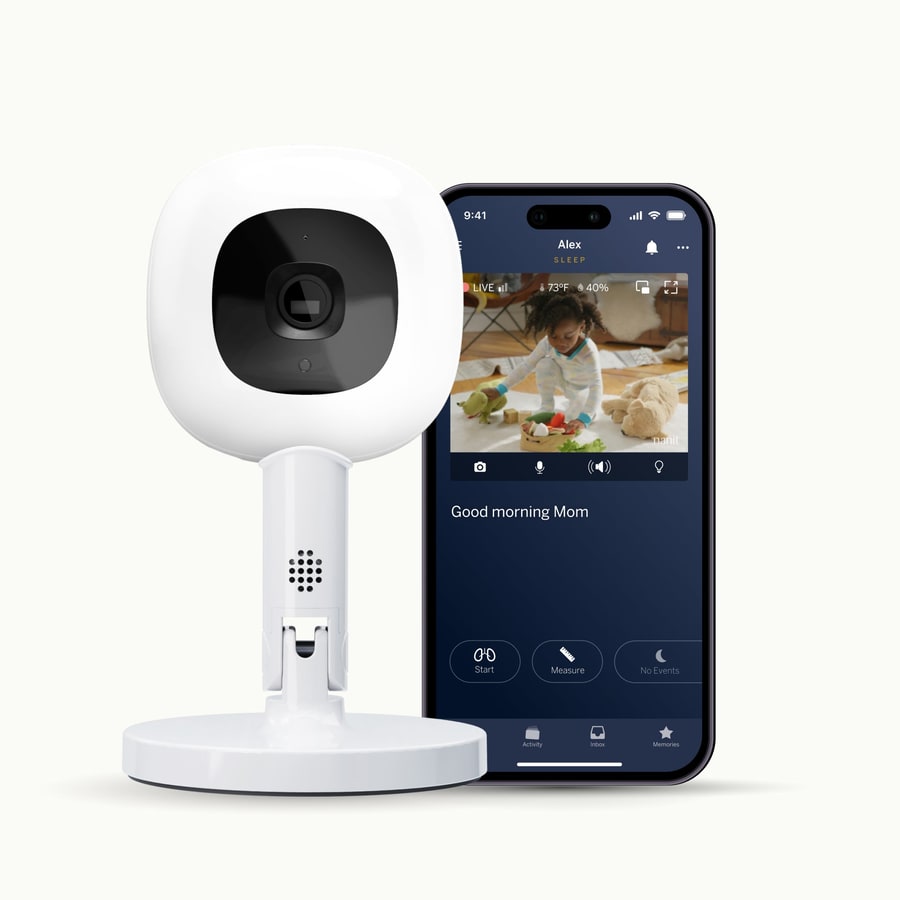
Buyer fit
The app-first choice for parents who want remote viewing, richer notifications, sleep-history tools, caregiver sharing, and are comfortable with Wi-Fi plus membership tradeoffs.
MSRP
—
Amazon
$249
at writing · 2026-05-05
Score breakdown
How this product scored
Same rubric, but focused on one product so the reasons behind the score stay readable.
Connection reliability
Strong when the home network and app behave, but less fail-safe than a local monitor because Wi-Fi, phones, and camera resets become part of overnight reliability.
Video and audio clarity
The 1080p app view, night vision, background audio, and phone/tablet viewing are useful, though owner comments make clear that premium specs do not erase lag or network-dependent quality.
Alert usefulness
This is Nanit’s best category: sound, motion, cry-style alerts, background audio, watch notifications, and sleep-history reminders can reduce real nightly mental load.
Privacy and control
Caregiver sharing is useful, but app/account/Internet monitoring gives privacy-first parents less control than the no-Wi-Fi local-screen monitors.
Setup and daily use
The Flex Stand is portable and convenient, but phone-as-monitor habits, placement limits, and overhead-analytics caveats keep it from being effortless for everyone.
Battery and power
The camera is plug-in and there is no parent-unit battery, but continuous monitoring shifts power planning to a phone, tablet, Fire tablet, iPad, Echo Show, or similar workaround.
Expandability and caregiver fit
Remote access and caregiver sharing are exactly why to buy Nanit, especially for sitters, grandparents, away-from-home checks, and households that want app-based access.
Durability and support confidence
Nanit has a mature ecosystem and substantial owner history, but plan changes, app behavior, mount concerns, and connection complaints still need buyer awareness.
Quick Verdict
Nanit is the smart-nursery brand in this set, not a simple local-screen monitor maker. The Pro with Flex Stand is trying to turn the nursery camera into a phone-based system: live app viewing, sleep timeline, caregiver access, smart alerts, breathing-motion language, and a portable stand you can move more easily than a fixed wall mount.
That extra convenience is real for the right family. One Nanit owner wrote, "The Nanit sends alerts to my watch when my son is crying during the night," which is exactly the kind of everyday detail product pages flatten into a feature bullet. Another parent said the sleep tracking helped because "I often forget when I put him down" and the app remembers for them. That is the good version of Nanit: less mental load when nights already feel weird.
But Nanit also asks for more trust than the no-Wi-Fi picks in our best baby monitors guide. It ranked #4 with a 7.4/10 because it is the best smart monitor here, not the safest default. You are buying into Wi-Fi, an app, plan rules, phone battery decisions, and placement caveats with the Flex Stand. Use the product links to check current Amazon price, seller, and availability before checkout; KB4UB may earn from qualifying purchases.
Score Breakdown
- Connection reliability: 7/10. Nanit can be rock-solid in the right home, and some owners say they have had no connection issues. The score stays capped because app and Wi-Fi dependence create more ways for monitoring to get weird than a local parent screen.
- Video and audio clarity: 8/10. The 1080p app view, night vision, background audio, and phone access are strong. The caveat is that premium camera specs do not automatically solve lag, network quality, or phone-screen fatigue.
- Alert usefulness: 9/10. This is Nanit's strongest lane: sound, motion, cry-style notifications, background audio, watch alerts, and sleep-history context are the reason to buy it.
- Privacy and control: 6/10. You get sharing controls and a mature app, but this is still an account/app/Internet monitor. Privacy-first parents will prefer Infant Optics, Babysense, HelloBaby, or VTech.
- Setup and daily use: 7/10. The Flex Stand is easier to move than a wall mount, but exact placement matters and some richer analytics may expect wall/floor-style overhead positioning.
- Battery and power: 6/10. There is no parent-unit battery to manage, but your phone, tablet, or smart display becomes part of the monitor setup.
- Expandability and caregiver fit: 8/10. App sharing and remote access are much better than local-only monitors for caregivers and away-from-home check-ins.
- Durability and support confidence: 8/10. Nanit has a deeper ecosystem and more owner history than newer smart/hybrid picks, though subscription changes, app behavior, and mount complaints still matter.
What feels great right away
The first-day appeal is not subtle. Nanit makes the nursery feel reachable from wherever your phone is. You can check the crib from the couch, from another room, or when someone else is handling bedtime. You can share access instead of handing over a dedicated screen. You can keep background audio running while doing other things.
For anxious new parents, that can feel like a pressure valve. In one Reddit thread about Nanit versus Miku, the buyer updated that they chose Nanit and were told the baby’s mom "sleeps better now knowing the monitor tracks breathing and there were no false alarms so far." That quote needs careful handling: Nanit is not a medical device, and breathing-motion features should not be treated like a safety guarantee. But emotionally, it explains why people pay for this system. They are buying reassurance, not just pixels.
The watch-alert use case is also genuinely useful. A deaf parent wrote, "I’m deaf and there aren’t many things out there that are accessible to deaf people," then called out Nanit alerts to their watch when their son cries. That is not a gimmick. For some households, phone and watch notifications are the whole reason a smart monitor beats a private local screen.
What keeps mattering after the first week
The feature that keeps Nanit interesting is memory. Not memory as in storage specs; memory as in "when did I put the baby down?" and "how did last night actually go?" One owner said, "The sleep analytics are outstanding," because they liked knowing sleep timing, sleep onset, and cycle patterns. Another said it was "super helpful that it tracks how long he sleeps because I often forget when I put him down." That is the part cheap monitors do not touch.
Caregiver access also ages well. A parent who liked Nanit said that when babysitters were over, "it’s nice to be able to pull up the kids on our phones while we’re out to check in." If your monitor job includes grandparents, sitters, travel, and remote parent check-ins, Nanit fits the way the household actually moves.
The Flex Stand matters most if your setup changes. It is more portable than a fixed nursery mount and easier to use for temporary rooms. Just do not assume a casual shelf placement unlocks every overhead sleep-analysis feature. Nanit’s own plan and mount language makes the setup-dependent pieces worth checking before you pay extra for analytics.
The annoyances to know before buying
The biggest Nanit complaint is not one tiny flaw. It is the total number of things you now depend on: Wi-Fi, phone, app, account, notification settings, plan rules, and physical access to the camera.
The harshest owner complaint said Nanit "constantly disconnects from our network" and that reconnecting meant entering the sleeping baby’s room to press a button. That does not mean every Nanit disconnects; another owner said, "Mine never disconnects from internet," and used a plugged-in tablet as a nightstand screen. The honest read is narrower: Nanit can be excellent in a stable home network, but when it fails, it fails in a way that feels much more annoying than a simple local monitor.
Phone dependence is the next catch. One critic wrote, "Goodbye battery," because Nanit does not include a dedicated parent screen. Fans work around this with an old iPad, Fire tablet, Echo Show, or plugged-in phone. That can be perfectly fine, but it is a setup you should plan for, not discover after the first long night.
Subscriptions are the other pre-check. Core live monitoring does not require the higher paid tiers, but saved history, more memories, longer analysis windows, caregiver limits, dashboards, and milestone features can change by plan. If the smart stuff is why you are buying Nanit, price the plan you actually expect to use.
Who should buy the Nanit Pro with Flex Stand
Buy Nanit if you actively want a smart baby monitor. It is best for parents who want:
- phone viewing instead of a dedicated parent screen
- remote check-ins away from home
- background audio and rich notifications
- caregiver sharing for partners, grandparents, or sitters
- sleep-history context and nap timing help
- a more portable Flex Stand setup instead of a permanent wall-only nursery rig
- watch alerts or phone notifications that fit accessibility needs
This is also the strongest pick here for parents who know they will live inside the app and will actually use the history, sharing, and alert features. If those details sound like relief rather than clutter, Nanit makes sense.
Who should skip it
Skip Nanit if your ideal baby monitor is boring, private, and local. Infant Optics DXR-8 PRO is the better default if you want a dedicated screen with no app account. Babysense is better if two rooms on one split-screen monitor are the main job. HelloBaby and VTech are better if the point is spending less for basic local video.
Skip it if subscription math makes you twitch. You can use core live-monitor features without buying every plan, but Nanit’s best reasons to exist are tied to app features, saved context, and account-based sharing. If you will resent that, buy a simpler monitor.
Also skip it if you expect breathing-motion language to behave like medical monitoring. It should not be used as a SIDS-prevention claim, a vital-sign monitor, or a guarantee that someone will always be alerted at the right moment. Treat it as a consumer smart-monitor feature, not a safety net you stop thinking about.
Bottom Line
The Nanit Pro Smart Baby Monitor & Flex Stand is the cleanest smart-monitor pick in this baby monitor set. It earns that lane with remote viewing, caregiver access, smart notifications, background audio, sleep-history tools, and a more portable stand than a fixed overhead mount.
It is also the monitor with the most homework before checkout. Make sure the Flex Stand supports the exact features you care about. Decide whether you are comfortable using a phone, tablet, or smart display as the parent screen. Check which Nanit plan matches the saved history, caregivers, memories, and analytics you expect. And be honest about your home Wi-Fi: if your router already makes you angry, do not put the baby monitor on that emotional roller coaster.
For app-first parents, Nanit can feel genuinely reassuring. For privacy-first parents, it will feel like too much. That is why it is the best smart monitor here, not the best baby monitor for everyone.
Feature breakdown
Full feature list
Grouped feature details are expandable so buyers can go deep when they want, without turning the whole review into a spec landfill.
Full feature list
10 features
+
Full feature list
10 features
App Access
true
Mount Type
Flex Stand / portable tabletop or shelf setup
Connectivity
Wi-Fi/app; Internet connection required for core app features
Field Of View
130° claimed for Flex Stand use
Parent Screen
Phone app only for this bundle; no dedicated parent unit captured
Medical Caveat
Breathing Motion should be treated as a consumer monitor feature, not a medical/vitals claim or safety guarantee.
Camera Resolution
1080p Wi-Fi video camera
Flex Stand Caveat
Some sleep-analysis, milestone, and time-lapse features may require wall/floor overhead-style setup; verify current Nanit plan and mount rules before buying for analytics.
Subscription Note
Core live video is available without the higher paid tiers, but saved history, caregivers, memories, and deeper analytics vary by plan.
Availability Snapshot
[object Object]
Tell us what this page missed
These pages get better when real buyer complaints make it back into the scoring model. If something important is underweighted, say it.
Rate this review
Give it a score from 1-10 and tell us what to improve.
0/4000 characters