eufy Security E21 Baby Monitor Review (2026): The Hybrid Pick With Homework
A single-product review of the E21’s local monitor, app access, 4K camera claim, battery camera, privacy switch, alerts, and setup caveats.
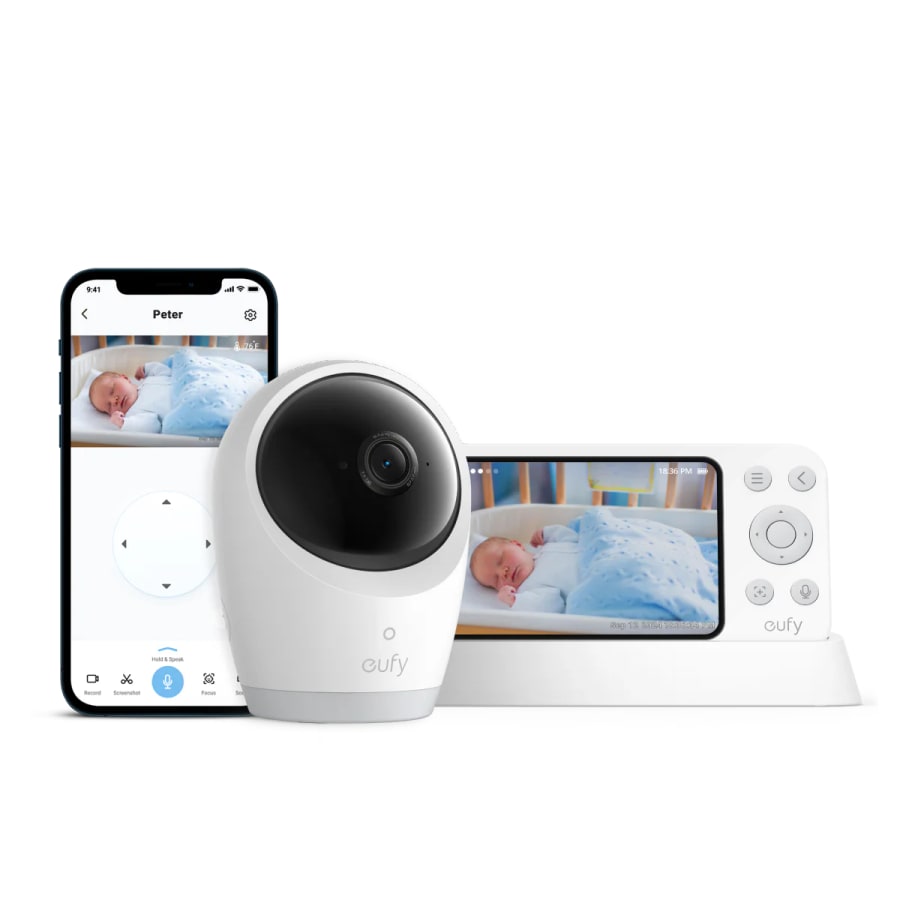
The eufy Security E21 is the flexible baby monitor for parents who want both a dedicated screen and optional app access, but it asks for more setup patience than simpler no-Wi-Fi picks.
MSRP
$259.99
Amazon
$179.98
at writing · 2026-05-05
Buyer fit
The most interesting compromise for buyers who want both a dedicated screen and optional app access, but its evidence base is still newer and thinner.
MSRP
$259.99
Amazon
$179.98
at writing · 2026-05-05
Score breakdown
How this product scored
Same rubric, but focused on one product so the reasons behind the score stay readable.
Connection reliability
Local-mode evidence is genuinely promising, including through-floor tests and a strong Reddit owner report, but the newer/thinner owner base and dropout counter-reports keep it below the mature local picks.
Video and audio clarity
The 4K camera claim, PTZ, zoom, good dim-light comments, and low-latency local feed are strengths, with the important caveat that the parent screen is 720p and night vision reduces perceived detail.
Alert usefulness
Cry, loud-noise, and temperature alerts with sensitivity/delay controls are useful, but motion-alert status and disconnect-notification concerns deserve verification before relying on it.
Privacy and control
The physical Wi-Fi switch, local parent unit, privacy shutter behavior, and microSD/no-subscription posture give parents more control than many hybrids, though app mode is still a connected-camera surface.
Setup and daily use
Local setup can be easy, but app onboarding errors, separate monitor/app connections, heavy-camera mounting friction, and settings tuning make it more fiddly than the no-Wi-Fi picks.
Battery and power
Parent-unit battery evidence is strong and the 5,000mAh camera is useful for travel/outages, but night-mode camera runtime is closer to five-to-six hours than all-night unplugged use.
Expandability and caregiver fit
Add-on cameras, parent-monitor split-screen, and app sharing with family members fit changing households well, though app multi-camera UX is less polished than ideal.
Durability and support confidence
Brand and early owner signals help, but the exact E21 trail is still thin and newer, with only 47 Amazon ratings captured and open questions around firmware/app behavior.
Quick Verdict
The eufy Security E21 is the most interesting compromise in this baby-monitor set. It gives you the thing local-monitor parents like — a dedicated 5-inch parent unit — without fully giving up the thing app-monitor parents want: phone access when you need it. eufy’s own product copy says you can check in "with or without Wi-Fi" and share app access with "up to 5 family members." That is the whole pitch.
It ranked fifth in our Best Baby Monitors in 2026, not because the idea is weak, but because it is younger and fussier than the safer local picks above it. The best owner/reviewer evidence is encouraging: one Reddit parent called the E20/E21 line "solid as a rock in terms of build quality and connectivity," and a hands-on reviewer said local setup "connected and it just worked." But the same review also said the app gave "all kinds of errors" before stabilizing.
So the E21 is not the boring-safe pick. Infant Optics is safer if you want no app. Nanit is more established if you want the app-first ecosystem. eufy is for the parent who wants both lanes in one box and is willing to test local mode, app pairing, SD-card recording, alerts, and mounting immediately after delivery.
Score Breakdown
- Connection reliability: 7/10. The local parent-unit connection has strong early signals, including through-floor and long-distance reviewer tests, but the evidence base is thinner than mature no-Wi-Fi monitors and there are counter-reports of close-range dropouts.
- Video and audio clarity: 8/10. The 4K camera claim, PTZ, zoom, and good night-view comments are real strengths. The parent screen is still 720p, and night vision will not look like daytime 4K.
- Alert usefulness: 8/10. Cry, loud-noise, and room-temperature alerts are useful, with sensitivity and delay controls. Motion alerts were still a question mark in the research, so do not buy it for that feature alone.
- Privacy and control: 8/10. The Wi-Fi switch, local parent unit, privacy shutter behavior, and local microSD posture are unusually understandable for a hybrid monitor. It is still an app-capable camera if you turn that lane on.
- Setup and daily use: 6/10. Local setup can be easy, but app onboarding, separate local/app pairing, mounts, camera weight, and notification tuning add friction.
- Battery and power: 7/10. The parent unit looks strong; the battery-powered camera is genuinely useful for outages and temporary nap spots, but night-mode runtime is not all-night.
- Expandability and caregiver fit: 8/10. Add-on cameras, split-screen on the parent monitor, and app sharing are exactly why this hybrid lane exists.
- Durability and support confidence: 6/10. eufy/Anker is a known brand, but this exact E21 evidence trail is still early, with only 47 Amazon ratings captured during research.
What Feels Great After Setup
The best part of the E21 is that you do not have to choose one monitoring philosophy forever. At home, you can treat it like a normal dedicated-screen monitor. When remote viewing, babysitter check-ins, or family sharing matter, you can bring in the app. That hybrid design is why it got the "Best hybrid monitor" lane instead of being judged against pure no-Wi-Fi picks on simplicity alone.
Local setup looks especially promising. A hands-on reviewer said setting up the camera with the parent unit was "completely separate from setting it up with the app" and that local mode "connected and it just worked." That separation matters: if you do not want Wi-Fi running for normal nights, you are not forced to use the app path.
The parent unit also sounds better than an afterthought. Review evidence praised the charging base, dim-light picture, remote camera movement, alert sensitivity controls, sleep/audio-only modes, zoom button, and push-to-talk. One reviewer tested the local range down a sidewalk and through a house with the camera upstairs and said the E21 "did a great job" in a home where other non-Wi-Fi monitors had struggled.
The camera battery is the other real differentiator. Unplugging the camera for a stroller nap, temporary playroom, grandparents’ house, or short outage is more than a spec-sheet party trick. One Reddit parent specifically liked that the cameras have "a built in battery" so you can "unplug and keep an eye on them even if away from a socket."
Where It Gets Fussy
The same flexibility that makes the E21 appealing also gives it more ways to annoy you. There are two setup lanes — monitor and app — plus Wi-Fi switch behavior, app permissions, microSD recording, notification sensitivity, firmware updates, add-on cameras, and mounting hardware. That is a lot of surface area for something you may be setting up while sleep-deprived.
The app setup evidence is mixed. The strongest caution came from the same hands-on review that liked the local monitor: "App kept giving me all kinds of errors when I was trying to set it up and it took me a while to get it connected. But after I got it connected, it was solid and worked fine from there." That is a calibrated caveat, not a dealbreaker. It means you should test the app before you rely on it for a date night.
Mounting is the other ownership wrinkle. The E21 includes several mounting options, which sounds generous, but the battery makes the camera heavier. Reviewer evidence called it "topheavy," and the gooseneck/slide-on mount setup drew complaints about sliding, getting stuck, and being awkward with generic mounts.
There are also feature-expectation traps. The camera is marketed as 4K, but the parent screen is 720p. The app may benefit more from the sharper camera than the bedside monitor does. And although eufy lists cry, loud-noise, and temperature alerts, one six-month reviewer said motion alerts had not rolled out yet. If motion alerts are central to your plan, verify current firmware/app behavior before buying.
Battery, Power, and Portability
Battery is one of the better reasons to consider eufy over simpler monitors. The official product FAQ says the 5,000mAh camera battery is meant for trips and outages and claims "about 9 hours of use and around 5.5 hours with night vision." A hands-on reviewer landed in the same neighborhood: the parent unit lasted "over 10 hours" with sound and picture running, while the camera lasted "about 5 hours" overnight in night mode.
That is useful, but it needs the right expectation. The parent unit may be able to handle a long night depending on settings, especially with sleep/audio-only modes. The camera battery is better thought of as portable flexibility or outage backup, not a guarantee that you can run the nursery camera unplugged all night in night vision.
The upside is practical. If your baby naps in a different room, if power blips are common, or if you travel to grandparents and do not want to rebuild the nursery wiring puzzle, a battery-powered camera gives the E21 a convenience edge. The cost is weight, heat/charging habits, and a mount that needs to be stable enough for the heavier camera body.
Privacy, App Access, and Recording
The E21’s privacy story is better than most hybrid products because it is concrete enough to explain. eufy describes local use with a physical Wi-Fi switch, and reviewer evidence liked that "you could use it locally without having to be streaming over the internet all the time." There is also app access when you want remote viewing or caregiver sharing.
That does not make it a no-risk magic box. It is still a connected camera when Wi-Fi/app access is enabled, and parents should use strong passwords, app updates, and whatever account protections eufy currently offers. The safe framing is control, not invincibility.
Recording is also more ownership-friendly than subscription-heavy systems. One reviewer said "there is no subscription required" and that recordings are stored locally on a microSD card in the camera. The tradeoff is that the card is an extra purchase and another thing to validate. Before you rely on saved clips, test event recording, continuous playback, SD-card formatting, and whether app access behaves the way you expect.
Compared with Nanit, eufy is less about sleep analytics and more about flexible viewing plus local storage. Compared with Infant Optics, it is more connected and more complicated. That middle ground is the point.
Who Should Buy the eufy E21
Buy the E21 if you want a dedicated parent screen at home but still want the option to check from a phone. It is especially compelling for parents who like local/private monitoring most nights but want app sharing for a partner, grandparent, or babysitter.
It also makes sense if camera movement, zoom, higher camera detail, split-screen expansion, and portable camera power matter more than maximum simplicity. If you have one baby now but may want a second camera later, the E21’s add-on-camera path and parent-monitor split-screen are meaningful advantages.
At the captured Amazon snapshot, the selected E21 4K style was In Stock at $179.98 against a visible $259.99 list price, sold by EufyHome and shipped from Amazon. That made it more tempting than its MSRP suggests. Recheck the exact ASIN, seller, bundle, and price before checkout, because E20/E21/add-on-camera listings are easy to mix up.
Who Should Skip It
Skip the E21 if you want the simplest possible baby monitor. The Infant Optics DXR-8 PRO and HelloBaby HB6550 are easier to explain: turn on the parent screen and avoid the app world entirely. Babysense is cleaner if your main need is two local cameras in the box.
Also skip it if you want a mature app-first sleep ecosystem. Nanit is more expensive and subscription-shaped, but it is more clearly built around sleep insights, saved history, and phone-first monitoring. eufy’s E21 comparison table marked sleep tracking as not supported; do not confuse 24/7 recording with analytics.
Finally, be cautious if long-term proof matters more than feature ambition. The E21 had only 47 Amazon ratings at capture. Early evidence is promising, but not broad enough to treat it like a years-proven default pick.
Bottom Line
Buy the eufy Security E21 if: you want the rare baby monitor that can be local at bedtime, app-accessible when useful, portable during outages or travel, and expandable for more than one camera.
Skip it if: you want zero app/account complexity, proven long-term owner volume, polished mounting, or a monitor that does not require testing settings after unboxing.
Bottom line: the E21 is the exciting compromise pick. It belongs in the ranking because many parents do not want to choose between a parent screen and a phone app. Just treat it like a newer hybrid product: test the exact local/app setup, alerts, SD card, mounts, and camera battery immediately, and do not assume the 4K camera claim means every parent-unit view looks 4K.
Feature breakdown
Full feature list
Grouped feature details are expandable so buyers can go deep when they want, without turning the whole review into a spec landfill.
Full feature list
9 features
+
Full feature list
9 features
Alerts
Cry, loud-noise, and room-temperature alerts with sensitivity controls
Battery
5,000mAh camera battery; official FAQ says about 9 hours or around 5.5 hours with night vision
Storage
microSD/local recording posture; SD card not included
App Access
eufy Baby app access and sharing with up to 5 family members
Connectivity
Hybrid local parent unit plus optional Wi-Fi/app access
Pan Tilt Zoom
330° pan, 60° tilt, 8× zoom
Parent Screen
5-inch 720p dedicated monitor with charging base
Amazon Snapshot
In Stock at $179.98 on 2026-05-05T12:22Z; ships from Amazon, sold by EufyHome
Camera Resolution
4K UHD camera claim; parent screen is not 4K
Tell us what this page missed
These pages get better when real buyer complaints make it back into the scoring model. If something important is underweighted, say it.
Rate this review
Give it a score from 1-10 and tell us what to improve.
0/4000 characters