
The recommendation
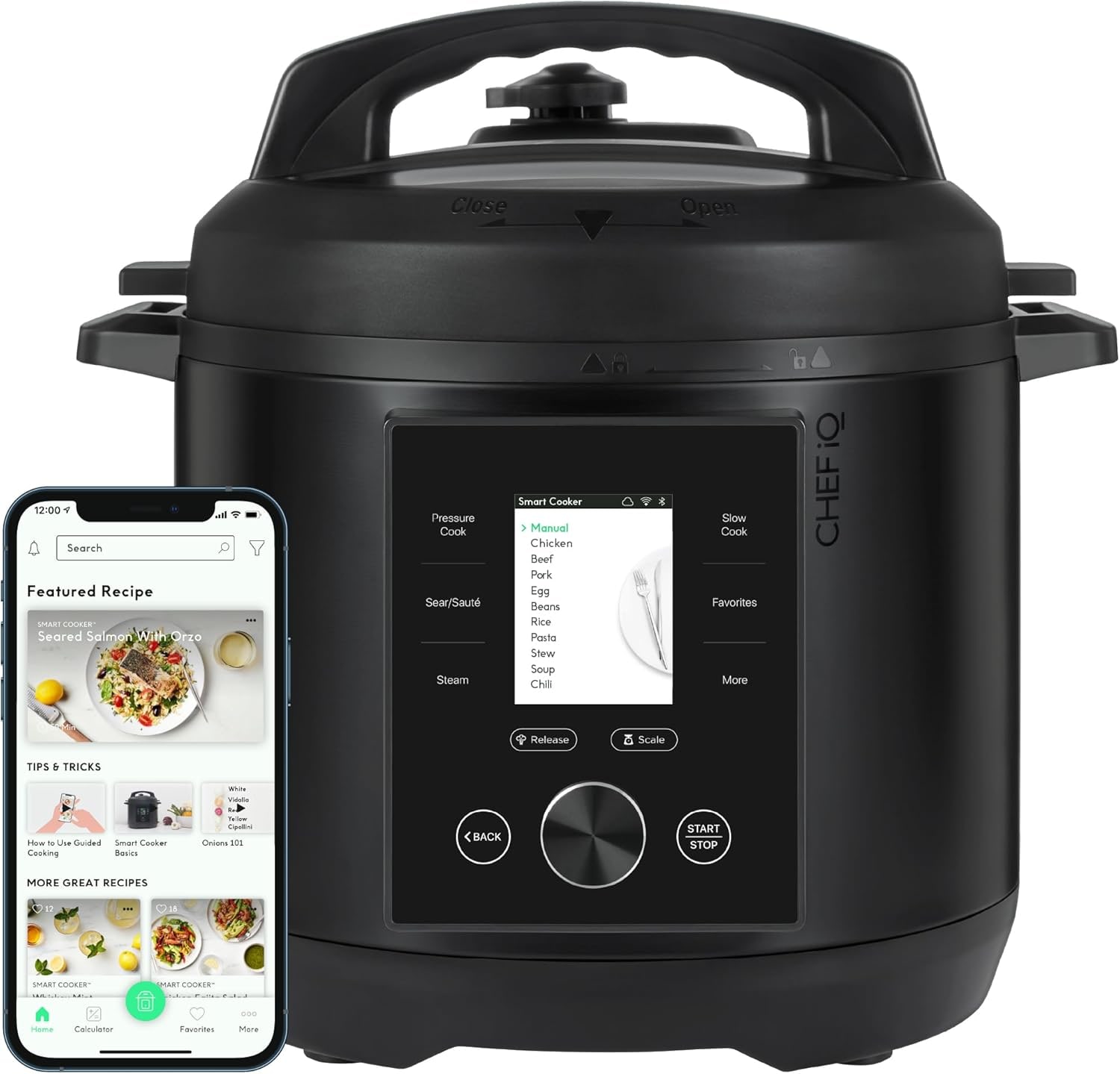
CHEF iQ appeals if you enjoy choosing through pictures, a wheel and touch options. Historical reports describe phone pairing and progress visible on a phone alongside on-device choices. That interaction brings setup into the routine, while care involves a separate collector and several removable pieces. Buy it because that way of choosing appeals to you and you are comfortable with the associated setup and handling.
Grades at a glance
| Product | Overall | Pot and accessory access | Menu and routine selection | Access to parts for cleanup |
|---|---|---|---|---|
| CHEF iQ Smart Pressure Cooker 6 Quart | 8.4 | 8.0 | 9.0 | 8.0 |
Does it fit your life?
Should you choose it?
CHEF iQ appeals if you enjoy choosing through pictures, a wheel and touch options. Historical reports describe phone pairing and progress visible on a phone alongside on-device choices. That interaction brings setup into the routine, while care involves a separate collector and several removable pieces. Buy it because that way of choosing appeals to you and you are comfortable with the associated setup and handling.
Pot access · Controls · Care · Grades · Alternatives
The bowl and accessory arrangement
A gifted demonstration shows the removable pot and a handled accessory rack. Those are practical details to picture alongside the screen: there are still physical pieces to lift out, put aside and keep together. The rack’s handles provide a visible grip. The reviewer received the appliance as a gift, so weigh the enthusiastic presentation with that disclosure in mind while looking at the demonstrated arrangement.
Sources: Everything to Know about the CHEF IQ Pressure Cooker!
What the ordinary controls feel like
The historical reports describe ingredient pictures, a selection wheel and touch choices, plus phone pairing and progress on the phone. Pictures may feel more inviting if you dislike choosing from function names alone. The tradeoff is deciding whether you want a phone involved in this routine and accepting the initial connection steps. These reports describe their software experience at the time; they are not a check of the current app.
Sources: CHEF iQ Smart Pressure Cooker Review - Watch Before You Buy! · Everything to Know about the CHEF IQ Pressure Cooker!
The care burden to expect
One demonstration shows a removable moisture collector, and another reviewer describes washing the basket, rack, lid, seals, bowl and collector before first use. The pieces are accessible, but there are several to manage. That initial wash is useful for understanding the collection, rather than predicting cleanup after repeated use. Someone who enjoys the screen should still consider whether this many separate care pieces fits their routine.
Sources: What Makes the Chef IQ Smart Cooker SO Revolutionary? · CHEF iQ SmartCooker: The smartest pressure cooker in the world with WiFi! Review + how to use 💡
How the ordinary-use grades compare
| Ordinary-use consideration | Grade / 10 |
|---|---|
| Pot and accessory access | 8 |
| Menu and routine selection | 9 |
| Access to parts for cleanup | 8 |
| Overall | 8.4 |
Use the separate grades to focus your comparison: a readable panel, a preferred bowl arrangement or less fiddly care may matter more to you than a small difference in the overall figure.
The buyer it suits
Choose CHEF iQ when visual guidance is an attraction in its own right. If you already enjoy using pictures and a phone to work through choices, the reported interface is a good reason to investigate it. If that sounds like extra administration, the connection features may add little for you. The removable pot and rack are familiar physical elements, but the collector and other care pieces still need attention.
Two alternatives worth comparing
Instant Pot Pro 10-in-1: The Pro brings together a handled bowl, favorites and removable bowl-and-lid access. Its six-quart reviewer likes how the handles line up with the housing and how favorites avoid repeated toggling. Those conveniences suit someone who returns to familiar selections and wants a defined grip on the inner bowl. They are less compelling if you would rarely use the shortcuts or have no preference for handles.
Sources: Instant Pot Pro 6qt Review | Do You Really Need It?
Read the Instant Pot Pro 10-in-1 review.
Breville Fast Slow Pro: The Fast Slow Pro is worth considering if you like a display that tells you the current stage and time. A reviewer praises its LCD feedback and access to removable care parts. A UK Sage BPR700BSS demonstration also shows the separate bowl and accessories. The appeal is being able to see what is selected and reach the parts that need attention.
Sources: Breville Fast Slow Pro Pressure Cooker Review - Is It Worth Buying? · Breville Sage BPR700BSS The Fast Slow Pro - 6-in-1 Combi Slow / Pressure Cooker review
Read the Breville Fast Slow Pro review.
Return to the seven-model comparison for the full grade table.
CHEF iQ Smart Pressure Cooker 6 Quart
CHEF
You want picture-led choices and are comfortable with phone pairing and separate care pieces.
CHEF iQ appeals if you enjoy choosing through pictures, a wheel and touch options. Historical reports describe phone pairing and progress visible on a phone alongside on-device choices. That interaction brings setup into the routine, while care involves a separate collector and several removable pieces. Buy it because that way of choosing appeals to you and you are comfortable with the associated setup and handling.
Reasons to choose it
- Wheel, touch choices and pictures support guided selection.
- Reports describe phone progress alongside on-device choices.
- The pot, handled rack and separate reservoir provide accessible parts.
Tradeoffs to know
- Phone pairing adds setup to the connected routine.
- Care involves several pieces and a separate moisture collector.
Think twice if: You prefer to minimize connected setup or the number of pieces to manage.
Ratings
Editorial score 8.4
Pot and accessory access8
A gifted demonstration shows the removable pot and a handled accessory rack. Those are practical details to picture alongside the screen: there are still physical pieces to lift out, put aside and keep together. The rack’s handles provide a visible grip. The reviewer received the appliance as a gift, so weigh the enthusiastic presentation with that disclosure in mind while looking at the demonstrated arrangement.
Menu and routine selection9
The historical reports describe ingredient pictures, a selection wheel and touch choices, plus phone pairing and progress on the phone. Pictures may feel more inviting if you dislike choosing from function names alone. The tradeoff is deciding whether you want a phone involved in this routine and accepting the initial connection steps. These reports describe their software experience at the time; they are not a check of the current app.
Access to parts for cleanup8
One demonstration shows a removable moisture collector, and another reviewer describes washing the basket, rack, lid, seals, bowl and collector before first use. The pieces are accessible, but there are several to manage. That initial wash is useful for understanding the collection, rather than predicting cleanup after repeated use. Someone who enjoys the screen should still consider whether this many separate care pieces fits their routine.
Sources & further reading
User reports at youtube.com
User reports at youtube.com
youtube.com review
User reports at youtube.com
youtube.com review
youtube.com review
youtube.com review
Keep reading
Something changed? Help us keep this useful.
Send a correction →