
The recommendation
Kobo Clara Colour is the better fit for readers who value one-handed handling and want to borrow on the reader, provided their library supports it. Amazon Kindle Paperwhite 16GB is the stronger fit for readers who value convenient progress controls and the on-device buying workflow reported by reviewers. Start with the books you already own: keeping a Kindle collection together can matter more than Kobo’s higher overall workflow grade.
The shortlist, at a glance
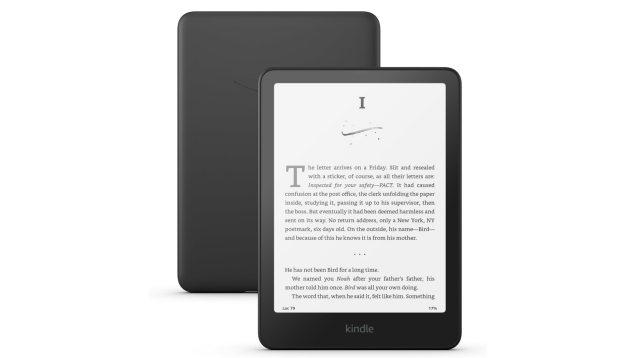
Readers who prioritize progress controls, reported on-device purchasing, and keeping an existing Kindle collection together.
Amazon Kindle Paperwhite 16GB →
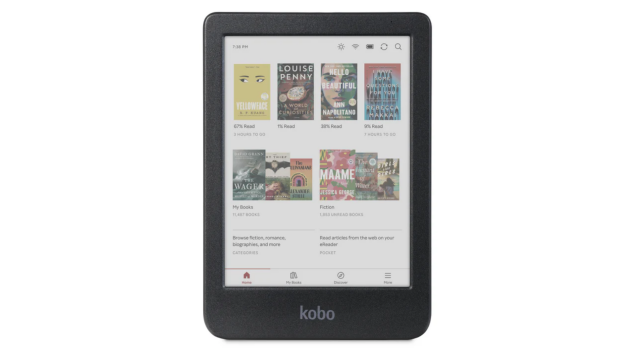
Readers who prioritize one-handed handling and direct borrowing after confirming their own library support.
Kobo Clara Colour →
Grades at a glance
| Product | Overall | physical handling | ordinary control selection | Library workflow |
|---|---|---|---|---|
| Amazon Kindle Paperwhite 16GB | 7.7 | 7.0 | 9.0 | 7.0 |
| Kobo Clara Colour | 8.1 | 9.0 | 8.0 | 7.0 |
Compare your shortlist
Does it fit your life?
The everyday differences
The first decision is where your next book will come from; the second is how you like to hold and operate the reader. Our grades cover those everyday tasks using published reviewer experiences. They do not measure display quality or replace hands-on testing. The overall grades are 7.7/10 for Amazon Kindle Paperwhite 16GB and 8.1/10 for Kobo Clara Colour. Kobo’s handling advantage produces the higher overall grade, while Paperwhite leads on reading controls. Both score the same for Library workflow because borrowing and buying involve different extra steps.
Scroll horizontally on a small screen to compare the rows.
| Everyday task | Amazon Kindle Paperwhite 16GB | Kobo Clara Colour | What should decide it? |
|---|---|---|---|
| Overall workflow grade | 7.7/10 | 8.1/10 | Match the individual tasks to your reading habits. |
| Physical handling | 7/10: reported bottom-button bumps; one reviewer preferred propping it up | 9/10: reported one-handed holding and a recessed rear power button | Kobo has the handling edge in these accounts. |
| Ordinary control selection | 9/10: bottom-corner progress selection and a Library/downloaded filter path | 8/10: page/time alternatives and collections; one reviewer changed a distracting default | Paperwhite is the easier recommendation if progress controls matter most. |
| Library workflow | 7/10: Libby browsing and send-to-Kindle steps; reported on-device store checkout | 7/10: direct borrowing after setup; reported phone QR checkout and a second-library burden for one reader | Borrowing and buying favor different workflows. |
The handling and control comparison draws on Kindle Paperwhite vs. Kobo Clara Colour review | Mashable, New Kindle Paperwhite Vs Kobo Clara Colour: Which EReader Is The Best Buy? | A Well-Read Wanderer, and Kobo Clara Colour: Review and Why I Returned Mine. Library steps come from Mashable and Peanut Blossom Book Club. Their accounts do not establish present-day menu layouts, checkout behavior, or worldwide library access. Charging is unassessed and outside these grades.
For reading in one hand, lean Kobo
For a reader you take from a bag and hold without a stand, the Clara Colour has the more persuasive handling reports. Peanut Blossom Book Club's reviewer describes carrying it in a purse and holding it in one hand; she also enjoyed holding it in bed with a case fitted. She also describes its rear button as recessed. Mashable places that button at the rear corner. These are useful handling observations; they do not promise that every hand or grip will suit it. Kobo Clara Colour: Review and Why I Returned Mine Kindle Paperwhite vs. Kobo Clara Colour review | Mashable
The Paperwhite reports describe a more noticeable compromise. Mashable found its bottom power button easy to press accidentally. A Well-Read Wanderer's author preferred standing the 12th-generation Paperwhite against something when reading one-handed. If you normally read with support, that particular complaint may matter less to you; if you often change grip, consider where your fingers will meet the bottom button. Kindle Paperwhite vs. Kobo Clara Colour review | Mashable New Kindle Paperwhite Vs Kobo Clara Colour: Which EReader Is The Best Buy? | A Well-Read Wanderer
Think about your usual position before giving the 9/10 Kobo handling grade much weight over the 7/10 Paperwhite. Reading at a table with the device supported makes a different demand from holding it in bed or taking it out of a bag. If possible, try your usual grip with the case you intend to use and check whether your fingers rest on the power button. These grades concern ordinary handling, not durability or health; the Paperwhite accounts specifically concern 2024/12th-generation devices.
Paperwhite makes progress information convenient
If your recurring question is whether you can finish a chapter before stopping, Paperwhite’s progress control is its most useful advantage here. Mashable's reviewers liked changing progress information from the bottom corner of the page, including page information, time left in the chapter, and time left in the book. For finding downloaded books, A Well-Read Wanderer describes opening Library instead of Home and filtering to downloaded books. That is a concrete route to your own books, though it should not be treated as a guarantee of today's interface. Kindle Paperwhite vs. Kobo Clara Colour review | Mashable New Kindle Paperwhite Vs Kobo Clara Colour: Which EReader Is The Best Buy? | A Well-Read Wanderer
Kobo still offers useful choices. Peanut Blossom Book Club's reviewer turned off a progress bar she found distracting in settings, then preferred page numbers or time left in the chapter. She also used custom collections to group books by genre, favorites, and reading year. That settings detour helps explain Kobo’s 8/10 control grade beside Paperwhite’s 9/10. It matters most if you want your preferred progress display immediately; a reader happy to adjust settings once may give it less weight. Kobo Clara Colour: Review and Why I Returned Mine
Page numbering is a preference check rather than a reason to dismiss Kobo. Mashable's two reviewers disagreed: one disliked trying to coordinate its digital page numbers with someone reading print, while the other liked knowing how many digital pages remained. For a book club, agree on a way to locate passages—such as chapter and opening words—before relying on page numbers. Neither this disagreement nor the grades establish that either reader will match every printed edition. Kindle Paperwhite vs. Kobo Clara Colour review | Mashable
Borrowing and buying pull in different directions
For library-heavy reading, Clara Colour has an appealing sequence in Peanut Blossom Book Club's account: connect OverDrive to a library card, browse on the reader, then open an available book's description and download it there. That can keep the borrowing task on the device. Before choosing it for this reason, confirm support for your country, library, card, and the titles you want; the reviewer's successful setup does not establish yours. Kobo Clara Colour: Review and Why I Returned Mine
Paperwhite borrowing involved opening Libby, browsing there, and sending the book to the Kindle library in Mashable's comparison. Buying went the other way: Mashable reported that checkout could be completed on the Kindle, while Kobo checkout required a phone QR step in that account. If you mostly buy your next book as soon as you finish one, Paperwhite's reported checkout path may matter more than Kobo's direct borrowing. These are reported workflows, not a promise about current checkout on every account. Kindle Paperwhite vs. Kobo Clara Colour review | Mashable
A smooth way to get the next book is only half the decision: you also need access to the books you already own. Peanut Blossom Book Club's reviewer returned her Clara Colour because maintaining a second ecosystem did not fit her large purchased Kindle collection or her reading schedule. That is a warning to check your own books before moving, not proof that all files are impossible to transfer. Make a short list of books you would want on day one and check the legitimate access route for each. Then consider whether keeping two separate collections would be acceptable. Borrowing on the device is less valuable if library availability does not fit the dates when you want to read. Kobo Clara Colour: Review and Why I Returned Mine
Both receive 7/10 for Library workflow: each has a useful acquisition route and a meaningful extra chore. A library borrower with confirmed Kobo support may reasonably prefer Kobo despite the tie; an established Kindle buyer may reasonably choose Paperwhite despite its lower overall grade. Charging and battery duration do not contribute to this category.
Three checks that can change your choice
Before paying, work through these checks in order. They can matter more than the small difference between the overall grades.
-
Check your books. Can you access the titles you already own, and can your library supply the books you want on the chosen reader? For borrowing, verify your country, library and card support as well as title availability. For buying, check the purchase steps available to your account.
-
Check your reading routine. Try your normal grip if you can. Decide whether quick progress selection or one-handed holding matters more, and whether you are comfortable changing settings to get the reading display you want.
-
Check the exact listing. This comparison targets the standard 2024 Paperwhite 16GB and Clara Colour 16GB. Paperwhite Signature Edition, Colorsoft, Basic, Kids, Scribe and older Paperwhites are outside its scope, as are Clara BW, Clara 2E and Libra Colour. Confirm condition, seller, region, bundle and the Paperwhite ad option. The sources’ 2024/12th-generation context supports this comparison; it does not identify the unit a retailer will send.
If measured display quality, battery duration, audiobook compatibility or today’s price difference will decide your purchase, check those requirements separately. These workflow grades do not name a current-price winner.
Sources and scope
This comparison uses published reviewer experiences; KB4UB has not performed new hands-on tests. Mashable's comparison explicitly concerns the 2024/12th-generation Paperwhite and Clara Colour. A Well-Read Wanderer's Paperwhite observations also concern that generation; its inconsistent Kobo naming is why its Kobo observations do not inform our judgment. Peanut Blossom Book Club's review concerns Clara Colour, while its unspecified Kindle comparator is not treated as the target Paperwhite.
All three publications disclose affiliate links or commissions. We paraphrase their accounts, retain the differences in reviewer preferences, and do not treat repeated passages as separate people. KB4UB may earn from retailer links.
- Kindle Paperwhite vs. Kobo Clara Colour review | Mashable
- New Kindle Paperwhite Vs Kobo Clara Colour: Which EReader Is The Best Buy? | A Well-Read Wanderer
- Kobo Clara Colour: Review and Why I Returned Mine
Updated October 16, 2026. The update re-evaluates the published workflow accounts; it is not a claim of fresh device testing, current firmware verification, live stock, or current checkout verification.
Amazon Kindle Paperwhite 16GB
Amazon
Readers who prioritize progress controls, reported on-device purchasing, and keeping an existing Kindle collection together.
The standard 2024 Paperwhite 16GB is the target here. Published accounts of the 2024/12th-generation device favor its progress controls and buying workflow, with compromises in holding and borrowing.
The takeaway
A practical choice for readers who value progress controls and the reported purchase workflow.
Reasons to choose it
- Convenient bottom-corner progress selection in the reviewers’ account.
- Library view and downloaded-book filtering provide a route to your books.
- On-device store checkout was available in the reported comparison.
Tradeoffs to know
- Bottom power button was easy to press accidentally in the comparison.
- One 12th-generation reviewer preferred supporting it for one-handed reading.
- Reported borrowing required external Libby browsing and send-to-Kindle steps.
Think twice if: You want to browse and borrow library books on the reader without the external Libby/send sequence described in the comparison.
Further reading
Ratings
Editorial score 7.7
physical handling7
Reported bottom-button bumps and a reviewer’s preference for supporting the device create a handling compromise.
ordinary control selection9
Reported bottom-corner progress selection and Library/downloaded filtering offer convenient controls.
Library workflow7
Reported on-device buying offsets the external Libby/send borrowing sequence. Charging is unassessed.
Kobo Clara Colour
Kobo
Readers who prioritize one-handed handling and direct borrowing after confirming their own library support.
Clara Colour 16GB is the handling-led choice in these published accounts. Its direct borrowing route is appealing when your library supports it and a second book collection fits your routine.
The takeaway
The handling-led choice, with an appealing borrowing route where your library supports it.
Reasons to choose it
- One-handed holding and purse carrying described by a reviewer.
- Recessed rear power button.
- Direct borrowing of available titles after library-card setup in a reviewer’s account.
Tradeoffs to know
- One reviewer needed settings to remove a distracting progress bar.
- Store checkout used a phone QR step in the reported comparison.
- One established Kindle reader returned it rather than maintain a second ecosystem.
Think twice if: Maintaining a second book ecosystem would complicate access to the books you already own.
Further reading
Ratings
Editorial score 8.1
physical handling9
Reported one-handed holding and a recessed rear power button make carrying and holding convenient.
ordinary control selection8
One reviewer used settings to replace a distracting progress bar; page/time alternatives and custom collections provided useful control choices.
Library workflow7
Direct borrowing after setup is offset by reported phone checkout and a second-library burden for one reader. Charging is unassessed.
Sources & further reading
mashable.com review
peanutblossombookclub.com review
awellreadwanderer.com review
Something changed? Help us keep this useful.
Send a correction →